Article Contents:
- Why split payments by batches at all
- The total order price and the payment schedule are different things
- MODEL A — 100% before launch
- MODEL B — deposit + balance
- MODEL C — each batch separately
- MODEL D — framework volume + release

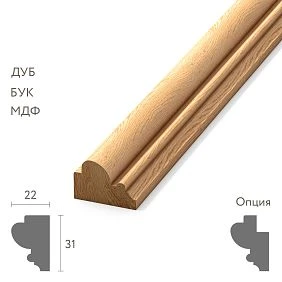
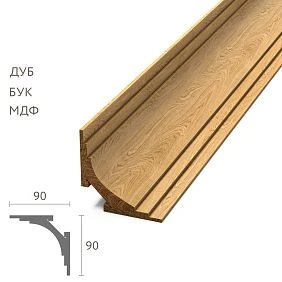
A large project rarely needs all the wooden trim in one day. For example, the project requires 2,400 m of skirting board, 1,800 m of molding, and 600 m of cornice, but installation proceeds in stages: the first batch is needed in October, the second in December, and the third only in February.
In such a situation, the question "how much does the order cost?" is insufficient. It is necessary to separately agree on when and for what exactly each payment is made, what volume is considered confirmed after that, what is reserved for the project, and which event authorizes the release of a specific batch.
wholesale supplies of building materials become manageable when four states are not mixed with each other:
| Status | What does it mean |
|---|---|
| APPROVED | The product is technically approved |
| RESERVED | The volume is allocated to the project according to the agreed procedure |
| PAID | The corresponding payment has been made |
| RELEASED | The specific batch is approved for preparation or shipment |
Key rule of the article:
PAID ≠ RESERVED ≠ RELEASED ≠ DELIVERED.
Payment alone does not prove that the batch has already been manufactured, reserved, ready for shipment, or physically present on site. This is determined by the terms of the specific order.
Why split payments by batches at all
If a project lasts eight months, there may be no simultaneous need for the entire volume.
| Batch | Skirting board | Molding | Crown Molding | Needed on site |
|---|---|---|---|---|
| B01 | 300 pcs. | 180 pcs. | — | October |
| B02 | 260 pcs. | 220 pcs. | 60 pcs. | December |
| B03 | 190 pcs. | 150 pcs. | 80 pcs. | February |
The commercial schedule must match the actual logic of the project. Otherwise, the customer may pay for and launch a volume significantly earlier than the site is ready to accept it, while the supplier may treat the future queue as a firm order, even though the customer viewed it only as a forecast.




The total order price and the payment schedule are two different things
The total volume may cost, say, 1,200,000 ₽. But that says nothing about the payment method.
Different models are possible:
Our factory also produces:







MODEL A — 100% before launch
The entire agreed volume is paid before execution begins.
Get Consultation
MODEL B — advance + balance
Part of the amount is paid upon order confirmation, and the balance — upon the occurrence of the agreed event.
MODEL C — each batch separately
B01, B02, and B03 have separate payments.
MODEL D — framework volume + release
The total project volume is known in advance, but each tranche is converted to firm/released separately.
No model is universally correct. The correct one is the one fixed in the terms of a specific order and understood by both parties.
What the Payment Schedule should record
| Milestone | Batch | Amount | Due date | Trigger | Status |
|---|---|---|---|---|---|
| P01 | B01 | … | … | Order confirmed | PAID |
| P02 | B01 | … | … | Ready notice | OPEN |
| P03 | B02 | … | … | Release B02 | FUTURE |
| P04 | B03 | … | … | Release B03 | FUTURE |
If commercial terms are tied to an event, it is not enough to write only the payment date. You need to see the trigger: order confirmation, batch readiness, release, or another agreed-upon event.
Advance payment: what it means specifically in your order
You cannot automatically assume that after the advance payment the entire linear footage has already been manufactured and is sitting in the warehouse.
After payment, one of several different statuses may occur:
- ORDER CONFIRMED;
- MATERIAL RESERVED;
- PRODUCTION RELEASED;
- PRICE LOCKED;
- another state expressly provided for by the order terms.
Therefore, in the Payment Schedule it is useful to indicate the resulting status next to the payment event.
Payment Allocation: what volume a specific payment covers
Especially on a long project, you cannot store a payment as an abstract “300,000 ₽ paid.”
| Payment | PO | Batch | Covered Qty | Covered Amount |
|---|---|---|---|---|
| PAY-01 | PO-147 | B01 | PLT-A 300 / MLD-A 180 | … |
| PAY-02 | PO-147 | B01 | Remaining B01 | … |
This way, when the quantity changes, it is clear which part of the order can no longer be considered “unpaid” or “fully paid” without a new reconciliation.
Material reservation and payment are not the same thing
A paid line item can be reserved if the agreed procedure provides for this. But the PAID entry by itself does not replace RESERVATION confirmation.
| SKU | Qty | Payment | Reservation | Release |
|---|---|---|---|---|
| PLT-A | 300 | PAID | CONFIRMED | B01 |
| MLD-A | 180 | PAID | CONFIRMED | B01 |
| KZ-A | 60 | FUTURE | — | B02 |
Such a table does not allow the purchaser to draw a false conclusion: "since the SKU is in the specification, it means it has already been paid for and allocated to the project."
Reservation Expiry: a reservation must have a clear time horizon
If a project reservation is valid for a limited time, this must be recorded separately from payment.
For example:
RESERVED UNTIL 15.12
Or:
RESERVATION SUBJECT TO B02 RELEASE
One cannot assume that a reservation is indefinite simply because the order exists in the system. The specific term and conditions are determined by the agreement for the order.
Phased deliveries of construction materials: each batch needs a commercial status
Phased deliveries of construction materials it is more convenient to track them by separate batch-status.
BATCH 01
PAID / READY / RELEASED
BATCH 02
APPROVED / NOT YET RELEASED
BATCH 03
FORECAST ONLY
Thus, the third phase does not become a firm commitment simply because its volume once appeared in the early project schedule.
FORECAST and FIRM ORDER are different things
The customer may inform in advance:
In February, approximately another 400 m will be needed.
This is a demand forecast.
FORECAST helps plan the possible volume and timing, but should not automatically mean FIRM ORDER unless the project conditions explicitly provide for this.
Why the supplier needs a forecast
It provides guidance on:
- potential volume;
- sequence of batches;
- approximate timelines;
- material requirements;
- future load.
But a forecast must remain a forecast until, according to the agreed procedure, it becomes firm/released.
Forecast Conversion: how a future batch becomes firm
It is useful to have a separate event:
B03 FORECAST → B03 FIRM
At this point, the final quantity, current price, price lock term, reservation, payment milestone, and production availability are rechecked.
This way, the future queue does not become an obligation unnoticed — it gets an explicit transition point.
Why staged payment should not break a single technical standard
B01 was paid in September, while B03 was paid only four months later. Financially, these are different stages, but technically both batches must reference the same project identity:
PLT-A / SKU / MATERIAL / SECTION / LENGTH / FINISH
Financial splitting of an order must not turn into technical splitting.
What may change between batches
Under the agreed procedure, the following may be adjusted:
- quantity;
- date;
- address;
- delivery method;
- commercial price, if it has not been fixed in advance.
But without new technical approval, the SKU, profile, material, or approved finish must not be changed silently.
Why it is risky to buy moulding in “pieces” without a master spec
The first batch is MLD-A. The second is needed five months later. If the buyer starts searching again for a “similar moulding,” the series loses a single profile.
Each new commercial queue must reference the MASTER SPEC, not a memory of the previous order.
The cornice does not need to be turned into a firm order until the configuration is confirmed
If the ceiling assembly is still changing, the position may remain:
DESIGN PENDING.
An uncertain profile must not be artificially converted into a firm order just to "close the procurement" on paper.
Price Lock: when the price is truly locked
Do not write: "an advance payment always locks the price." This depends on the specific offer or contract.
You need to see:
- PRICE VALID UNTIL;
- PRICE LOCKED ON;
- VOLUME COVERED;
- BATCHES COVERED;
- revision terms, if any are provided.
The price may be locked for the entire project volume, only for B01, or require a new check before each release.
Volume Lock and Price Lock are not the same thing
You can agree on the total project volume in advance without locking the price for all batches. And vice versa — you can lock the price for a certain volume that has not yet been allocated to exact dates.
VOLUME LOCK answers the question of what volume has been agreed. PRICE LOCK answers for what volume and period the price applies.
This is especially important if B03 is still FORECAST and the commercial price is valid only until the end of the year.
Why "price agreed" without a timeframe is insufficient
The quotation was issued on September 1. B03 is needed in May. If the documents do not specify whether the same price applies for nine months, the parties may interpret the phrase "project price agreed" differently.
Therefore, a price lock must be described not only by the amount, but also by the volume and validity period.
Price Lock Register
| Price Ref | SKU | Volume | Valid until | Batches | Status |
|---|---|---|---|---|---|
| PR-01 | PLT-A | 750 pcs. | 31.12 | B01-B02 | LOCKED |
| PR-02 | MLD-A | 550 pcs. | 31.12 | B01-B02 | LOCKED |
| PR-03 | KZ-A | 140 pcs. | — | B02-B03 | REVIEW |
This way, the buyer immediately sees for which future batch the commercial terms need to be revised.
Payment Milestone and Production Milestone must not be mixed up
P01 — advance paid does not automatically mean PRODUCTION COMPLETE.
It is useful to maintain two independent tracks:
COMMERCIAL STATUS
and:
PRODUCTION STATUS.
One view of four batch statuses
| Batch | Payment | Reservation | Production | Logistics |
|---|---|---|---|---|
| B01 | PAID | CONFIRMED | READY | BOOKED |
| B02 | PARTLY PAID | CONFIRMED | NOT STARTED | — |
| B03 | FORECAST | — | — | — |
A single "order in progress" status doesn't show the real picture.
Paid but Not Released is a normal status if it's provided for by the scheme
Sometimes the batch has already been paid for, but the site hasn't given release yet. This isn't an error if the agreed terms are set up that way.
In the system, it's useful to see:
B02 = PAID / RESERVED / NOT RELEASED
Then the warehouse and logistics don't treat payment as automatic permission to ship.
What to do if the site postpones the second phase
Phased construction material deliveries almost always depend on the construction schedule.
B02 was needed on December 15, but the site won't be ready until February 1.
First, they determine the state of the batch itself:
- not yet launched;
- already in production;
- ready;
- reserved;
- packed;
- logistics is already booked.
Only after that do they discuss a new commercial and operational scenario.
You can't just write "don't ship it for now"
If the material is already ready, additional questions arise:
- where it is stored;
- for what period;
- who bears additional costs if they are provided for;
- when the new release date is;
- whether the price lock is retained for subsequent queues.
Moving an item must become a controlled change of a specific batch.
Paid Batch Moved: what to check when moving an already paid batch
If B02 has already been paid but the item's date has been moved, you need to separately check the reservation, storage location, new Release Date, delivery costs, possible commercial impact of storage, and the price lock for subsequent queues.
The mere fact of payment does not automatically resolve any of these issues.
Schedule Change Register
| Change | Batch | Old date | New date | Production state | Commercial impact |
|---|---|---|---|---|---|
| SC-01 | B02 | 15.12 | 01.02 | NOT STARTED | 0 / review |
| SC-02 | B03 | 10.02 | 15.03 | READY | Storage review |
Release Notice — a separate event
For a multi-stage project, a simple status is useful:
RELEASE B02.
It means that a specific previously planned batch is now allowed to be moved to the next agreed stage — for example, to production, assembly, or shipment, depending on the order model.
Who has the right to release a batch
There should be no situation where an installer calls the supplier directly and asks to "send it tomorrow."
The project pre-assigns an authorised contact:
- purchaser;
- project manager;
- another authorised person.
This way the supplier does not receive conflicting instructions.
PO and Release are different concepts
A PO formalises the purchase under the agreed commercial scheme.
A RELEASE authorises a specific stage or a specific batch if the project uses a staged-release model.
Not every project works exactly this way. But for a long procurement, this approach cleanly separates the "total approved volume" from "what is allowed to be launched now."
A Release Notice must have a minimum set of data
For example:
RELEASE-B02 / PO-147 / REV04 / 260 PLT-A / 220 MLD-A / 60 KZ-A / REQUIRED 01.02
And separately — the name of the authorized person and the release date.
How to account for delivery in the Payment Schedule
If delivery is paid separately, it is useful to distinguish:
PRODUCT PAYMENT
and:
DELIVERY PAYMENT.
Then moving B02 does not create confusion about which specific transport has already been paid for and which logistics still belongs to a future period.
One batch is not always equal to one delivery
Three batches of goods can go:
- by three separate vehicles;
- by two combined deliveries;
- with pickup from the same queue;
- with one batch split across two addresses.
Therefore, the payment schedule should not automatically assume "one batch = one identical delivery".
Delivery Register
| Delivery | Batch | Mode | Address | Payment status |
|---|---|---|---|---|
| D01 | B01 | Truck | Site A | PAID |
| D02 | B02 | Truck | Site A | FUTURE |
| D03 | B03 | Pickup | Warehouse | — |
Final Payment does not automatically mean ORDER CLOSED
After the last payment, the following may remain:
- short delivery;
- replacement;
- claim;
- return;
- commercial adjustment;
- unconfirmed batch balance.
Financial status and material status continue to be tracked separately.
Payment Register
| ID | PO | Batch | Trigger | Planned | Paid | Balance | Status |
|---|---|---|---|---|---|---|---|
| PAY-01 | PO-147 | B01 | Order | … | … | 0 | PAID |
| PAY-02 | PO-147 | B01 | Ready | … | … | … | OPEN |
| PAY-03 | PO-147 | B02 | Release | … | 0 | … | FUTURE |
The register answers the question: what has already been paid, which milestone was the basis, and what is still expected.
Do not mix payments from different projects
If one supplier handles HOTEL-A, OFFICE-B, and HOUSE-C, each payment needs at minimum:
PROJECT ID + PO + BATCH + PAYMENT ID.
Otherwise, the finance department sees the transfer, but procurement doesn't understand what volume it covers.
The invoice must be linked to a Purchase Order
For example:
INVOICE-221 → PO-147 → B02 → PAY-03
This way you can quickly answer: "What exactly are we paying for right now?"
Why the payment reference must match the internal Payment ID
If the finance team sees only the invoice number, and procurement sees only PAY-03, unnecessary manual reconciliation occurs.
Useful link:
PAYMENT ID / INVOICE / PO / BATCH / PROJECT
Then any transfer is quickly matched to the correct milestone.
What to check before milestone payment
| Question | Yes / no |
|---|---|
| Is the current version of the order being used? | … |
| Correct PO? | … |
| Correct Batch? | … |
| Does the amount match the terms? | … |
| Has the trigger actually occurred? | … |
| Are all Change Orders accounted for? | … |
| Is the Price Lock in effect? | … |
This is not a re-check of each line item on the invoice, but rather a control specifically verifying that a particular milestone has actually occurred and belongs to the correct batch.
Milestone Evidence: what to use to confirm that an event has occurred
If P02 occurs after the Ready Notice, it is useful to store the document itself or the message with the batch identifier.
For example:
READY-NOTICE-B01 / PO-147 / issued 12.10
So the payment is tied not to a verbal phrase like "seems ready", but to a specific order event.
Partial Milestone: what to do if a batch is not fully ready
For example, B02 includes three SKUs, but one cornice is not ready yet. You cannot automatically consider the entire milestone reached if the conditions are tied to full batch readiness.
Depending on the agreed model, you can wait for full readiness, split B02 into B02-A and B02-B, create a partial milestone, or move the problematic line to the next batch.
The main thing is not to substitute the actual status with the wording "the batch is almost ready".
Quantity change between batches
B02 was planned as 180 MLD-A. After the final measurement, 165 is needed.
If the batch is not yet firm/released and the conditions allow a change, the new quantity is processed according to the agreed procedure.
You cannot silently replace 180 with 165 in the old Excel: the commercial schedule, price lock, and future payment may be calculated for a different quantity.
If the quantity increased
For example +24 PLT-A.
You need to determine:
- whether the volume is included in the existing PO;
- whether the previous price still applies;
- whether an additional payment is needed;
- whether the deadline changes;
- whether the increase falls under B02 or a new batch.
A quantity change always has not only a technical but also a commercial impact.
Payment Recalculation after a quantity change
If B02 decreased from 180 to 165 MLD-A, you need to recalculate not only the item line but also the remaining payment.
Useful fields:
ORIGINAL BATCH VALUE
REVISED BATCH VALUE
PAID TO DATE
NEW BALANCE
Thus the new order quantity and Payment Schedule remain synchronized.
Commercial Change Log
| Change | Batch | Old Qty | New Qty | Price impact | Payment impact |
|---|---|---|---|---|---|
| CO-01 | B02 | 180 | 165 | −… | PAY-03 revised |
| CO-02 | B03 | 190 | 214 | +… | New milestone |
Retention — only if it is actually provided for
If the specific order documents provide for withholding part of the amount until a certain event, this can be tracked as a separate milestone.
If retention is not provided for, it must not be invented "for reliability." The article explains the term and the logic of the status, but does not establish a mandatory commercial model.
Credit Balance and additional payment after a change — separate statuses
After recalculating the batch, it may turn out that more has been paid than the new amount or, conversely, an additional payment is required.
In the management register, this can be shown as CREDIT BALANCE or ADDITIONAL PAYMENT REQUIRED.
How exactly the financial adjustment is formalized is determined by the documents of the specific transaction. It is only important to link it to the same revised batch and change record.
Project Cash Flow
The buyer sees:
October — B01
December — B02
February — B03
The finance team needs to see not just “the trim costs 3 million ₽,” but exactly when and under what events the money will be required.
Planned vs Actual Cash Flow
| Month | Plan | Actual | Reason |
|---|---|---|---|
| Oct | … | … | B01 |
| Dec | … | … | B02 moved |
| Feb | … | … | Final batch |
A shift in the construction schedule becomes visible not only logistically, but also financially.
Why Cash Flow should reference the Batch Plan
If B02 is moved from December to February, the financial plan must change according to the same change. Otherwise, procurement works with the new schedule while the finance team continues to expect payment in the old month.
Useful link:
CHANGE ID → BATCH PLAN → PAYMENT SCHEDULE → CASH FLOW.
Payment Forecast and Payment Commitment are different things
As with a material forecast, a future payment can only be a planned cash requirement.
PAYMENT FORECAST helps the budget.
PAYMENT COMMITMENT arises only from the terms of a specific order and a milestone that has occurred.
This way, the finance team does not perceive every future figure as an obligation that has already occurred.
Key mistakes in managing payments by batches
| Mistake | Consequence |
|---|---|
| Treating a prepayment as batch readiness | Incorrect schedule |
| Confusing reserve and payment | False expectation of availability |
| Not fixing the price lock period | Dispute after several months |
| Treat forecast as a firm order | Excess volume |
| Issue release verbally | Conflicting commands |
| Do not link invoice to batch | Payment error |
| Pay according to old revision | Incorrect amount |
| Mix projects | Unable to reconcile the balance |
Payment Control Snapshot before each new batch
| Field | Status |
|---|---|
| Current Order Revision | OK / HOLD |
| Batch Qty | OK / HOLD |
| Price Lock | OK / REVIEW |
| Reservation | CONFIRMED / OPEN |
| Payment Trigger | MET / NOT MET |
| Invoice → PO → Batch | MATCH / HOLD |
| Release Authority | CONFIRMED |
| Next Action | PAY / RELEASE / WAIT |
This way, before each new stage, it is clear exactly what should happen next, rather than just "the next payment in December."
Who confirms the Payment Gate
On a large project, it is useful to separate the checks:
- procurement confirms the PO, batch, and revision;
- operations confirms the actual milestone;
- the finance team confirms the amount and payment status;
- an authorized person issues the Release, if one is required.
This is not a mandatory organizational chart, but a principle: technical readiness, the payment amount, and the authorization to release the batch should be verified deliberately, not by one person from memory.
Final algorithm for managing payment of phased delivery
- Lock the total project volume.
- Split it into B01 / B02 / B03.
- Separate Forecast from Firm Order.
- Lock the CURRENT ORDER REVISION.
- Determine the Payment Model.
- Create a Payment Schedule.
- Define a Trigger for each milestone.
- Understand what exactly the advance payment means.
- Separate PAID and RESERVED.
- Lock the Price Lock.
- Specify which Batches it covers.
- Separate Commercial and Production Status.
- Assign an authorised release contact.
- Link the Release Notice to the PO and Batch.
- Track Delivery Payment separately.
- Link Invoice → PO → Batch → Payment ID.
- Before payment, verify that the milestone has been reached.
- Keep Milestone Evidence.
- When the quantity changes, update the Commercial Change Log.
- When transferring a batch, update the Schedule Change Register.
- Update Cash Flow.
- Do not treat Final Payment as an automatic ORDER CLOSED.
- Reconcile the material and financial statuses separately.
Staged payment for wooden trim is not needed to complicate document flow. It is needed so that a long project does not turn one large order into a set of unclear promises: "this has already been paid," "this seems to be reserved," "this batch can be released," "the price seems to be the old one."
When each queue has a Batch ID, Payment Schedule, Price Lock, Reservation Status, Release Notice, and a link to the PO, the customer and supplier both understand equally what has already become a firm commitment, what is only planned, and which event triggers the next commercial step.
Then the financial schedule begins to follow the real construction schedule, rather than living separately from production, reservation, and logistics.