Article Contents:
- Why price should not appear before technical approval
- What a Material Submittal is in simple terms
- A specification and a Material Submittal are not the same thing
- SPECIFICATION
- MATERIAL SUBMITTAL
- FOR REVIEW
- APPROVED
- APPROVED AS NOTED
- REVISE & RESUBMIT
- REJECTED
- SUPERSEDED
- How does a submittal differ from a specification?
- Is a link to the product card sufficient?
- Is it mandatory to use the English term Material Submittal?
- What should be done if the geometry is approved but the finish is not?
- Can APPROVED AS NOTED be used?
- What does REVISE & RESUBMIT mean?
- When must the submittal be approved?
- Should the submittal be kept after ordering?

The design project specifies an oak wooden molding with a specific role in the wall composition. The purchaser found a suitable MLD-XXX: the profile is similar, the price is acceptable, and the required finish is available. The most dangerous mistake is to proceed from this straight to payment.
Between the design requirement and the order, a separate control stage is needed: Material Submittal — an approval package for the specific product that the contractor or purchaser actually intends to supply to the site.
for building materials wholesale The working chain looks like this:
DESIGN REQUIREMENT → PRODUCT CANDIDATE → MATERIAL SUBMITTAL → TECHNICAL REVIEW → APPROVED / REVISE / REJECTED → FOR PROCUREMENT → ORDERED.
The point is simple: the specification states what the project requires, while the submittal shows which actual product is proposed to meet that requirement.
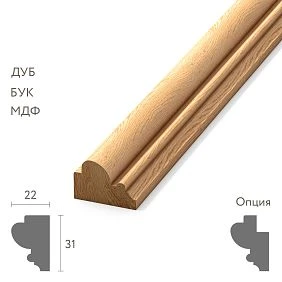
For wooden mouldings, the package may include the SKU, material, dimensions, profile, length, drawing, photograph, physical sample, finish, application area, and a list of deviations. Only after these data are reviewed does the project decide whether the specific item can be approved for purchase.
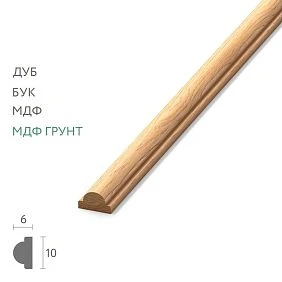
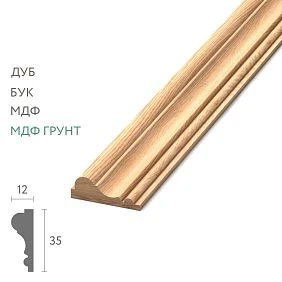
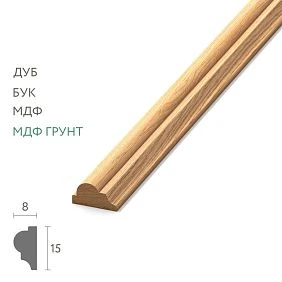
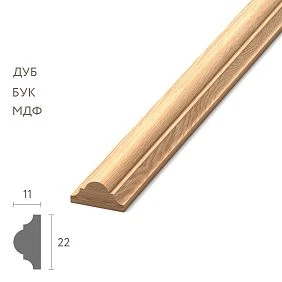
Current skirting boards, mouldings, and cornices can be checked in the section STAVROS wooden molding, and for technical documentation STAVROS has a separate section of catalogs and drawings, where PDF catalogs and DWG materials for the products are published.
Why price should not appear before technical approval
Weak sequence:
found the product → got a discount → almost ordered → sent the designer a photo "just in case."
Stronger:
project requirement → specific candidate → technical package → review → approval → procurement.
The reason is obvious: a favorable price does not turn an unsuitable molding into the right one.
If the procurement team first emotionally "buys" a product because of price and availability, and only then seeks approval, the project review becomes a formality. Pressure arises:
let's just approve it already, it's in stock.
Submittal reverses the logic: first compliance with the project, then the commercial action.




What is a Material Submittal in simple terms
This is a card or a set of documents by which a contractor, package coordinator, or purchaser shows the project team a specific product they intend to use, and receives an official response regarding its application.
In construction practice, a submittal may include:
- product data;
- shop drawings;
- material data;
- samples;
- photographs;
- technical data sheets;
- comments;
- deviations from the design requirements.
For wooden trim, the package is usually simpler than for engineered equipment, but the principle is the same: the design must verify the proposed solution before mass purchasing or manufacturing.
Our factory also produces:






A specification and a Material Submittal are not the same thing
This is the central distinction.
Get Consultation
SPECIFICATION
Project requirement.
For example:
M-03 / wooden molding / oak / profile per design / Lobby area.
MATERIAL SUBMITTAL
Proposed actual solution.
For example:
M-03 → STAVROS MLD-XXX / oak / size ___ / length ___ / drawing ___ / sample S01.
That is:
specification = requirement;
submittal = proposed solution.
If these two concepts are conflated, the purchaser either gets too much freedom, or the project becomes tied to a product before a proper technical review.
Why a link to a product card does not replace approval
The link helps open the product.
But it does not record:
- which exact configuration was selected;
- which material;
- what length;
- what finish;
- which project revision it closes;
- in which zone it is used;
- whether there are deviations;
- which physical sample relates to this item.
A month later, the card may display differently, and the team will no longer remember what exactly was approved.
Therefore, the link is a useful addition, but not the approval record itself.
Each approval must have a unique ID
Bad file names:
molding new.pdf
molding new 2.pdf
last molding final.pdf
Within a few weeks, they lose their meaning.
Better:
SUB-PG-001
SUB-PG-002
SUB-PG-003
And revisions:
SUB-PG-003-R01
SUB-PG-003-R02
This way you can see which document is newer and which version received official status.
What to include on the first page of a submittal
Practical cover sheet:
| Field | Example | | --- | --- | | Submittal ID | SUB-PG-003 | | Project | Hotel A | | Project code | M-03 | | Product | wooden molding | | SKU | MLD-XXX | | Manufacturer | STAVROS | | Revision | R01 | | Date | ___ | | Submitted by | ___ | | Reviewer | ___ | | Required approval date | ___ | | Status | FOR REVIEW |
If the project is small, the table can be simplified.
But the ID, SKU, revision, date, and status must remain unambiguous.
Who exactly should review the submittal
Not every project participant should approve everything.
For a single item, the roles may look like this:
- the contractor or procurement specialist prepares the package;
- the project manager checks completeness;
- the designer checks the visual and architectural result;
- the architect or another designated reviewer verifies compliance with the design requirements;
- the client gets involved where the procedure provides for it.
The main thing is to assign the ball in court in advance: who currently holds the action.
If the status FOR REVIEW, but it is unclear who should respond, the submittal has effectively stalled.
In the register, it is useful to store the following fields:
Current action by / Due date / Next step.
Then the approval delay becomes visible before it turns into a procurement delay.
What to attach to the wooden skirting board submittal
One photo is not enough for a skirting board.
A useful package:
- article number;
- the material;
- overall height;
- overall thickness;
- product length;
- cross-section or drawing;
- area of application;
- matching architrave;
- finish;
- sample, if needed;
- comment on the installation detail.
The main risk with a skirting board is that it can be the right product but wrong for a specific junction.
Why the skirting board must be coordinated together with the architrave
Suppose the selected skirting board fully meets the requirements for material and style.
But the actual architrave is thinner.
As a result, a random step appears near each door.
The problem is not with the quality of the skirting board.
The problem is in the junction.
Therefore, for a critical case, it is useful to attach the following to the submittal:
- a section fragment;
- dimensions of both elements;
- the desired position of the face planes;
- a photo or mock-up of the junction, if one has already been made.
The submittal must confirm not only the product, but also its suitability for the project application.
For wooden moulding, the main attachment is the section
A frontal photograph does not clearly show:
- the depth;
- protrusion;
- radii;
- grooves;
- relief;
- the geometry of the shadow.
Therefore, for the molding:
PHOTO = visual reference;
SECTION = technical reference.
STAVROS offers catalogs and DWG drawings of products, which can be used as part of a technical review if they relate to the specific item under consideration.
For a project, this is far more reliable than approving based on a single attractive photograph.
How to approve molding for a frame layout
The submittal can include:
M-03 / MLD-XXX
and attach:
- cross-section;
- the size of the future frame;
- floor mounting;
- ceiling mounting;
- distance to the door;
- intended material;
- finish;
- application area.
Then the project verifies not an abstract profile, but its role in a specific composition.
If the same model is used at a different scale, this can be specified as a separate area or a separate application line.
A wooden cornice requires a ceiling assembly
A cornice cannot be approved by a line alone:
KZ-XXX / oak.
It is necessary to understand:
- full cross-section;
- position relative to the wall;
- position relative to the ceiling;
- built-in furniture;
- curtain system;
- light, if it interacts with the assembly;
- other decorative profiles.
A cornice that is perfectly matched in style may conflict with the actual ceiling solution.
Therefore, its submittal should contain not only a product card but also a fragment of the design assembly.
When documentation is insufficient and a physical sample is needed
The file verifies dimensions well.
A physical sample is needed when the project requires evaluating:
- the scale of the profile;
- the texture;
- breed;
- shade;
- relief;
- the actual shadow;
- the selected finish.
STAVROS sells product samples and individual wooden decor samples for preliminary evaluation before ordering.
If a sample is part of formal approval, it must be linked to the document.
Not:
a piece of oak molding on the table.
But:
SUB-PG-003 / SAMPLE S01 / MLD-XXX / OAK.
Then, a month later, it is clear exactly what is in the sample box.
The document and the physical sample must have the same ID
Imagine five wooden profiles lying on a designer's table.
The documents for them are in an electronic folder.
Without labeling, it is easy to confuse:
- the material;
- revision;
- alternative;
- old rejected sample;
- final approved sample.
Therefore, the physical sample label may contain:
SUB-PG-003-R02 / S01 / APPROVED
If a new version appears, the old sample is not automatically destroyed but is moved to archived status or explicitly marked as superseded/rejected.
PRODUCT APPROVAL and FINISH APPROVAL can be separated
Sometimes the geometry is already approved, but the finish is not yet.
For example:
MLD-XXX / geometry — APPROVED
But:
finish F02 — PENDING.
This is more useful than a general status:
the molding seems to be approved.
Parameters can be tracked separately:
| Parameter | Status | | --- | --- | | SKU | APPROVED | | Material | APPROVED | | Geometry | APPROVED | | Finish | PENDING | | Quantity | PENDING FINAL MEASURE |
Then the buyer understands exactly what else is blocking the order.
APPROVED does not always mean “can be ordered immediately”
This rule needs to be defined within the project.
For example, a project may use the chain:
APPROVED → FOR PROCUREMENT → ORDERED.
APPROVED means that the technical solution has been approved.
FOR PROCUREMENT means that the specifier or project manager has authorized procurement to initiate a commercial action.
This intermediate status is useful if:
- the quantity has not yet been finalized;
- the budget has not been approved;
- finish is approved separately;
- the order must be linked to a construction phase.
What matters is not the specific status name, but the absence of confusion between technical approval and actual order placement.
The most important part of the submittal is Deviations
If the proposed product fully complies with the design requirement:
NO DEVIATIONS.
If it differs, the deviation is stated directly.
For example:
Design requirement: height 100 mm.
Proposed product: 95 mm.
The difference cannot be hidden in an attached PDF with the hope that the reviewer will find it themselves.
Deviations are where the procurement team honestly says:
this is how a candidate differs from a design basis.
Silence does not mean compliance
Phrase:
almost the same profile
must be translated into a comparison.
You need to specify:
- what is the same;
- what differs;
- whether the difference affects the assembly;
- whether a project change is needed.
If an alternative molding is proposed, it receives the status:
ALTERNATIVE / DEVIATION.
This makes the replacement transparent.
How to create an alternative profile
Example:
| Parameter | Design Basis | Proposed | | --- | --- | --- | | SKU | MLD-A | MLD-B | | Width | ___ | ___ | | Depth | ___ | ___ | | Material | oak | oak | | Finish | F01 | F01 | | Section | drawing A | drawing B | | Comment | — | profile differs |
This way the reviewer immediately sees that this is not an identical item.
If the change is accepted, the new line becomes part of the current documentation.
If rejected, the original design basis is retained.
Working statuses of Material Submittal
A large project usually needs more than just yes / no.
Possible system:
FOR REVIEW
The package has been sent for review.
APPROVED
May be used within the established conditions.
APPROVED AS NOTED
May be used when addressing reviewer comments.
REVISE & RESUBMIT
The package must be revised and a new revision submitted.
REJECTED
The proposed solution was not accepted.
SUPERSEDED
The document has been superseded by a new revision.
This is an example workflow.
The project must define the specific status definitions itself, especially if they affect contractual rights and order release.
Why REVISE & RESUBMIT is a normal outcome
A submittal does not exist to get everything approved on the first try.
For example, the package is good, but:
- no cross-section;
- incorrect length specified;
- node not attached;
- physical sample is not labeled;
- finish does not match the design basis.
Reviewer returns:
REVISE & RESUBMIT.
Purchaser corrects the package and issues:
SUB-PG-003-R02.
R01 is saved in history and receives the status SUPERSEDED.
Why you cannot overwrite a PDF with the same name
If a file has the same name, different participants may work with different copies.
One sees the new profile.
Another — the old one.
But both files are named:
molding.pdf.
The revision must be part of the name:
SUB-PG-003-R01.pdf
SUB-PG-003-R02.pdf
It is this version that then goes into the procurement line.
The main tool — Submittal Register
Practical register:
| ID | Project code | SKU | Rev | Submitted | Status | Approved date | | --- | --- | --- | --- | --- | --- | --- | | SUB-001 | P-01 | PLT-___ | R01 | 01.09 | APPROVED | 04.09 | | SUB-002 | M-03 | MLD-___ | R02 | 03.09 | REVISE | — | | SUB-003 | K-02 | KZ-___ | R01 | 04.09 | FOR REVIEW | — |
Additionally useful:
- reviewer;
- responsible contractor;
- required approval date;
- next action;
- sample ID;
- deviations;
- procurement status.
So on a single screen you can see which items are actually approved and which cannot yet be released for procurement.
Why a register is better than correspondence
In the messenger:
the cornice seems to have been approved.
In register:
K-02 / SUB-003-R01 / APPROVED / 04.09.2026.
Or:
K-02 / REVISE & RESUBMIT.
The difference is fundamental.
The correspondence stores the conversation.
Register stores the management status.
Approval needs to be included in the procurement schedule
Approval takes time.
It cannot be placed immediately before installation.
For example:
- the material is needed on site on November 15;
- production — 20 days;
- delivery — 5 days;
- internal time buffer — 3 days.
Total:
20 + 5 + 3 = 28 days.
This means technical approval must be obtained no later than approximately 28 days before the required date, if production starts specifically with approval and there are no other stages.
For the date November 15, 2026, the guideline is:
October 18, 2026.
This is not a universal STAVROS deadline and not an industry standard.
This is an example of backward planning:
REQUIRED ON SITE DATE − LEAD TIME − DELIVERY − PROJECT BUFFER = REQUIRED APPROVAL DATE.
What to do if the review is delayed
The problem must be visible in the schedule before it becomes a delivery problem.
For the submittal, you can store:
- submitted date;
- reviewer due date;
- required approval date;
- required on-site date;
- lead time.
If REQUIRED APPROVAL DATE is approaching, but the status is still FOR REVIEW, the item becomes a procurement risk.
Then the project manager sees that a delay may occur even before the order is placed.
How to prioritize dozens of submittals at the same time
On a large project, it is easy to end up with dozens of approval cards.
Reviewing them only in order of receipt is not always reasonable.
An item has higher priority if:
- long production lead time;
- complex replacement;
- high architectural criticality;
- large volume;
- early installation date;
- the physical sample must be delivered separately;
- other decisions depend on its approval.
A simple flag can be used:
LOW / MEDIUM / HIGH / CRITICAL.
For example, a standard skirting board needed in three months can be MEDIUM.
A custom cornice for the lobby with a long production lead time and installation in five weeks is HIGH or CRITICAL.
This is not a standard, but a way to direct the reviewer's attention to where a delay in approval has a greater impact on the project.
Do not start a large volume before approval of a critical item
For a simple standard product, the procedure can be shortened.
But for design-critical trim, a mass order before technical approval creates a risk:
- incorrect profile;
- wrong material;
- incompatible assembly;
- unsuitable finish;
- a large volume of product that can no longer be used without rework.
The larger the run, the more expensive an error becomes before approval.
Therefore, on large projects, a formal release gate is justified.
Wholesale building materials: why submittal is especially important with large volumes
If you need wholesale construction materials over hundreds or thousands of meters, the error scales up.
Five incorrect planks can be replaced relatively quickly.
An error of 1500 m in a single molding turns into a separate project problem.
That is why technical approval is best done before BULK RELEASE.
The larger the volume and the more complex the profile, the more valuable the check before ordering.
When an APPROVED SAMPLE is not yet enough
A physical sample confirms:
- profile;
- the material;
- scale;
- the texture;
- finish.
But it does not always show:
- the actual junction at the door;
- the full frame composition;
- room scale;
- ceiling joint;
- actual cutting plan.
For a hotel, a chain of properties, or a large repeatable interior, a full-size mock-up may be needed after sample approval.
This is already the next step:
SAMPLE APPROVED → MOCK-UP → MOCK-UP APPROVED → BULK RELEASE.
Submittal and mock-up do not compete.
They solve different tasks.
Wholesale building materials: what to check before Bulk Release
Before wholesale building materials before releasing into the main order, a final checklist is useful:
- SKU approved;
- material approved;
- section approved;
- finish approved;
- deviations closed;
- sample linked;
- revision current;
- quantity released;
- approval date recorded;
- procurement status = FOR PROCUREMENT.
Only after this:
BULK ORDER RELEASED.
If at least one critical parameter remains PENDING, a large batch should not be released automatically.
Construction material in bulk: approval must remain linked to the order
After approval construction material wholesale must not turn into a regular string:
MLD-XXX / 900 m.
Stronger:
M-03 / MLD-XXX / OAK / F02 / SUB-PG-003-R02 APPROVED / 900 m.
Now the buyer sees:
- project code;
- exact SKU;
- the material;
- finish;
- the document on the basis of which the goods are authorized;
- quantity.
This link must be preserved until the delivery is accepted.
Approval information must carry over into the procurement line
If the submittal ended up in a separate folder and procurement lives in another table without a link to the approval, the information chain breaks.
Minimum procurement line:
| Field | Value | | --- | --- | | Project code | M-03 | | SKU | MLD-XXX | | Material | Oak | | Finish | F02 | | Submittal | SUB-PG-003-R02 | | Approval | APPROVED | | Qty | ___ | | Order status | FOR PROCUREMENT |
Now a new buyer can understand why this particular item is allowed.
The receiver must also see the approval number
MLD-XXX arrived at the site.
Check:
does the delivery match SUB-PG-003-R02 APPROVED?
The following are cross-checked:
- SKU;
- the material;
- configuration;
- length;
- marking;
- linked sample, if used as a reference.
So approval does not end its life after payment.
It becomes a reference for subsequent stages.
When a full submittal can be simplified
Not every renovation needs a multi-page package and a large register.
A simplified form is sufficient if:
- Few SKUs;
- standard products;
- small project team;
- no complex alternatives;
- no large print run;
- no multiple reviewers;
- timelines do not require a separate approval schedule.
But even in a simplified scheme, it is useful to preserve:
project code → SKU → material → photo/drawing → deviations → reviewer response → revision → approval.
You can simplify the volume of document flow, but not the clarity of the decision itself.
Material Submittal must not replace the responsibility of the manufacturer or designer
Approval means that the project team has accepted a specific proposed solution within its own procedure.
But it must not be interpreted as a universal guarantee:
- quality of the future batch;
- correctness of installation;
- absence of a manufacturing defect;
- compliance with unknown site conditions.
Each subsequent stage still has its own verification:
approval → order → receiving inspection → installation → final acceptance.
Submittal covers only its own risk area: the selection of a specific product relative to the design requirement.
Ten mistakes when approving wooden trim
1. Sending only a link to the product.
No recorded configuration or revision.
2. Attaching a photo without the SKU.
A month later, it is impossible to restore the product line.
3. Not attaching the molding cross-section.
The front view does not show the profile geometry.
4. Not specifying the material.
A single profile can have different finishes.
5. Mixing up product and finish approval.
The team considers the item fully approved, even though the finish is still pending.
6. Not specifying deviations.
The reviewer has to look for differences from the design basis themselves.
7. Not labeling the sample.
The physical reference loses its link to the document.
8. Overwrite the old revision.
Different participants use different versions.
9. Order before approval of a critical item.
Technical review becomes a formality after payment.
10. Do not link approval to the actual order.
The receiver does not understand which approved version to compare the delivery against.
Final linear trim approval algorithm
- Define design requirement.
- Find a specific product candidate.
- Assign submittal ID.
- Specify project code and SKU.
- Attach material, dimensions, and length.
- Attach section or drawing.
- Add photo and link to the product card.
- Attach application detail.
- Specify finish.
- List deviations.
- Link physical sample to ID.
- Assign reviewer and due date.
- Set required approval date.
- Submit
FOR REVIEW. - Obtain official status.
- If there are comments, issue a new revision.
- Do not delete superseded versions.
- After full approval, move the item
FOR PROCUREMENT. - Move the approval ID to the procurement line.
- Issue a bulk order.
- When receiving a batch, verify the delivery against the approved submittal.
This creates a controlled technical gateway between the project and procurement, which prevents price, availability, or urgency from quietly replacing an architectural decision.
Questions about Material Submittal
How is a submittal different from a specification?
The specification sets the project requirement. The submittal shows the specific product the contractor proposes to fulfill that requirement.
Is a link to the product page sufficient?
No. You need a fixed configuration, revision, material, drawing, status, and, if required, a physical sample.
Is it mandatory to use the English term Material Submittal?
No. The project may call the process "material approval," "approval card," or something else. What matters is the workflow and an unambiguous status.
What should be done if the geometry is approved but the finish is not?
Separate the statuses: PRODUCT / GEOMETRY — APPROVED, FINISH — PENDING. Do not release a mass order of the finished final execution until the dependent parameter is closed.
Can APPROVED AS NOTED be used?
Yes, if the project has defined the meaning of this status in advance and it is clear which comments must be addressed.
What does REVISE & RESUBMIT mean?
The package must be corrected and submitted as a new revision. The old version remains in the history as superseded or with another archival status.
When must the submittal be approved?
By the date when approval becomes critical for production and delivery. It is calculated backward from the required on-site date, taking into account lead time, logistics, and project contingency.
Should the submittal be retained after the order?
Yes. It remains the reference for acceptance, installation, replacement, and future reorders.