Article Contents:
- Why an architect shouldn't choose a slatted panel from a photo alone
- First the actual product — then the architectural layout
- A panel and a separate slat are different design units
- Separate slat
- Finished slat panel
- Vertical
- Horizontal
- MDF
- Oak or beech
- Panel selected after layout
- Panel and rail mixed up
- The end panel has not been checked
- Sockets are placed over the rhythm provisionally
- The thickness of the architrave is not shown
- The radius is calculated from the chord
- SKU replaced without REV
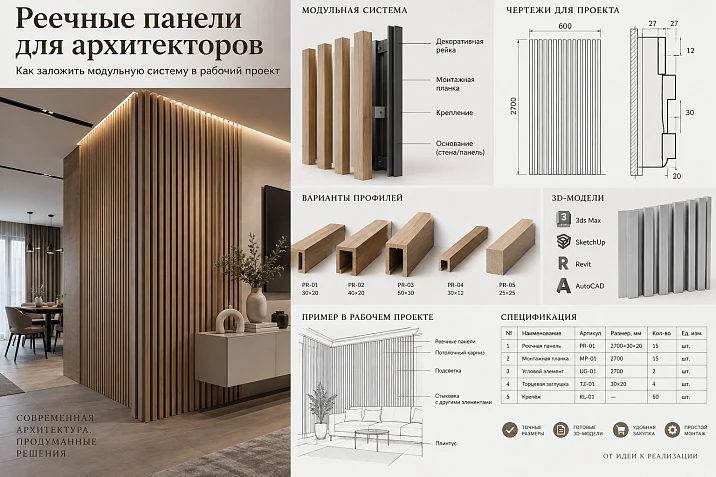
In a visualization, a slatted wall may look like a continuous rhythm of verticals. On a working drawing, everything is more complex: a panel has a real width, thickness, length, its own module, edge, joint, specific SKU, and installation constraints. If these parameters are not fixed before documentation is issued, a beautiful rhythm quickly turns into a task of "fitting on site."
For an architect, a slatted panel is not a wall texture. It is a modular architectural system that must go through the entire project path:
zone → real SKU → module → layout axis → start and end → openings → corners → electrical → ceiling and skirting → radii → DWG → quantity → specification → order.
Therefore, the right approach does not begin with conditional hatching in CAD. First, a real product is selected, then its geometry becomes part of the project.
This is exactly how slatted panels for architects differ from a decorative choice based on a photograph: the solution must not only look good, but also be assembled from specific products without random cuts, conflicts with outlets, and surprises at doors.
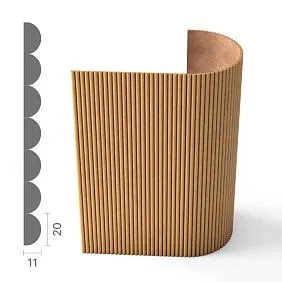
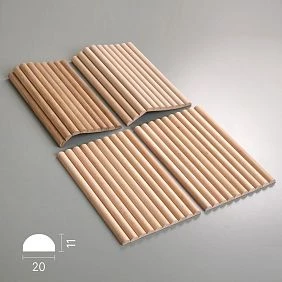
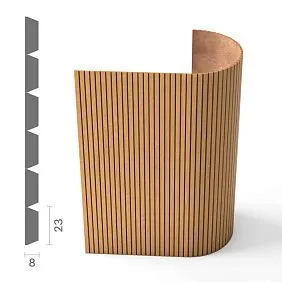
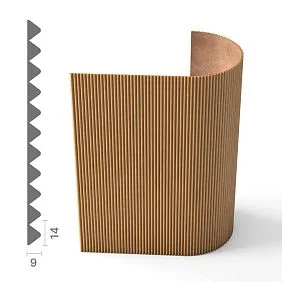
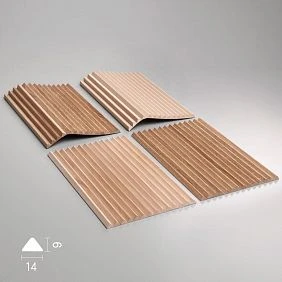
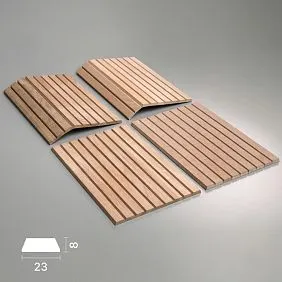
Why an architect cannot simply choose a slatted panel from a photograph
A photograph shows the effect.
You can see:
- the direction of the rhythm;
- the density of the slats;
- color;
- the texture;
- the character of light and shadow;
- an example of application.
But for working documentation, this is not enough.
The architect needs:
- the actual SKU;
- panel width;
- thickness;
- length;
- the material;
- installation direction;
- module;
- actual position of the joints;
- edge finishing method.
Two slatted panels can look similar in photos yet lay out differently on the wall.
A difference of a few millimeters within a single module on a long wall turns into a noticeable shift of the entire grid.
That is why the image is a reference.
The project begins with dimensions.




First the real product — then the architectural layout
The working sequence should be as follows:
catalog → SKU → A / C / L → module → zone → nodes.
Not the other way around:
drew a beautiful rhythm → then look for a similar panel.
The second path only seems faster at the concept stage. At the working stage, it leads to rework.
If the real panel differs from the conventionally drawn one:
- the number of modules changes;
- the end panel shifts;
- the socket lands on the relief;
- the door ends up in a different phase of the pattern;
- a joint appears in the visible area;
- the furniture no longer aligns with the axis.
Therefore, the specific SKU should appear before the detailed layout.
To choose a real product, it is convenient to use the catalog of slatted panels for the design project, and transfer the selected geometry into the working drawings.
Our factory also produces:
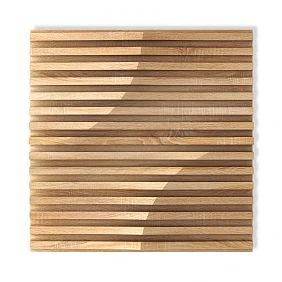
A panel and a separate slat are different design units
This is a fundamental distinction.
Get Consultation
Separate slat
If a separate decorative rail is used, the architect defines:
- cross-section;
- spacing;
- distance between axes;
- gap;
- quantity;
- the start and end of the field.
The rhythm is composed of independent elements.
Finished slat panel
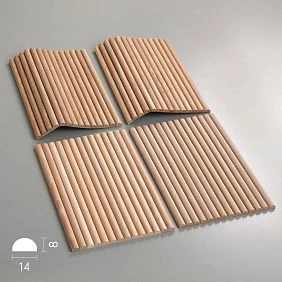
For the panel, part of the geometry is already combined into a factory module.
The designer works with:
- the overall panel width;
- thickness;
- length;
- internal pattern;
- the joint between adjacent modules;
- trimming of the end panel.
A finished panel cannot be treated as a set of independent slats.
Conversely, individual slats cannot be designed using the logic of a finished module.
In a visualization, the result may look similar.
In the specification and installation, these are two different systems.
Which parameters of a slatted panel need to be fixed
Minimum set:
- Manufacturer;
- SKU;
- width A;
- thickness C;
- length L;
- the material;
- surface;
- installation direction;
- design code.
For example, PAN-003 width and thickness are determined by the specific geometry of the product, while length and material depend on the version. The current product page presents options made of MDF, oak, and beech.
For an architectural project, this means a simple thing: records PAN-003 are sometimes not enough.
If a single SKU allows for multiple materials or sizes, the specification must record the specific configuration used to build the layout.
Otherwise, the visualization may be done in oak, the working design may be conditional, and the order may end up in MDF.
What is a slatted wall module
The word "module" is often used too loosely.
One must distinguish:
the width of an individual slat — the physical width of the protrusion;
the gap — the space between adjacent slats;
the pitch — the repeating distance between identical rhythm points;
the width of the finished panel — the full dimension of the factory element;
the installation module — the value by which the system repeats when panels are joined.
These are not the same thing.
If the drawing only states step 50, the installer should not have to guess whether this figure refers to the axis of the slats, the clear gap, or the module of the finished panel.
The more precise the term, the fewer decisions are carried over to the site.
From which point to start the layout
A slatted wall cannot automatically start from the left corner.
First, the layout base must be determined.
It can be:
- the central axis of the wall;
- TV axis;
- the axis of the bed;
- a doorway;
- angle;
- wardrobe;
- a niche;
- column;
- the architectural axis of the room.
Let's imagine a wall 4.8 m wide.
On the left is a built-in wardrobe, on the right is a door. The geometric center of the entire wall is almost useless here: a person perceives only the free space between the furniture and the opening.
In such a situation, it makes more sense to use the visible architectural zone as the base.
First, the base.
Then the modules.
Symmetrical layout
Symmetry is useful where there is a real compositional center.
For example:
- TV zone;
- bed headboard;
- the wall section between two doors;
- the central wall of the hall;
- fireplace composition.
Sequence:
axis → whole modules → edge margins.
At the same time, symmetry should be checked not only by the panel, but also by the internal pattern.
If a module contains several slats, the geometric center of the panel may not coincide with the visual center of the rhythm.
Therefore, it is better to look at the entire wall as a whole.
When symmetry is not needed
Architectural logic is more important than mathematical logic.
If a wall has a strong real boundary — a door, a wardrobe, a column, a niche — the layout can start from it.
For example, the panel runs from the door casing to the built-in furniture.
In this case, equal margins on the left and right are not required.
Much more important:
- finish the panel cleanly next to the door casing;
- avoid a narrow random cut on the cabinet;
- preserve a complete rhythm in the main visible area.
Symmetry is good when it supports the space.
When it ignores the architecture, it becomes formal.
First and last panel
The middle part of a slatted wall almost always looks convincing.
Problems appear at the edges.
If the width of the area is not a multiple of the module, you need to choose one of the options in advance:
- trim the outer panel;
- distribute the trim symmetrically;
- использовать добор;
- изменить стартовую ось;
- изменить ширину зоны;
- завершить панель архитектурным профилем.
Нельзя оставлять решение монтажнику.
Случайная узкая полоса у угла может визуально разрушить весь ритм.
Поэтому проектирование реечной стены разумно начинать одновременно с двух вопросов:
где первая панель?
and:
что произойдёт с последней?
Как показать крайние панели на развёртке
On the working layout, it is necessary to separately record:
- the boundary of the zone;
- the starting axis;
- the width of the edge element;
- the type of cut;
- the direction of the panel;
- the position of the joint;
- the size of the field to the adjacent element.
It is not enough to simply shade the entire surface.
If the panel is cut, the size of the cut must be clear.
If an extension is used, it must have its own code.
If the edge is closed with a profile, this profile must appear in the node and specification.
Vertical and horizontal layout
The same panel can function fundamentally differently in space depending on its direction.
Vertical
Emphasizes height and interacts more strongly with:
- doors;
- wardrobes;
- vertical axes;
- columns.
The main calculation is based on the wall width.
Horizontal
Interacts more strongly with:
- room height;
- door lintels;
- headboard;
- TV;
- furniture horizontals.
Here, the height mark of the first module is especially important.
No option is better in itself.
The architect must choose the direction as part of the composition, not as a material setting after purchase.
Long wall: where to place the joints
If the length of the product is insufficient, a joint occurs.
A random horizontal seam in the middle of a large open wall is almost always more noticeable than it appears in the drawing.
It is better to tie it to the architecture in advance:
- furniture lines;
- molding;
- shelf;
- ceiling band;
- material boundary;
- a niche;
- another justified horizontal line.
If this is impossible, the position of the seam still needs to be specified.
Phrase join on site moves an important visual decision to installation.
Panels near the doorway
The door combines several geometries at once:
- panel;
- platband;
- reveal;
- plinth;
- edge of the wall.
On the layout, you need to check:
- where the last module ends;
- which end remains visible;
- whether the panel fits the door casing;
- whether a narrow cut appears;
- whether the baseboard runs continuously.
A panel cannot be considered only frontally.
Near a door, at least one cut is always needed.
Panel and door casing of different thicknesses
Let's imagine that the slatted panel protrudes from the base more than the casing.
On the facade, the problem is almost invisible.
A step appears on the side.
It can be:
- deliberate;
- closed with an extension piece;
- finished with a shadow gap;
- undesirable.
In the cross-section, it is worth showing:
wall → adhesive/mounting layer → panel → finish surface → casing.
Only then does it become clear how the assembly looks physically.
Internal corner
At the inner corner, you need to decide how the module ends.
Options:
- with a full plank;
- with a trimmed module;
- with a shadow gap;
- with a filler element;
- with a continuation onto the adjacent wall.
If both walls are slatted, another question arises: should the rhythm visually continue through the corner?
Sometimes yes.
Sometimes each wall should have its own independent grid.
The decision depends on the architecture of the space, but it must be visible in the design.
External corner
The outer corner is more challenging: a person simultaneously sees two planes and the end face.
Need to check:
- which edge of the panel remains on the outside;
- whether the rhythm matches;
- whether an extension is needed;
- whether the end face is closed;
- whether there is a separate batten at the corner itself;
- how the material behaves after the turn.
A bad external corner immediately gives away modular finishing as “cut off.”
A good one looks as if the rhythm was designed together with the architecture.
Sockets and switches
Electrical fittings should appear on the elevation at the same time as the panel.
You need to check the connection:
center of the electrical accessory ↔ batten ↔ groove ↔ module joint.
The problem is especially noticeable when the socket frame falls partly on the protrusion and partly in the groove.
Formally, it fits.
Installation-wise and visually, it no longer does.
Therefore, engineering points cannot be placed after the layout is approved.
What to do if a socket falls on a relief
There are several design solutions:
- shift the electrical point;
- change the starting module;
- provide a mounting pad;
- resolve the trimming locally;
- change the size of the decorative area.
There is no universally correct option.
But there is a universally bad one: leaving the question until installation.
If the electrical wiring is already fixed, the architect will adapt the panel.
If the layout is more important and the engineering point can still be moved, it makes more sense to change the electrical wiring.
The decision depends on the project stage.
Panels and built-in furniture
First, you need to determine whether the panel goes behind the furniture.
Options are possible:
- the wall is fully clad, and the furniture is installed in front of it;
- the panel ends at the side panel;
- the panel partially extends behind the furniture;
- the furniture is integrated into the slatted composition.
The amount of material differs for each scheme.
Also need to check:
- the visible end face;
- gap;
- the depth;
- facade opening;
- plinth;
- top junction.
If the furniture is designed after the panel, there is almost always a risk of conflicts.
Slatted panel in the TV zone
The TV zone looks simple only in the visualization.
Need to combine:
- screen axis;
- panel module;
- bracket;
- cable;
- Outlets;
- lighting;
- nightstand;
- edge of the decorative zone.
If the TV mount passes through the panel, the base for it must be provided in advance.
There is no need to cover the engineering part with nice hatching.
The working drawing must show how the screen is actually attached to the wall.
Headboard panels
Here the main base is usually the bed axis.
Then check:
- wall lamp;
- switches;
- Outlets;
- headboard height;
- edge of the panels;
- symmetry of the rhythm;
- adjacent cabinets.
Even a slight offset of the sconce relative to the rail becomes noticeable due to the regular vertical pattern.
Therefore, the axes are aligned first.
Then the electrical wiring is installed.
Slatted panel and ceiling
The top junction can be different:
- flush to the ceiling;
- via a shadow profile;
- under a cornice;
- into a niche;
- with a separate finishing profile.
If the ceiling is suspended, it is important to decide in advance on the installation sequence and the actual junction line.
If a cornice is used, its projection must be compared with the panel thickness.
A working section drawing is more useful here than any visualization.
Slatted panel and skirting board
The lower junction must also be selected in advance.
Possible scenarios:
- panel down to the floor;
- panel starts above the skirting board;
- skirting board runs over the panel;
- a separate lower profile is used;
- the baseboard is interrupted in the slatted area.
Visually, these options produce different results.
If a tall vertical panel suddenly ends at a standard baseboard, the composition may lose its integrity.
But sometimes a continuous baseboard, on the contrary, is needed as a common horizontal line of the room.
The project must decide this before installation.
Radius surfaces
The slatted system becomes especially interesting on a radius.
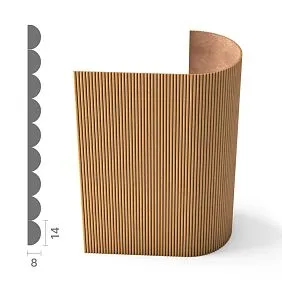
In the current STAVROS category, flexible slatted panels are presented, intended among other things for curved surfaces, columns, niches, and arches.
This does not mean that the radius can be ignored.
For a working project, you still need to know:
- the specific SKU;
- acceptable application scenario;
- actual surface radius;
- installation direction;
- the position of the joint;
- quantity.
Product flexibility is not a substitute for geometry.
How to lay a panel onto a column
For a round column, the actual circumference is determined first.
If the radius is known R, the geometric circumference:
L = 2πR.
But this figure is not yet equal to the purchase quantity.
Need to consider:
- module width;
- the location of the vertical joint;
- trimming;
- completion method;
- actual panel length;
- possible remainder.
The vertical joint is best placed in the least noticeable area, rather than randomly on the frontal axis.
Panel on a curved wall
Mistake — measuring such a wall in a straight line on the plan.
The actual arc length is needed.
For complex geometry, it is easier to take it directly from the CAD model or working drawing.
Then the arc is divided into actual modules.
Pay especially close attention to:
- start;
- end;
- end cut;
- adjacency to a straight wall.
If the radiused zone transitions into a flat one, the joint becomes a separate architectural detail.
MDF or solid wood in an architectural project
The challenge here is not choosing “which is better.”
These are different design scenarios.
MDF (740–760 kg/m³, emission class E1/E0) provides ideal geometry, uniformity, and better base for enamel: high adhesion, smooth surface, absence of knots and cracks.
Suitable when the following is required:
- painting;
- a specified color;
- a uniform surface;
- the absence of pronounced natural texture.
Oak or beech
Chosen when these matter:
- natural pattern;
- Tinting;
- the materiality of wood;
- the perception of the grain.
The same texture in painted MDF and natural oak is perceived completely differently.
That is why the material is not a technical option after visualization.
It is part of the architectural solution.
Why the material must be fixed before the final visualization
Let's imagine two surfaces with the same geometry.
First:
MDF + RAL
Second:
oak + stain
In the diagram, the rhythm is the same.
In the interior — different sensations.
Painted MDF is more pronounced through light and shadow and color.
Natural oak adds its own grain pattern, variability, and materiality.
If the designer visualized oak but left in the specification MDF / wood — your choice, the decision is not yet finalized.
The material must be approved before the final documentation is issued.
Sample before issuing working documentation
For slatted panels, a sample is especially useful.
It shows simultaneously:
- the texture;
- the depth;
- a real step;
- thickness;
- color;
- surface quality;
- behavior under side lighting.
On screen, the rhythm can be zoomed in or out.
A physical sample provides a real sense of scale.
Therefore, for a critical material, the correct sequence looks like this:
shortlist SKU → sample → APPROVED → working project.
How to use OPAN in approval
The STAVROS category presents individual samples of OPAN slatted panels alongside full-size PAN items.
For a designer, this is a convenient logic:
- select several suitable systems;
- request samples;
- compare texture and relief;
- approve a specific option;
- only after that, record the corresponding SKU in the documentation.
The sample itself does not replace the working size.
But it helps avoid approving material based solely on a screen.
Slatted panels DWG
The DWG should reflect the actual modular system, not decorative hatching.
The elevation drawing shows:
- zone boundaries;
- starting axis;
- modules;
- joints;
- end elements;
- doorways;
- electrical wiring;
- Furniture;
- dimension chains.
If real DWG of slatted panels, the file must match the same SKU that is in the specification.
You cannot scale the module in AutoCAD and assume that the product remains the same.
What to show in the section
Minimum section:
wall base → adhesive or fastening → panel → finished surface.
But in the junctions next to other elements, more is needed.
For example, at a door:
- base;
- panel;
- platband;
- reveal;
- visible offset.
At the floor:
- panel;
- plinth;
- gap;
- floor covering.
At the ceiling:
- panel;
- ceiling profile;
- cornice or shadow line.
The section answers the question that the elevation does not see: how much do the elements protrude relative to each other?
What to store in the specification
Useful row structure:
| Field | Value |
|---|---|
| Code | PAN-01 |
| Manufacturer | STAVROS |
| SKU | PAN-003 |
| Material | MDF / oak / beech |
| Size | specific configuration |
| Direction | vertical / horizontal |
| Room | Lobby |
| Zone | Wall-03 |
| Calculated Qty | estimated |
| Order Qty | purchasing |
| Status | APPROVED |
| Revision | current |
| URL | Product |
If one SKU is used in multiple rooms, you can keep separate rows by zone and then aggregate Order Qty before purchasing.
How to calculate the number of modules
Bad formula:
wall area / panel area.
It can give a rough estimate, but it does not guarantee the correct quantity.
Need to check:
- actual layout;
- edge cuts;
- Doors;
- niches;
- remainders;
- possibility of reusing offcuts;
- installation direction.
Two walls of equal area may require different numbers of panels.
The reason is different geometry.
Therefore, it is better to calculate using the unfolded layout rather than just the area.
Calculated Qty and Order Qty
These fields are best kept separate.
Calculated Qty — the geometric requirement per the project.
Order Qty — the quantity actually purchased after accounting for modules, cuts, and reserve.
On a simple straight wall, they may be almost identical.
On a radius, a wall with doors, or several niches, the difference may be more noticeable.
If only the order total is stored, the ability to verify the calculation is lost.
How to work with multiple PAN types on a single site
On a large site, it's easy for the following to appear:
PAN-01
PAN-02
PAN-03
These should be separate project line items.
For each one, the following are recorded:
- its own SKU;
- the material;
- size;
- direction;
- area;
- quantity;
- the status.
They should not be combined into a single line slatted panels, even if they look similar.
Different SKUs mean different purchasing line items.
How to handle revision when replacing a panel
Replacing a panel is not just updating the SKU.
A new SKU can change:
- module;
- thickness;
- rhythm;
- size;
- edge margins;
- the position of electrical outlets;
- joints;
- quantity.
Therefore, a replacement triggers a re-check of related drawings.
Working scheme:
SKU changed → check DWG → check nodes → recalculate qty → new REV → APPROVED.
Silent substitution is especially dangerous here.
A similar panel can completely change the architectural layout.
When a slatted panel isn't needed at all
Sometimes a project benefits from a different solution.
It's worth abandoning the slatted system if:
- the rhythm conflicts with a large number of doors and utility points;
- the surface is too small for a proper module;
- furniture almost completely covers the wall;
- the project requires a perfectly smooth monolithic plane;
- the module creates too many random cuts;
- the visual effect can be achieved with a simpler finish.
Not every accent wall has to be slatted.
If the architecture constantly forces you to "break" the module, perhaps the system itself was chosen poorly.
Typical mistakes in a working project
Panel selected after layout
First the rhythm was drawn, then a similar product was found.
Consequence: the module does not match.
Panel and rail mixed up
The project uses the term "rails", but the order turns out to be a ready-made panel.
Consequence: incorrect calculation.
Edge panel not checked
The main field is beautiful, the edge is random.
Consequence: on-site improvisation.
Sockets are applied over the rhythm conditionally
The actual frame falls on the relief.
Consequence: on-site trimming.
The thickness of the architrave is not shown
The unfolded view looks fine.
Consequence: unexpected offset.
The radius is calculated from the chord
The actual surface length is greater.
Consequence: material shortage.
SKU replaced without REV
The new panel has a different module.
Consequence: the working layout no longer matches the product.
Architect's final checklist
Before releasing working documentation, check:
- a real SKU is selected;
- material approved;
- size is fixed;
- module is clear;
- a separate rail is not confused with a panel;
- starting axis is defined;
- first panel is anchored;
- last panel resolved;
- trims shown;
- doors checked;
- casing thickness checked;
- internal corners resolved;
- external corners resolved;
- sockets and switches coordinated;
- furniture approved;
- TV zone checked;
- ceiling assembly determined;
- baseboard determined;
- radius calculated from actual arc;
- sample approved, if required;
- DWG matches SKU;
- Calculated Qty calculated;
- Order Qty is determined;
- the specification is up to date;
- REV is locked.
If after this the installer still has to decide on their own "which rail to start the wall with," the design phase is not finished.
How to buy panels after project approval
Purchase should be the last step of architectural coordination.
First:
real SKU → module → layout → nodes → quantity → APPROVED.
After this, you can proceed to ordering.
To select specific products, use the section slatted wall panels, and to compare with other systems — the general section Wall Panels.
If a physical check of the material is needed, you can use Product samples, and digital materials — 3D models of slatted panels.
The professional project route can be linked to the section STAVROS for designers and architects.
The main procurement rule is simple:
the order must include the exact SKU for which the architect built the working layout.
Not a “similar panel.”
Not an "analog in the same color."
But specifically the system for which the module, edge conditions, openings, electrical, quantity, and details have already been verified.
Then the slatted surface ceases to be a decorative texture and becomes a full-fledged part of the architectural project.