Article Contents:
- What a designer really needs from a materials library
- Why a folder of references doesn't replace a library
- What information to save
- Polyurethane relief
- Moldings and Cornices
- Wall and slat panels
- Wooden decorative elements
- Carved decoration
- Stucco decor for walls
- What a designer should check
- Project repeatability
- When to purchase after approval
- Frames
- Vertical axes
- Horizontal division
- Door portal
- Compositions with overlays
- Paint-ready panels
- Slatted panels
- Accent Wall
- TV Area
- Bed headboard
- Commercial interior
- What to store in a wood sample card
- Why the sample is especially important
- Fiber direction
- Batch approval
- Large profile in a small room
- Fine texture in a large hall
- Wood only on screen
- Slatted rhythm without scale
- Unaccounted panel thickness
- What to check on the sample
- Texture
- Relief
- Color
- Surface Quality
- Scale
- Adjacent materials
- Why samples need to be labeled
- Check more than just color
- Check the sheen
- Check under different lighting
- Photograph the approved board
- Why the name alone is not enough
- Why a photograph is not enough
- Why the URL should be stored together with the SKU
- How to organize the studio's local library
- What to check after import
- Do not stretch the profile "for beauty"
- Rhythm matters for panels
- Texture matters for wood, but not only it
- For frames
- For cornice
- For Panels
- For decorative units
- Scale
- Geometry
- Color
- Material
- Height
- Thickness
- Style
- Do not write "as per sample"
- Add URL
- Add status
- Add room and zone
- Add quantity with unit
- Trim
- Panels
- Piece decor
- Samples
- Finish
- Installation materials
- Reserve
- Check relevance
- Check quantity
- Check finish
- Check sample
- Check URL
- Digital level
- Physical level
- Design level
- Why you shouldn't store everything in one table
- Compare depth
- Compare the character of the pattern
- Compare scale
- Check everything in 3D
- Mistake 1. Storing only images
- Mistake 2. Not recording dimensions
- Mistake 3. Not linking the sample to the SKU
- Mistake 4. Using a third-party 3D model
- Mistake 5. Not updating the status
- Mistake 6. Not checking adjacent materials
- Mistake 7. Not storing the DWG
- Mistake 8. Buying before final approval
- A one-off random item
- No clear manufacturer
- No real possibility of reordering
- Unknown item code
- Geometry not verified
- Don't show twenty similar options
- Show material in context
- Show 3D
- Show sample
- Confirm selection
- Moldings
- Panels
- Piece decor
- What is included in STAVROS interior designer materials?
- Why do designers need physical samples if there are good photographs?
- Do you need to store 3D for every material?
- What is more important — the product code or the photograph?
- How to store samples in the studio?
- Can you choose wood from a catalog alone?
- Why do you need a DWG of a molding?
- How to link a material board to a specification?
- When can I order the material?
- Where can I find the current categories and professional STAVROS materials?

A designer needs a working material library not to store hundreds of beautiful images. Its purpose is to quickly turn an idea into a realizable project. Each item must have a clear material, actual size, texture, product code, digital files, a sample, and the ability to reorder. Only then does the material become part of a professional workflow rather than a random reference.
For STAVROS, the scope of such a library can be defined quite precisely: stucco decor, moldings, wall and slat panels, wooden decorative elements, carved decor, physical samples, catalogs, 3D models, and DWG. It is in this logic that materials for interior designers become a working design tool: first the designer selects suitable solutions, then checks them against samples and in a digital model, after which they record specific SKUs in the specification and pass the project to procurement.
A useful sequence looks like this:
category → specific product → product code → sample → 3D → visualization → DWG → working documentation → specification → quantity → order.
If one of the stages is skipped, the risk of error increases. For example, the material looked good in a photo, but the sample was not checked; a 3D model was placed in the scene, but the product code was not recorded; a molding was approved on the render, but the actual profile was not transferred to the drawing. In each case, the problem will surface after the project is approved — when fixing it is more expensive.

What a designer really needs from a material library
A good material library should answer not the question “is this beautiful,” but the question “can this be confidently used in a project and ordered exactly in the form in which it was approved.”
For each item, it is useful for the designer to know:
-
what the product looks like;
-
what the actual dimensions are;
-
what its texture is;
-
which article number;
-
whether a physical sample exists;
-
whether there is a 3D model;
-
whether there is a DWG;
-
whether the same SKU can be reordered;
-
how the item will be recorded in the specification.
The main principle: material for a designer is an identifiable project item.
That is why materials for architects it is more convenient to view it as a system of linked data. A catalog image shows the appearance. A sample shows the actual surface. 3D shows the scale in the interior. DWG shows the geometry. The product code shows the link to purchasing. The specification shows the material's place in the project.




Why a folder of references does not replace a library
References are useful at the idea-search stage. But if the folder contains a photo of a molding without the manufacturer, size, and product code, it does not help the specifier.
A professional library should allow you to follow the path:
saw it → found the actual product → checked it → used it in the project → ordered it.
This approach is especially important for a design studio, where the same material may recur across several projects.
Our factory also produces:




What information to save
A minimal material card may contain:
| Field | What to fix |
|---|---|
| Manufacturer | STAVROS |
| Category | molding / trim / panel / wood |
| Article number | Exact SKU |
| Size | actual |
| Material | actual |
| Finishing | base or coordinated |
| URL | category or product page |
| Sample | Yes / no |
| 3D | file name or link |
| DWG | file name or link |
| Projects | where used |
| Status | selected / approved / ordered |
This way the library stops depending on the memory of a specific employee.
Get Consultation
Which STAVROS decorative materials can be specified in a project
It is more convenient to build the library not by styles such as “classic / modern,” but by the type of project material.
Polyurethane stucco
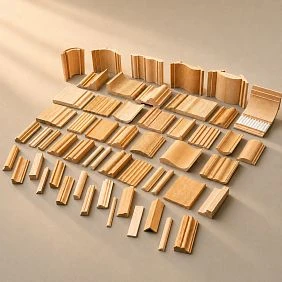
Polyurethane moldings — this is a large group of interior and architectural decor: moldings, cornices, rosettes, overlays, and other elements.
For a designer, this is primarily a library of ready-made geometries. Each element can be evaluated by size, relief, role in the composition, and connection with neighboring details.
Moldings and Cornices
Moldings made of polyurethane useful for frames, architectural wall divisions, portals, transitions, and ceiling compositions.
Moulding requires particular discipline: the designer must keep not only an image of the profile but also its actual cross-section.
Wall and slat panels
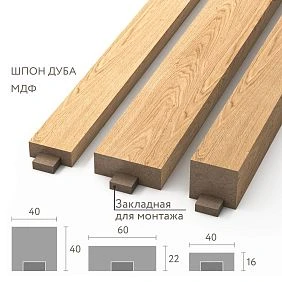
MDF wall panels — a separate design material, because they affect a large surface at once.
Here, what matters is:
-
module;
-
rhythm;
-
direction;
-
thickness;
-
junction with the door;
-
baseboard;
-
light;
-
position of sockets.
Wooden decorative elements
wooden decorative elements especially interesting for furniture, doors, portals, classical and bespoke interior compositions.
In a wood library, one must consider not only the shape but also the materiality: the natural grain and shade require working with a real sample.
Carved decor
Carved wooden decoration — a separate class of products, where the scale of the ornament, texture, direction of the grain, and connection to a furniture or architectural object are especially important.
Stucco decor for walls
Polyurethane wall decor can be used as standalone accents or as part of framing and architectural systems.
When working with a wall, the designer needs to see not a single applique, but the entire composition: the molding, the central element, the boundaries of the panel, the furniture, and the lighting.
Polyurethane as a material for an interior project
Polyurethane decor is convenient for project work primarily because the designer deals with ready-made geometry and repeatable SKUs. This makes it possible to approve the proportion once and then use the same element in several zones or rooms.
What the designer should check
For each item, the following are important:
-
overall dimension;
-
relief depth;
-
orientation;
-
profile;
-
the ability to combine with other elements;
-
coating;
-
installation location.
If a complex composition is used in the project, you cannot choose each element separately. The molding, applique, cornice, and rosette must be checked as a system.
Project repeatability
For a hotel, restaurant, or large private house, the same element may be repeated dozens of times. In this case, the SKU becomes part of the project standard.
If the visualization and specification use the same SKU, reordering is much easier than selecting similar decor from a photo.
When to buy after approval
Once the material has been selected and finalized, you can You can buy ready-made stucco matching the Baroque style. Calculate the quantity: linear meters of cornices and moldings, number of rosettes, pilasters, consoles, corner elements. Add a ten to fifteen percent allowance for trimming. proceed based on the specific project specification.
The commercial stage should come after verifying size and composition, not before.
Moldings: the base material for wall architecture
Molding is one of the most versatile elements in a designer's library, but it's easy to underestimate if you see it as just a line on the wall.
A real profile has width and depth, which means it affects:
-
frame size;
-
clearance to furniture;
-
distance to the casing;
-
wall relief;
-
shadow;
-
amount of material;
-
corner cutting.
Frames
If the frame is designed around a painting, sconce, or decorative overlay, its inner field depends on the profile width.
For example, the outer size of the frame is 1200 × 800 mm. If the conventional profile in the visualization was 30 mm, and the real one is 50 mm, the inner field will change by 40 mm along each dimensional axis: 20 mm on each side.
If there is a large overlay inside, it may no longer fit.
Vertical axes
Molding can be used as a single vertical next to a door, mirror, or furniture. In this case, it is important to tie it to the architecture rather than placing it "approximately in the center."
Horizontal division
A horizontal profile is tied to the height of furniture, a windowsill, a door handle, or another axis. In the library, it is convenient to store profiles not only by SKU, but also by scale: small, medium, large.
Door portal
Molding next to a casing must be coordinated in thickness and offset. If two profiles almost touch, the difference in depth can create an accidental shadow effect.
Compositions with overlays
For frames with a central ornament, it is useful for the designer to keep compatible groups separately: profile + decorative element + corner variant.
Once the profile is approved, you can buy polyurethane moldings using the same product code that is used in the project.
MDF wall panels for designer interiors
A panel is no longer local decor, but a material for a large surface. An error in choosing the rhythm or scale affects an entire wall.
Panels for painting
A paintable surface gives the designer the ability to subordinate the relief to the overall color scheme.
Working options:
-
in the color of the wall;
-
contrastingly;
-
in the color of the furniture;
-
as an independent accent plane.
Slatted panels
Rhythm should be assessed at the scale of a specific wall.
The same module on a wall of 1800 mm and 7000 mm will be perceived differently.
Accent Wall
A panel field should have a logical boundary:
-
angle;
-
furniture;
-
door;
-
a niche;
-
axis.
A random break in the middle of a wall usually looks weaker.
TV area
Here the panel interacts with:
-
a TV;
-
a nightstand;
-
with sockets;
-
cables;
-
lighting.
That is why 3D and a working layout are especially useful.
Bed headboard
You need to check the wall lights, sockets, nightstands, and the scale of the relief relative to the bed.
Commercial interior
In a restaurant, office, or salon, the panel is often repeated in several areas. That is why the article number and the possibility of reordering are important.
After the project is approved, you can buy MDF wall panels specifically the system that was used in the visualization and specification.
Natural wood in a designer's library
Wood cannot be fully assessed from a screen alone. Even if a photograph shows the correct tone, the actual texture depends on the surface, lighting, and the specific sample.
What to store in a wood card
For a wood material, it is useful to record:
-
wood species;
-
article number;
-
size;
-
product type;
-
finish;
-
sample photo;
-
the approval date;
-
project.
Why the sample is especially important
A natural surface has variation. Therefore, the designer's task is not always to achieve absolute uniformity.
It is far more important to define the acceptable range and understand how the material works alongside:
-
the floor;
-
a door;
-
furniture;
-
textiles;
-
stone;
-
metal.
Grain direction
For long or repeating elements, the direction of the grain affects the composition. In furniture, this is especially noticeable on fronts and large overlays.
Batch matching
If a single wooden composition should be perceived as one unified field, it is better to decide in advance which elements should preferably be supplied together.
How to choose a material not from a beautiful photo, but for a real project
A photograph answers the question “do I like it.” A project requires much more.
Working check:
material → size → scale → profile → surface → color → installation method → neighboring materials.
Large profile in a small room
A profile that looks striking in a large interior photo may take up too much wall area in a compact space.
Fine relief in a large hall
Conversely, a delicate ornament photographed in close-up may get lost from a distance of five to six meters.
Wood only on screen
The screen does not show the actual surface accurately enough for final approval.
Slatted rhythm without scale
The texture in the visualization may create a beautiful pattern, but it does not show the real frequency of the slats.
Unaccounted panel thickness
The panel may conflict with the door casing, baseboard, or built-in furniture if its actual depth is not included in the drawing.
Therefore, the choice of material should end not with the “add to favorites” button, but with verification in the context of a specific room.
Material samples for designers
A digital library speeds up the search, but the final decision on texture and color is best made on a physical material.
At the shortlist stage, the designer already understands which options are suitable by type and geometry. The next step is to get material samples and compare them not in isolation, but within the project palette.
Workflow:
catalog → shortlist → sample → material board → client approval → status APPROVED.
What to check on the sample
Texture
Smooth, embossed, wood-grain, matte — a screen shows the character of the surface only approximately.
Relief
A molding or panel in a photo may appear deeper due to side lighting. A physical sample lets you see the real shadow.
Color
It is especially important to compare color under the lighting that will be close to the actual interior.
Surface quality
Small details of the edge, sanding, and coating are more noticeable up close than in the catalog.
Scale
A sample helps you understand how large the profile looks next to other materials.
Adjacent materials
It is better not to evaluate a single molding in your hands. Place it next to:
-
wall paint;
-
floor sample;
-
furniture front;
-
fabric;
-
metal;
-
stone.
Why samples need to be labeled
If a design studio keeps dozens of profiles and panels, within six months it becomes easy to lose the connection between a physical fragment and its product code.
On the reverse side, it is useful to record:
STAVROS / product code / project / date / status.
So decor samples become part of the working library rather than a collection of unidentifiable fragments.
Material board: how to gather the materials for a single project
A material board is needed not for a beautiful presentation in itself, but to check the compatibility of solutions.
On a single board or table, it is useful to gather:
-
the base wall color;
-
molding;
-
decorative overlay;
-
panel;
-
wood;
-
baseboard;
-
facade;
-
textile;
-
metal;
-
stone, if it is present in the project.
The main question: do the materials work together.
Check more than just color
Two materials can match perfectly in shade but conflict in scale.
For example:
-
a small molding next to a large wood panel looks too weak;
-
a deep slatted panel next to a thin casing creates a random mismatch;
-
an overly active carved overlay competes with expressive stone.
Check the sheen
A matte wall, semi-matte molding, and glossy metal react to light differently.
In a rendering, the designer controls the highlight with a shader. On site, the surface will be physical.
Check under different lighting
It's useful to look at the material board:
-
by the window;
-
under warm artificial light;
-
under more neutral light;
-
under side lighting.
Materials that look identical in the morning can differ noticeably in the evening.
Photograph the approved board
After approval, it's useful to take a reference photo and keep it next to the specification.
This doesn't replace the product codes, but it helps quickly restore the approved combination.
Material catalog: why the product code matters more than the picture
Image search is great at the inspiration stage. At the project stage, the identifier matters more.
Material catalog for designers should be used not merely as a PDF flipbook, but as a source of specific project items.
For each selected part, the following must be stored:
-
manufacturer;
-
article number;
-
material;
-
sizes;
-
finishing;
-
URL;
-
room;
-
approval status.
Why the name alone is not enough
The entry "white molding" does not allow the item to be purchased again.
The entry "molding STAVROS, SKU ..., profile ..., URL ..." — does.
Why a photograph is not enough
Two moldings may look similar in the preview but differ by 10–15 mm in width. In a framed composition, that is already a significant difference.
Why the URL must be stored together with the SKU
The assembler will not have to search for the item again. They immediately open the required page.
How to organize a studio's local library
You can use the following structure:
STAVROS / polyurethane / moldings
STAVROS / panels / MDF
STAVROS / wood / decorative-elements
In each folder:
-
PDF catalog;
-
3D;
-
DWG;
-
preview;
-
SKU table;
-
sample photos.
To download source documents, it is convenient to use STAVROS catalogs.
3D models: transferring material into visualization
3D in this article is not a separate modeling topic, but the next stage after selecting a real item.
Correct sequence:
catalog → SKU → model → visualization.
3D models of interior decor are useful because they allow you to check the real scale of the product within the room.
What to check after import
-
scale;
-
width;
-
height;
-
depth;
-
orientation;
-
position relative to the wall;
-
match with the product code.
Do not stretch the profile “for beauty”
If the real molding has a fixed cross-section, it cannot be increased in width in the scene without changing the product item.
You can change the length of the section, but not the physical geometry of the production profile.
Rhythm matters for panels
If the panel in reality has a specific module, the model should show the same spacing.
A “slatted” texture may be sufficient for an early concept, but not for final approval of a large accent wall.
Texture matters for wood, but not only that
A 3D shader helps convey the look, but it doesn't replace a physical sample.
That's why a digital model and a physical material should be used together.
DWG: transferring the selected material into working documentation
A visualization answers the question “what does it look like.” A working drawing answers “how to build it.”
DWG decor drawings they are needed where precise geometry matters:
-
molding profile;
-
cornice profile;
-
cross-section;
-
section;
-
abutment;
-
layout;
-
anchoring.
For frames
The DWG records:
-
outer size;
-
inner size;
-
profile width;
-
distances between frames;
-
clearances to the door and furniture.
For the curtain rod
It is necessary to understand:
-
height along the wall;
-
ceiling projection;
-
position relative to curtains;
-
possible location for lighting.
For panels
The elevation shows:
-
field start;
-
field end;
-
direction;
-
sockets;
-
doors;
-
furniture;
-
Baseboard.
For decorative knots
If the insert must fit precisely into the frame, its dimensions are tied to the molding profile.
These elements cannot be designed in separate files without cross-checking.
How to select materials as one system rather than one by one
One of the most common mistakes is selecting each material separately.
The designer liked a baseboard. Then separately a panel. Then another molding. After that, a door is selected.
On site it turns out that all four solutions are good on their own, but together they create too many different thicknesses and rhythms.
It is more correct to check the system:
baseboard + panel + molding + cornice + door.
Scale
A large cornice and a microscopic baseboard can produce an unbalanced vertical composition.
Geometry
If the panel is deeper than the door casing, the junction must be decided in advance.
Color
It is not necessary to make everything the same shade. But the difference must be intentional.
Material
Polyurethane, MDF, and wood have different surface characteristics. They should be combined according to the project logic.
Height
Baseboards and horizontal moldings create lines that must relate to the furniture and doors.
Thickness
The difference in thickness is especially noticeable at direct junctions.
Style
You should not assemble a system solely by stylistic names. Real geometry and scale are far more important.
How to add decorative materials to the specification
The specification is the bridge between the library and purchasing.
Example:
| Code | Material | SKU | Size | Room | Quantity |
|---|---|---|---|---|---|
| ML-01 | PU molding | ... | ... | Living room | ... |
| PN-01 | MDF panel | ... | ... | Office | ... |
| DEC-01 | Wood | ... | ... | Bedroom | ... |
Do not write "as per sample"
The phrase "molding as in the sample" only works while the sample is physically nearby.
The documentation must include the SKU.
Add URL
For the assembler, this reduces the number of search errors.
Add status
Useful statuses:
-
DRAFT;
-
CLIENT APPROVED;
-
SPECIFIED;
-
ORDERED.
Add room and zone
A single room may have different panels or different profiles.
Therefore, the entry "living room" is insufficient. Better:
Living room / TV area.
Add quantity with unit
Not just "18".
But:
-
18 pcs.;
-
36 lin. m;
-
12 panels.
How to compare the cost of materials for a project
You cannot reduce different groups of decor to a single conventional metric of "price per square meter".
Each type has its own logic.
Linear trim
Calculated by length.
The budget includes:
-
profile;
-
allowance;
-
corner cuts;
-
installation;
-
finishing.
Panels
Counted by module, piece, or area — depending on the specific item.
It is important to consider:
-
layout;
-
offcuts;
-
openings;
-
end modules.
Piece decor
Counted by quantity.
For example:
-
8 sockets;
-
12 overlays;
-
4 brackets.
Samples
This is a separate project cost, but it can reduce the cost of an error on a large order.
Finish
Painting or other finishing is a separate operation.
Installation materials
If the material requires a separate installation system, it must be counted together with the main item.
Allowance
Stock must be justified by the layout. A universal percentage for all materials is incorrect.
How to move from the material library to ordering
Final chain:
idea → category → SKU → 3D → sample → approval → DWG → specification → quantity → purchase.
At this stage, the library starts saving time: all decisions are already identified.
Check relevance
Before ordering, you need to make sure that the SKU used matches the current catalog.
Check quantity
3D helps preliminarily, but the final numbers are verified against working drawings.
Check finish
Especially for wood and painted decor.
Check sample
If the material is visually critical.
Check URL
The link in the specification must lead to the product or category that was agreed upon.
After that, the project is truly ready for procurement.
How to set up a materials library within a design studio
If materials are used regularly, it is useful to create not just a folder called "samples," but a clear system.
Digital level
You can use the following structure:
STAVROS / polyurethane /
STAVROS / moldings /
STAVROS / wall-panels /
STAVROS / wood-decor /
Stored inside:
-
catalogs;
-
3D;
-
DWG;
-
preview;
-
SKU table;
-
links;
-
project notes.
Physical level
Samples are best grouped by category and labeled.
For example:
PN-001 / slat panel / project ABC
ML-014 / molding / approved
The main thing is that a physical sample can be quickly linked to its digital card.
Project level
A shortlist is created for a specific project. It keeps only the materials that are actually being considered.
After approval, the selected items receive APPROVED status and are moved to the specification.
Why you shouldn't store everything in one table
If the library is large, a single table with thousands of rows becomes inconvenient.
It is better to separate:
-
master database;
-
project shortlist;
-
the final specification.
The master database stores the studio's knowledge. The shortlist helps with selection. The specification is used for purchasing.
How to work with stucco decor as a system
molded decoration made of polyurethane rarely exists in a project in isolation.
For example, a wall composition may include:
-
molding;
-
a central overlay;
-
corner element;
-
baseboard;
-
Ceiling cornice.
If you select them one by one, there is a risk of mismatched ornament scale.
Compare depth
A deep inset in a very thin frame can look heavy.
Compare the character of the pattern
A floral ornament and strict geometry can be combined, but it must be done deliberately.
Compare scale
A small detail within a large architectural division can get lost.
Check everything in 3D
Even if each SKU is selected correctly, the composition needs an overall check.
How to use the STAVROS professional page
STAVROS for designers and architects useful as an entry point to professional tools: 3D models, DWG, catalogs, and brand collaboration.
For a studio, this makes it possible to connect several stages:
search → design → approval → procurement.
There is no need to store an unknown PDF, a model without a source, and a sample without a product code separately. The shorter the chain between the manufacturer and the specification, the lower the likelihood of error.
Mistakes when creating a materials library
Mistake 1. Storing only images
Why it happens: the library is created as a moodboard.
Consequence: a material you liked cannot be quickly found and ordered.
How to avoid it: add a SKU and URL to each image.
Mistake 2. Not recording dimensions
Why it happens: in the photo, the scale seems clear.
Consequence: a large molding is placed in a small room, or small decor gets lost in a large one.
How to avoid: keep the actual dimensions.
Mistake 3. Not linking the sample to the product code
Why it happens: the sample is in a box without labeling.
Consequence: after a few months, it is impossible to tell which product was approved.
How to avoid: labeling on the sample and an entry in the database.
Mistake 4. Using a third-party 3D model
Why it happens: it looks better or is easier to download.
Consequence: the catalog has no product with that geometry.
How to avoid: build the final scene on real SKUs.
Mistake 5. Not updating the status
Why it happens: the team continues working with the old shortlist.
Consequence: a rejected option ends up in the purchase.
How to avoid: DRAFT / APPROVED / ORDERED statuses.
Mistake 6. Not checking adjacent materials
Why it happens: each specialist is responsible for their own category.
Consequence: the panel, skirting board, and door conflict in thickness.
How to avoid: a systematic check on the material board and in the elevation drawing.
Mistake 7. Not storing DWG
Why it happens: the visualization seems sufficient.
Consequence: the profile on site is interpreted differently.
How to avoid: keep a technical file for linear trim and complex assemblies.
Mistake 8. Buying before final approval
Why it happens: there is a desire to secure material for the site in advance.
Consequence: the project changes, but the purchase has already been made.
How to avoid: buy after APPROVED status, if timelines allow.
When material does not need to be added to the working library
Not every item you like should become part of the studio's permanent database.
One-off random product
If the material was used once and is unlikely to be repeated, it is enough to keep it in the project archive.
No clear manufacturer
A reference without a source is useful for inspiration, but not for a procurement library.
No realistic possibility of reordering
If an item is unique and no longer available, it cannot be used as a standard specification.
SKU unknown
Until the product is identified, it remains a reference.
Geometry not verified
A beautiful render without real dimensions should not go into the library as a ready-made solution.
How to prepare materials for a client presentation
A professional library helps make the presentation more convincing.
Don't show twenty similar options
It's better to choose 3–5 candidates that have already been checked against project constraints.
Show the material in context
For example:
-
a molding sample next to the wall color;
-
a panel next to the door and floor;
-
wooden decor next to a furniture facade.
Show 3D
The client sees the scale in the interior.
Show a sample
The customer sees the actual surface.
Confirm selection
After approval, the material receives APPROVED status.
This is an important point: the decision is no longer verbal.
How to calculate materials from the specification
Moldings
Calculated by the length of frames and sections.
For example, a frame 1200 × 800 mm:
2 × (1.2 + 0.8) = 4 m.
Five frames:
5 × 4 = 20 m.
Then the actual cutting is performed taking into account the profile length and angles.
Panels
Calculated by the actual zone and module.
If the zone width is 3600 mm and the working module is conventionally 300 mm:
3600 / 300 = 12.
If the width is 3700 mm:
3700 / 300 = 12,33.
Then the designer must decide what the edge looks like, rather than simply ordering 13 modules.
Piece decor
Calculated by installation locations.
If a hotel has 24 identical rooms and each has two overlays:
24 × 2 = 48 pcs.
But before ordering, it is checked whether the actual conditions are the same in all rooms.
How to save solutions for repeat projects
The library is especially valuable when a material has already gone through the full path: selection → sample → project → installation.
After completing the project, it is useful to add the following to the card:
-
a photo of the completed installation;
-
installer's comment;
-
cutting notes;
-
actual consumption;
-
finishing specifics;
-
ease of reordering.
This way, the studio's internal database becomes not a manufacturer's catalog, but its own accumulated experience.
Designer's checklist before approving a material
Check:
-
A real SKU exists.
-
Dimensions are known.
-
Material is confirmed.
-
There is a physical sample if needed.
-
Color verified.
-
3D matches the product.
-
DWG matches the profile.
-
Quantity calculated.
-
URL added to the specification.
-
The item can be reordered.
-
Adjacent materials checked together.
-
Skirting and panels matched in thickness.
-
Doors and moldings do not conflict.
-
The status of the item is clear.
-
The final version is not confused with an earlier variant.
FAQ
What is included in the materials for STAVROS interior designers?
In the context of this article — stucco decor, moldings, wall panels, wooden decorative elements, carved decor, samples, catalogs, 3D models, and DWG. This does not refer to all building materials in general.
Why does a designer need physical samples if there are good photographs?
A photograph helps choose a direction, but it does not confirm the actual surface, the scale of the relief, and the color under real lighting.
Should 3D be stored for every material?
No. 3D is especially useful for materials that affect geometry and scale: moldings, panels, cornices, rosettes, large decor.
What is more important — the SKU or the photograph?
At the inspiration stage — the photograph. At the specification stage — the SKU. Without an SKU, reordering is unreliable.
How to store samples in the studio?
Label with manufacturer, article number, and status, and store a photo and link in the digital database.
Can wood be selected from the catalog only?
For preliminary selection — yes. For the final decision in a color-sensitive project, it is better to check a physical sample.
Why is a molding DWG needed?
To accurately understand the profile, dimensions, and references in the working documentation.
How to link a material board to the specification?
Each physical sample is assigned a code or SKU, which is then repeated in the specification table.
When can the material be ordered?
When the item is approved, dimensions are checked, quantity is calculated, and the article number is recorded.
Where can you find current categories and professional STAVROS materials?
You can start with the website STAVROS and professional sections for designers, catalogs, and samples.
Final working algorithm
1. Formulate the project task.
Not "need decor," but "need molding for frames in the living room" or "slatted panel for the TV area."
2. Select a category.
Stucco, molding, panel, wood.
3. Find the specific SKU.
Do not save only the photo.
4. Check the size.
The actual dimensions must work in the space.
5. Get a sample.
If color, texture, and relief matter.
6. Add to 3D.
At real scale.
7. Check adjacent materials.
Door, skirting board, furniture, floor, textiles.
8. Get DWG.
If an exact profile or detail is needed.
9. Approve the material board.
With the client.
10. Transfer the SKU to the specification.
With size, quantity, and URL.
11. Calculate the quantity.
Based on the actual layout.
12. Check the current status.
Before purchasing.
13. Place the order.
Specifically the item that went through the project.
This is how the materials library becomes part of the design studio's production process: it helps not only to select but also to execute the project without losing anything between the visualization and the actual object.