Article Contents:
- The design specification and the actually installed specification are not always the same
- DESIGN SPEC
- PROCUREMENT SPEC
- AS-BUILT SPEC
- ARCHIVE
- OPERATIONS PACK

The last batch has arrived, installation is complete, issues are closed, and the interior has been accepted. But for operation, the facility may still remain informationally incomplete. The designer remembers which molding was ultimately approved for the lobby. The procurement specialist knows that the finish was changed in the restaurant. The site foreman remembers that on the fifth floor a different commercial length of the same profile was used. Physical samples are kept by the kit assembler, the operational reserve is in the warehouse, and several revisions of the specification remain in the project archive.
Comprehensive supply for construction projects ends with quality only when the actual execution is assembled into one clear system and handed over to those who will service the facility after construction is completed.
The working chain looks like this:
DESIGN SPEC → PROCUREMENT SPEC → INSTALLED MATERIALS → AS-BUILT REGISTER → RESERVE HANDOVER → OPERATIONS PACK → CLOSEOUT.
It is precisely at the final stage that the project specification ceases to be a document about what was intended to be purchased and turns into a record of what actually remained in the completed facility.
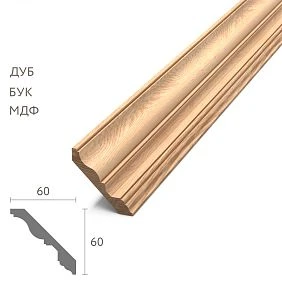
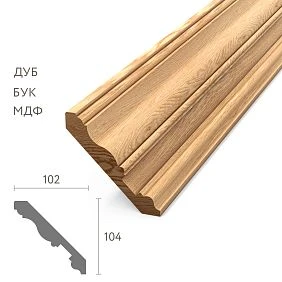
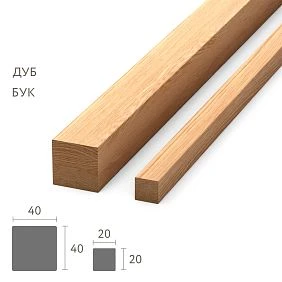
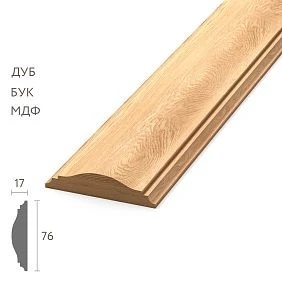
The project specification and the actually installed specification are not always the same
It is useful to distinguish three states.




DESIGN SPEC
What was specified by the designer.
Our factory also produces:




PROCUREMENT SPEC
What was approved for purchase after coordination and changes.
Get Consultation
AS-BUILT SPEC
What was actually installed in the completed facility.
For operation, it is the latest version that matters. If MLD-B was later officially replaced by MLD-C in the project, the engineer two years later must see the actual MLD-C, not start searching from an outdated working album.
Comprehensive supply for construction sites does not end with the last delivery
The last machine means:
DELIVERY COMPLETE.
But not necessarily:
PROJECT CLOSEOUT COMPLETE.
Before closing, another type of work remains: to collect the final SKUs, materials, finishes, application areas, changes, remaining stock, samples, and operational reserve.
This is no longer logistics. This is the transfer of the facility's technical memory.
Why operations needs to know the exact article numbers of wooden trim
In two or three years, completely ordinary tasks may arise:
- the baseboard was damaged by furniture;
- part of the molding was removed during engineering repairs;
- the cornice needs to be restored after local work;
- one hotel room requires rework;
- a new area needs to be opened in the same finish standard.
Entry:
MLD-XXX / OAK / FIN-02 / LOBBY
allows a technical request to be generated immediately.
The phrase “classic wooden molding from the lobby” forces dozens of similar profiles to be compared all over again.
What as-built means for wooden trim
In this article, as-built is a working record of what actually remained in the completed project after all approved changes.
It should not turn into a construction regulatory instruction. For wooden trim, the task is practical: several years later, a person who was not involved in the construction should understand:
- what this profile is;
- where it is installed;
- what material it is made of;
- what finish it has;
- what configuration is final;
- whether there is a reserve;
- by which order to look up the history.
Final Wood Trim As-Built Register — the central closeout document
| Project code | Design SKU | Final SKU | Material | Finish | Zone | Reserve |
|---|---|---|---|---|---|---|
| P-01 | PLT-A | PLT-A | Oak | F01 | Rooms | 8 pcs. |
| M-02 | MLD-B | MLD-C | Oak | F02 | Lobby | 5 pcs. |
| K-03 | KZ-A | KZ-A | Beech | F03 | Restaurant | 3 pcs. |
The table shows both the original and the actual decision at the same time. This is especially useful where the project changed during construction.
What should be included in the as-built register
For each profile, it is useful to record:
- project code;
- manufacturer SKU;
- product type;
- the material;
- size or cross-section;
- commercial length;
- finish code;
- area of application;
- the last approved revision;
- order number or PO;
- if necessary — batch;
- quantity of operational reserve;
- reserve storage location.
Such a set already allows future identification without searching for the old project command.
Why a single wooden skirting board SKU is not enough
One item code can be used in several versions.
For example:
PLT-XXX / OAK / FIN-01
and:
PLT-XXX / BEECH / FIN-03
If only PLT-XXX is left in the as-built, information about the actual configuration will be lost.
The operational record should describe not the product family, but the specific version that remained at the site.
A skirting board application map saves time for future repairs
For example:
P-01 → Rooms 201–240
P-02 → Lobby / Corridor
P-03 → Restaurant
A few years later, the engineer first defines the zone, then immediately gets the required configuration.
This is faster and more reliable than searching for a profile by appearance alone.
A molding composition requires linking the SKU to the zone
A single project may use five or ten similar moldings. A list of MLD-A, MLD-B, MLD-C by itself does little to help with maintenance.
A link is needed:
M-03 → MLD-XXX → LOBBY WALLS.
For a complex composition, you can add to it:
- drawing;
- a frame diagram;
- a photo of the finished wall;
- physical sample ID.
For a wooden cornice, it is useful to save the application detail
A cornice is often connected not only to the wall and ceiling. Its position can be affected by curtains, light, furniture, ceiling niches, and adjacent profiles.
Therefore, it is useful to store in the operations pack not only the SKU but also a reference to the final node or section.
Then, during local repairs, there is no need to restore the original position from photographs.
As-built should show the agreed changes
Example:
DESIGN
M-03 / MLD-A
FINAL
M-03 / MLD-B
CHANGE REF
approved substitution SC-04
The old line is not deleted from the history. As-built explains why the working PDF and the finished interior differ.
Why can't you simply replace the old line with a new one
A year later, someone will open the previous revision and see MLD-A. If there is no change history, the question arises: is this an error or a deliberate replacement?
Therefore, it is better to store:
DESIGN → CHANGE → FINAL.
Then the actual specification remains verifiable.
Comprehensive turnkey supply of construction projects ends with the transfer of information
Comprehensive turnkey supply of construction projects should logically be completed not only with the fact of the last delivery but also with the transfer of operational information.
Chain:
product → documentation → installation → as-built → reserve → operation.
If a facility received the right material, but a year later no one can identify it, part of the value of project procurement is lost.
What to do with approved physical samples
Key samples should not be automatically discarded after project handover.
They may be needed for:
- reordering;
- local repair;
- finish comparison;
- geometry confirmation;
- searching for a replacement if the original SKU is no longer available.
But a sample only makes sense when it is identified.
How to label a master sample
For example:
HOTEL-A
M-03
MLD-XXX
OAK
FIN-02
APPROVED
Without labeling, a year later it is just a piece of wood whose origin will have to be guessed.
A geometric sample and a finish sample are not always the same object
If the profile is painted, tinted, or lacquered, the geometric sample and the reference finish may serve different functions.
It is useful to keep the link:
SKU + FINISH CODE + SAMPLE ID.
This way, a future replacement is checked both for shape and for finish.
Operational reserve is not handed over as an “overall quantity”
Not:
there are 28 planks left in stock
But:
| SKU | Material | Finish | Qty | Storage |
|---|---|---|---|---|
| PLT-A | Oak | F01 | 8 | Rack R2 |
| MLD-C | Oak | F02 | 5 | Rack R3 |
| KZ-A | Beech | F03 | 3 | Rack R4 |
A reserve becomes a working operational resource only after identification and transfer of responsibility.
Reserve Handover — a separate process
A clear chain:
RESERVE PREPARED → COUNTED → LABELLED → HANDED OVER → ACCEPTED BY OPERATIONS.
The final status matters: the contractor may consider the boxes prepared, but operations must confirm that it knows what it has accepted and where it is stored.
What cannot be considered a good operational reserve
Five unnamed planks without an article number, material, or finish are a weak reserve, even if they are physically present in the warehouse.
The same applies to:
- short offcuts with no clear purpose;
- mixed SKUs in one pack;
- unlabeled samples;
- profiles with no zone assignment.
Useful offcuts and full reserve stock are better kept separate
A short leftover may be useful for local restoration or as a reference sample, but it will not replace a whole plank in case of serious damage.
Therefore, the following statuses can be used:
FULL-LENGTH RESERVE
USEFUL OFFCUT
REFERENCE SAMPLE
This way, operations understands the real value of each leftover.
Comprehensive building material deliveries should be closed out as a single object history
Comprehensive building material deliveries may consist of ten orders, seven batches, several change orders, and two or three suppliers.
But in the closeout package, all of this should turn into one actual picture:
what is actually installed at the site right now.
The operations service should not have to assemble this picture on its own from old invoices.
Order Cross-Reference links the installed SKU to the procurement history
Example:
M-03 / MLD-XXX / PO-147 / BATCH-02
After three years, this allows you to quickly retrieve the history of the original order and create a repeat request.
Cross-reference is especially useful for:
- non-standard configurations;
- modified SKUs;
- special finishes;
- different product lengths;
- multiple batches of the same profile.
Operations doesn't need the entire procurement archive
It's useful to distinguish two levels.
ARCHIVE
Full history:
- PO;
- invoices;
- change orders;
- revisions;
- claims;
- acceptance documents.
OPERATIONS PACK
Short summary information:
- what is installed;
- where;
- which finish;
- which reserve;
- where it is stored;
- by which identifier to reorder;
- which drawing relates to the element.
The Operations Pack should be a short entry point to the full archive, not a copy of it.
Final photographs help identify the zone
For key spaces, three levels are useful:
- overall interior;
- medium shot;
- close-up profile.
A photo does not replace the SKU. It helps you quickly understand where and how the item is used.
A QR code can be an interface to a Digital Record
A QR code on the operational reserve box can lead to an internal card:
- SKU;
- drawing;
- finish;
- zone;
- sample ID;
- order history.
This is an organizational solution, not a replacement for proper documentation. If the link stops working, the core data must still remain in a readable register.
Final Material Schedule — a compact operations view
| Code | SKU | Product | Material | Finish | Zone | Drawing | Reserve |
|---|---|---|---|---|---|---|---|
| P01 | PLT-… | Baseboard | Oak | F01 | Rooms | D-21 | 8 |
| M03 | MLD-… | Molding | Oak | F02 | Lobby | D-35 | 5 |
| K02 | KZ-… | Cornice | Beech | F03 | Restaurant | D-42 | 3 |
This is the document from which operations should begin searching for information.
Comprehensive supply of construction materials: closeout saves time on the next renovation
Comprehensive supply of construction materials creates maximum value when, a few years later, renovation does not begin with the question:
What is actually installed here?
But with the record:
Zone Lobby → M03 → MLD-XXX → OAK → F02.
That is, the technical history immediately turns into action.
Who should accept the closeout package
This could be:
- facility manager;
- property management company;
- owner;
- technical service;
- another designated representative.
The job title is not essential. What matters is that there is a specific recipient who accepts the documentation and the reserve.
Two-way handover is better than a simple "archive sent"
A handover is considered stronger when there is confirmation:
OPERATIONS PACK SENT
Then:
REVIEWED
and:
ACCEPTED BY OPERATIONS
If operations sees a missed finish code or an unsigned reserve, it is better to find the problem before the final project closeout.
Handover Checklist before CLOSEOUT
- Final specification issued.
- All approved substitutions included.
- Final SKUs verified.
- Material specified.
- Finish specified.
- Application areas specified.
- Drawings up to date.
- Physical samples labeled.
- Operational reserve recalculated.
- Reserve marked.
- Storage location specified.
- Order / PO reference saved.
- Open claims marked separately.
- Operations Pack handed over.
- Receipt confirmation received.
OPEN CLAIM cannot be masked with the status "project closed"
All profiles can be installed and accepted, but the claim is still ongoing for three moldings.
This should be visible in the closeout register:
CLAIM OPEN
After the decision:
CLAIM CLOSED
Project handover must not erase outstanding obligations.
Snag List and As-Built Register serve different purposes
The snag list shows installation remarks and their closure.
The as-built register answers a different question: what ultimately remained installed after all changes and remarks were completed.
Therefore, in the closeout it is sufficient to record:
INSTALLATION STATUS = ACCEPTED
or list the open exceptions.
The final version needs AS BUILT status
For example:
SPEC-PG-R08 — AS BUILT
This distinguishes it from:
SPEC-PG-R07 — FOR CONSTRUCTION
Operations should not accidentally open the last construction revision and mistake it for the actual one.
Why FOR CONSTRUCTION is not enough
During construction, the following could have appeared:
- approved substitutions;
- modified zones;
- new finish;
- different commercial length;
- changed quantities;
- partial replacements.
The actual object may differ slightly from the working release, even if all changes were fully agreed upon.
As-Built Audit: Drawing ↔ Register ↔ Site
Before releasing the final version, it is useful to check three areas:
| Check | What we confirm |
|---|---|
| Drawing → Register | Every code from the final drawing is in the schedule |
| Register → Drawing | Every row of the schedule has a clear zone |
| Register → Site | The entry corresponds to the actually installed profile |
It is the third check that turns the document from a “latest project” into a true as-built.
The closing package should answer the question in 60 seconds
Question:
What is on this wall and how can I order it again?
If answering requires finding the old designer, scrolling through Telegram, and opening eighteen invoices, the closeout was done poorly.
A good operations pack provides a short sequence:
ZONE → PROJECT CODE → SKU → MATERIAL → FINISH → RESERVE / ORDER REF.
If the exact SKU is no longer produced
Even then, the technical history remains useful.
Preserved:
- cross-section;
- drawing;
- physical sample;
- the material;
- finish;
- photo of the finished area;
- original SKU.
This is enough to search for a replacement deliberately, rather than picking a "roughly similar" profile from memory.
Closeout should not turn into bureaucracy
The scale of the package depends on the project.
For an apartment, the following may be sufficient:
- one table;
- several SKUs;
- photo;
- two or three samples;
- a box of signed reserve.
A 120-room hotel will require a deeper structure by zone types, finishes, batches, and reserve.
Documentation is needed not for its volume, but for future action.
Closeout Snapshot — a short version of the entire project history
| Field | Status |
|---|---|
| As-Built Spec | ISSUED |
| Final Material Schedule | ISSUED |
| Reserve | HANDED OVER |
| Samples | LABELLED / STORED |
| Open Claims | 0 / LISTED |
| Operations Pack | ACCEPTED |
| Closeout Date | … |
The snapshot allows the manager to quickly see whether the project has indeed been fully handed over to operations.
Source of Truth: which document should be considered the main one after handover
After project completion, the archive may simultaneously contain a working PDF, several Excel schedules, a procurement spec, change orders, and an as-built schedule. Operations needs to understand in advance which document is the main one.
A convenient logic:
| Document | Role after handover |
|---|---|
| FOR CONSTRUCTION | History of the working project |
| PROCUREMENT SPEC | History of the approved procurement |
| AS-BUILT REGISTER | Main record of actual execution |
| OPERATIONS PACK | A short interface for operations |
If operations receives five files without a clear priority, it is still forced to guess which one is current.
Catalog Snapshot: why a single link to a product card is not enough
A link to the product page is useful, but it should not be the only proof of configuration.
After a few years, the page may change, the assortment may be updated, and the old SKU may disappear. Therefore, along with the URL, it is useful to save:
- article number;
- the material;
- size;
- commercial length;
- finish code;
- drawing;
- the date the data was recorded.
This way, repair operations do not depend on what the online catalog will look like in the future.
Zone Map: it is easier for operations to search by room rather than by SKU
An engineer usually does not start with the question “where is MLD-XXX installed?” but with the question “what is in the Lobby?”
Therefore, a reverse map is useful:
| Zone | Project code | SKU | Finish |
|---|---|---|---|
| Lobby | M-03 | MLD-XXX | F02 |
| Rooms 201–240 | P-01 | PLT-XXX | F01 |
| Restaurant | K-02 | KZ-XXX | F03 |
The same closeout should allow information to be searched in both directions:
SKU → where it is installed
and:
ZONE → what is installed.
Reorder Test: closeout needs to be verified with a real scenario
Before the final CLOSEOUT, it's useful to run a simple test.
Let's take a hypothetical task:
Molding in the Lobby is damaged. A replacement needs to be ordered.
Someone who wasn't involved in the construction should be able to find, within a few minutes:
- Zone = Lobby;
- Project code = M-03;
- Final SKU;
- Material;
- Finish;
- Drawing;
- Reserve Location;
- Order / PO reference.
If this requires calling the former site foreman, then the package isn't ready yet.
It's better to start a repeat order from the reserve rather than immediately from purchasing
The Operations Pack should show not only "what to buy," but also "whether the required profile is already on site."
Therefore, the repair scenario:
ZONE → SKU → CHECK RESERVE → USE RESERVE / REORDER.
This is especially useful for hotels, offices, and commercial properties with recurring profiles.
The operational reserve after handover also requires monitoring
Handing over the reserve is not the last moment of its life.
After the first repair, part of the stock may be used. Therefore, it is useful for operations to keep track of:
INITIAL RESERVE
USED
BALANCE
For example:
MLD-C / initial 5 / used 2 / balance 3
This way, the reserve does not disappear unnoticed after the first local works.
When it is worth replenishing the operational reserve
There is no universal percentage. The decision depends on the site, the repeatability of the profile, and the availability of reordering.
But the signals may be:
- the remaining stock has become critically low;
- the SKU is being discontinued;
- the profile is used in a large number of rooms;
- planned repairs are upcoming;
- replacement in practice requires long continuous pieces.
The closeout package provides the starting point, and operations then manages the remainder from there.
What to do if the facility manager has changed
Documentation must survive changes in personnel.
Therefore, it is better to store the operations pack not only in one employee's personal folder, but in the facility's official archive with a clear name and location.
When handing over to a new responsible person, it is useful to check:
- access to the Digital Record;
- storage location of samples;
- storage location of reserve;
- current balance;
- list of open claims.
Thus, technical memory belongs to the object, not to a specific person.
Complex Closeout Owner: who is responsible for assembling the final package
On a large project, information is held by several participants: the architect, procurement, sales, the site foreman, the warehouse, and the facility team.
Therefore, before completion deliveries of construction materials it is useful to appoint a single closeout owner who assembles the final version and checks that no contradictions remain between sources.
This can be a kit assembler, a project manager, or another responsible person. What matters is not the job title, but having an owner of the final result.
Closeout Issue Log: what to do with the last discrepancies
| Issue | What was found | Owner | Status |
|---|---|---|---|
| CL-01 | M-03 in the drawing and register have different SKUs | Designer | OPEN |
| CL-02 | Reserve MLD-C is not marked | Warehouse | OPEN |
| CL-03 | Finish sample not found | Complectation | REVIEW |
While critical closeout issues remain open, the status PROJECT CLOSEOUT COMPLETE is premature.
Final confirmation must refer to a specific revision
Not:
package accepted
But:
OPERATIONS PACK R03 / ACCEPTED / 11.09.2026
If R04 is later issued due to claim closure or register correction, it is clear which version was initially handed over and which became current.
Final algorithm for handover of wooden trim to operation
- Retrieve the latest DESIGN / PROCUREMENT SPEC.
- Collect all approved changes.
- Determine the actually installed SKUs.
- Check Material.
- Check Section / Size / Length.
- Check Finish.
- Link each profile to Zone.
- Save Order / PO / Batch references.
- Check Drawing → Register → Site.
- Issue SPEC-PG — AS BUILT.
- Generate Final Material Schedule.
- Select key physical samples.
- Sign Sample ID.
- Calculate operational reserve.
- Separate Full-Length Reserve / Useful Offcut / Reference Sample.
- Mark the reserve.
- Record Storage Location.
- Generate Operations Pack.
- Separately flag Open Claims.
- Hand over the pack to the responsible operations person.
- Obtain ACCEPTED BY OPERATIONS.
- Record Closeout Snapshot and date.
Final comprehensive supply of the facility with wooden trim is not only about delivered linear meters and closed invoices. After installation, another important task remains: to hand over to the operations service a clear technical memory of the finished interior.
As-built register, final inventory, marked reserve, signed samples, zone map and order cross-reference allow, several years later, to quickly answer the question of which specific skirting board, molding or cornice is installed in a particular zone and how to restore it without visually selecting "something similar."
This is exactly how the project specification turns into an operational tool, and closeout truly completes the supply life cycle.