Article Contents:
- Building materials catalog — a product source, not ready-made project documentation
- Why catalog photos are not enough
- The first thing we transfer from the catalog is the exact SKU
- Why the product name is a weak identifier
- Why the SKU must be recorded together with the date and source
- A catalog item number and a project code are not the same thing
- The correct link: M-03 = MLD-XXX
- How to avoid a conflict of project codes
- What to transfer from a wooden skirting board card
- Why a single PLT-XXX designation is sometimes not enough
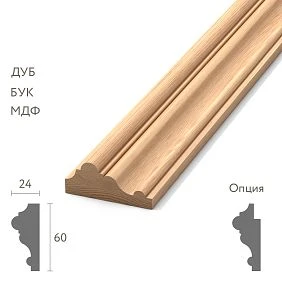
- For moulding, it is critical to preserve the cross-section
- DWG is not needed just for the archive
- How to store DWG so that in a year you understand what it relates to
- Why a wooden cornice should be shown in the room section
- Four places where the same code should appear
- Moulding on an elevation should not be a decorative line without a name
- Why this is important for builders
- Dimensions should be taken from the specific version
- Construction catalog: the product link must be supplemented with saved data
- Digital Product Record — a digital card of the approved profile
- Source of Truth: which document is considered the main one
- Not every profile from the catalog automatically becomes part of the project
- When a profile needs to be put on HOLD
- Why SELECTED does not equal FOR PROCUREMENT
- When a PDF is enough and when a DWG is needed
- Construction materials catalog: how to maintain a shortlist until the final choice
- Why rejecting a candidate should be recorded briefly but specifically
- Why a shortlist is useful three months later
- Wood species must go next to the SKU
- The catalog describes the product, but the project must describe the finish separately
- Why FINISH CODE is better kept separate from SKU
- One profile can be used in multiple rooms
- But a different finish must be visible in the coding
- What the Schedule of Wood Trim should look like
- Why the Schedule should have its own revision
- What to do if the designer replaced the profile
- Why changing the SKU requires checking every place where the code lives
- Audit: every project code must have a real product
- Pre-Procurement Freeze: when the design needs to be temporarily locked
- And vice versa: every linear run on the drawing must be in the schedule
- The buyer should not have to start a new profile search
- What to do if the selected SKU is unavailable at the time of purchase
- Not the entire architectural set is needed by the seller
- What a minimal handoff package to procurement looks like
- How to pass quantities: by project code, not just by SKU
- When identical SKUs cannot be consolidated
- How to check that a single SKU has not silently split across the project
- Ten mistakes when transferring linear runs from the catalog into the project
- Final audit before FOR PROCUREMENT
- Final algorithm for transferring a profile from the catalog to the working project

The architect found a suitable wooden molding in the catalog. At the conceptual stage, the presentation included a photograph, a link, and the caption “classic molding.” Two months later, the working documentation went to the specifier, and even later — to the buyer. At that point, it turned out that no one could confidently remember the exact product code, cross-section, material, commercial length, or the rooms in which this particular profile was supposed to be used.
A building materials catalog helps you find an existing product, but by itself it is not working project documentation. To keep the selected profile from getting lost between concept, drawings, and procurement, it must be taken through a consistent chain:
CATALOG → SKU → DRAWING → PROJECT CODE → PLAN / ELEVATION → DETAIL → SCHEDULE → PROCUREMENT SPEC.
For wooden trim, this chain is especially important. Baseboards, moldings, and cornices look like simple linear elements, but an error in even one product code changes the geometry, the joint, the light and shadow, and sometimes the entire architectural pattern of the room.
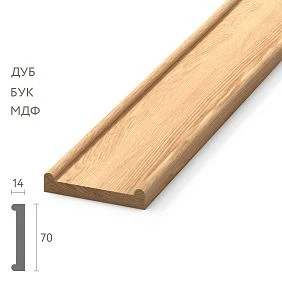
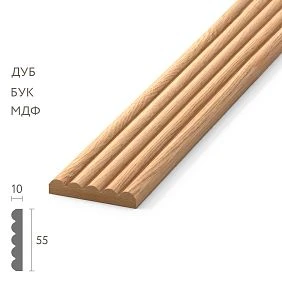
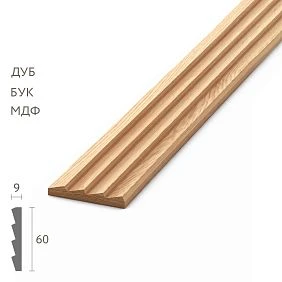
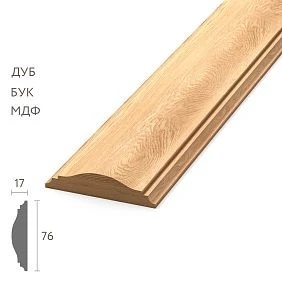
A building materials catalog is a source of goods, not ready-made project documentation
The catalog answers the question: what exists?
The working project must additionally answer:
- where the element is used;
- in what finish;
- what material it is made of;
- with which finish;
- what size and cross-section it has;
- what the project code is;
- what volume is required;
- which nodes it is connected to.
Therefore, transferring a product into a project is a separate engineering and information operation, not copying a picture from a product card.




Why catalog photos are not enough
A photograph shows the character of the profile well: classic or modern, smooth or textured, massive or slim.
But a photo does not replace:
- exact article number;
- section size;
- a technical drawing;
- type of wood;
- commercial length;
- approved finish.
The main rule:
PHOTO ≠ PRODUCT ID.
Our factory also produces:
The first thing we transfer from the catalog is the exact SKU
Not:
wide wooden baseboard
But:
PLT-XXX
Not:
classic wooden molding
But:
MLD-XXX
Not:
wooden cornice
But:
KZ-XXX
The SKU becomes the first stable bridge between the catalog and the project.
Get Consultation
Why a product name is a weak identifier
A single project can have three different moldings, two baseboards, and two cornices. Names like "bedroom molding," "large molding," and "molding 1" quickly lose their uniqueness.
A few months later, another employee no longer understands whether "molding 1" is the same MLD-XXX listed in the schedule or an old candidate from the concept.
The manufacturer's article number is needed precisely so that the project points to a specific physical product.
Why SKU should be recorded together with the date and source
A single entry MLD-XXX is enough to identify a product, but for a long project it is useful to keep two more fields: SOURCE — where the data came from, and CHECKED DATE — when the parameters were verified.
For example:
MLD-XXX / source: STAVROS catalog / checked: 11.09.2026
This creates a reference point: the team understands what information the design decision was based on.
Catalog item number and project code are not the same thing
For example:
manufacturer's item number: MLD-XXX
project code: M-03
Both are needed simultaneously.
M-03 convenient to place on elevations, plans, details, and schedules. MLD-XXX links the project to the actual manufacturer's product.
Correct link: M-03 = MLD-XXX
The project code answers the question:
where does this element live in the project?
The SKU answers:
what exactly should be purchased?
If only the SKU is kept, drawings become cluttered with long article numbers. If only the project code is kept, the buyer loses the connection to the catalog.
How to avoid conflicts between project codes
Codes must be unique within a project. If in one album M-03 means one molding, and in another — a different one, end-to-end identification stops working.
It is useful to establish a simple scheme in advance:
P-01, P-02...— baseboards;M-01, M-02...— moldings;K-01, K-02...— cornices;N-01...— architraves, if they are part of the same system.
The scheme may be different. It is only critical that one code always designates one design configuration.
What to transfer from the wooden skirting board card
For the skirting board, at minimum:
- SKU;
- the material;
- height;
- thickness or projection;
- commercial length;
- version/design variant;
- link to the source in the project working archive;
- design code.
If a separate finish is provided, it is recorded in a separate field rather than hidden in a note.
Why a single PLT-XXX designation is sometimes not enough
A single profile can have multiple versions by material, size, or length. Therefore, the final project line must describe a specific configuration.
For example:
P-01 / PLT-XXX / OAK / A×C = ... / L = ... / FIN-01
Such a line is already suitable for purchasing and verification.
For molding, it is critical to preserve the cross-section
A width of 30 mm by itself does not describe the molding.
Two profiles of the same width can have different:
- relief;
- overhang;
- radii;
- the depth;
- light-shadow pattern.
Therefore, in the project, the molding must have a SECTION — a working cross-section linked to a specific SKU.
DWG is needed not just for archive purposes
STAVROS publishes a section of catalogs and drawings, where a PDF catalog of wooden moldings and an archive of DWG drawings of products are available. For a designer, this is useful only when the file is integrated into the project's working system.
Not:
downloaded profile.dwg and put it in Downloads
But:
M-03 / MLD-XXX / DWG / REV PROJECT-02
Then the geometry, code, and product remain linked.
How to store DWG so that a year later you understand what it relates to
A file like molding.dwg is almost useless in a large archive. It is better to link the file name to the project code and SKU:
M-03_MLD-XXX_section.dwg
If the project issues its own revisions of the unit:
M-03_MLD-XXX_detail_R03.dwg
Then the file itself already carries minimal context and depends less on the memory of a specific employee.
Why a wooden cornice needs to be shown in the room section
The cornice is simultaneously connected to the wall, ceiling, room height, sometimes curtains, concealed lighting, and furniture.
Therefore, one line KZ-XXX is not enough in the specification.
Its position in the assembly must be shown:
- relative to the wall;
- relative to the ceiling;
- relative to other profiles;
- in the correct orientation.
Four places where the same code must appear
For example M-03.
| Document | What should be visible |
|---|---|
| PLAN / ELEVATION | M-03 on the required line |
| DETAIL | M-03 in the assembly |
| FINISH SCHEDULE | M-03 = MLD-XXX / material / finish |
| PROCUREMENT SPEC | M-03 = MLD-XXX / exact configuration |
If in one place M-03 means a different profile, the project is already informationally corrupted.
A molding on the elevation must not be a decorative line without a name
Bad drawing: a rectangular frame without a designation.
Good:
frame → callout M-03
And next to it in the legend:
M-03 — MLD-XXX / oak / FIN-02
This way, the installer does not have to guess which of several similar profiles was used.
Why this matters for builders
On site, a person sees the code M-03 and checks it against the schedule. They don't need to guess: "This is probably that narrow molding from the adjacent room."
The fewer interpretations required on site, the lower the chance of an accidental substitution.
Dimensions must be taken from the specific configuration
Not:
approximately 100 mm
and the exact value from the selected configuration.
If the product page ever changes, the approved project still retains its own technical record on which the decision was based.
Construction catalog: the product link must be supplemented with saved data
A construction catalog is convenient as an entry point. But a project cannot be built on a URL alone.
A year later, the product page may be updated, the product range may change, and the project employee may leave.
Therefore, the working documentation stores its own technical record.
Digital Product Record — a digital card of the approved profile
| Field | Value |
|---|---|
| Project code | M-03 |
| Manufacturer SKU | MLD-XXX |
| Product | Molding |
| Material | Oak |
| Section | ... |
| Length | ... |
| Finish | FIN-02 |
| Drawing | M-03.dwg |
| Sample | S-03 |
| Status | APPROVED |
This card becomes a single place where the project and procurement see the same product identity.
Source of Truth: which document is considered the main one
A project may contain a product card, a PDF catalog, a DWG, an internal schedule, and a procurement spec. If they diverge, the team must understand where to find the approved solution.
| Level | Role |
|---|---|
| Manufacturer's catalog | Initial product data |
| Digital Product Record | Locked project configuration |
| Schedule / Drawings | Application in the project |
| Procurement Spec | What is allowed to be purchased |
If the card on the website was updated after the FOR PROCUREMENT release, this must not silently change an already approved project. The change undergoes a separate review and a new revision.
For long projects, it is useful to keep a so-called catalog snapshot: PDF product cards, an export of technical parameters, or another archival record of the data on which the decision was based. It does not replace the manufacturer's current website, but it helps prove which configuration was considered the original at the time of design.
This is especially important if several months pass between concept and procurement. The architect works with the historically approved configuration, while the purchaser simultaneously checks its current availability. These two tasks must not be mixed.
Not every profile from the catalog automatically becomes part of the project
Useful statuses:
- CANDIDATE — under consideration;
- SELECTED — preliminarily selected;
- APPROVED — approved;
- FOR PROCUREMENT — approved for procurement;
- REJECTED — rejected.
This way, the moodboard, shortlist, and procurement specification cease to be one and the same document.
When a profile needs to be moved to HOLD
HOLD status is useful if the item was already SELECTED or APPROVED, but a new conflict has arisen:
- the cross-section does not match;
- the assembly has changed;
- the finish has not been approved;
- a conflicting revision has appeared;
- procurement has reported that the configuration is unavailable.
HOLD is better than silently deleting the row: it is clear that the item existed and why it was stopped.
Why SELECTED is not equal to FOR PROCUREMENT
The designer may have chosen a beautiful molding, but the following have not yet been checked:
- node;
- the material;
- finish;
- sample;
- product length;
- quantity.
The buyer should not treat any profile selected at the concept stage as a finalized order item.
When a PDF is enough and when a DWG is needed
| DWG | |
|---|---|
| View | Working node |
| Approval | Unfold |
| Archive | Detailing |
| Handoff to non-CAD participants | Geometry check |
DWG is not always required. For a simple item, an accurate card and PDF are sufficient if the geometry is already unambiguously defined. But for nodes and complex junctions, CAD geometry significantly reduces the risk of misinterpretation.
Building materials catalog: how to maintain a shortlist until the final selection
A building materials catalog is useful as a source of candidates, but not all candidates should disappear after a selection is made.
| Candidate | SKU | Width | Material | Status | Reason |
|---|---|---|---|---|---|
| M-A | MLD-... | ... | Oak | REVIEW | check the joint |
| M-B | MLD-... | ... | Oak | APPROVED | Selected |
| M-C | MLD-... | ... | Beech | REJECTED | Does not match by material |
Rejected items are not deleted without a trace. Their status helps you understand the history of the selection a few months later.
Why rejecting a candidate should be recorded briefly but specifically
Reason did not like it gives almost nothing. Much more useful:
REJECTED — the offset conflicts with the door casing
Or:
REJECTED — the material does not match the approved species
Such a record turns the shortlist into a working history of decisions.
Why the shortlist is useful three months later
If someone asks: "Why wasn't MLD-A used?", the project doesn't start the selection over.
The log shows:
REJECTED — didn't fit due to the offset near the casing.
This saves repeated discussions and protects the decision already made.
Wood species must go next to the SKU
Not:
MLD-XXX
But:
MLD-XXX / OAK
if the project requires oak.
The same geometry in a different species is already a different project configuration.
The catalog describes the product, but the project must describe the finish separately
For example:
FIN-01 — natural oak
FIN-02 — tinting
FIN-03 — enamel
Then the project record:
M-03 / MLD-XXX / OAK / FIN-02
A finish should not exist only in the explanatory note if it affects purchasing.
Why FINISH CODE is better kept separate from SKU
SKU is responsible for the product geometry. FINISH CODE — for the project execution.
The same MLD-XXX can be used with different finishes. Therefore, the records M-03 / MLD-XXX / FIN-01 и M-03 / MLD-XXX / FIN-02 cannot be merged into a single purchasing line just because the item code matches.
One profile can be used in several rooms
There is no need to create M-03A, M-03B, and M-03C just because the same profile is repeated in three rooms.
If the SKU, material, and finish are the same, the code can be repeated.
This simplifies the schedule and subsequent consolidation of quantities.
But a different finish must be visible in the coding
If the geometry is the same but the finish is different, these are already two procurement configurations.
For example:
M-03-F01
and:
M-03-F02
Otherwise, the correct molding may arrive at the site, but for the wrong finish zone.
What the Schedule of Wood Trim should look like
| Code | SKU | Product | Material | Size | Finish | Zones |
|---|---|---|---|---|---|---|
| P-01 | PLT-... | Baseboard | Oak | ... | F01 | 101–120 |
| M-03 | MLD-... | Molding | Oak | ... | F02 | Lobby |
| K-02 | KZ-... | Cornice | Oak | ... | F01 | 101–120 |
It is this schedule that becomes the central bridge from working drawings to procurement.
Why the Schedule should have its own revision
If M-03 changes, you need to understand which schedule is the current one:
WOOD-TRIM-SCHEDULE-R04 — CURRENT
Old:
WOOD-TRIM-SCHEDULE-R03 — SUPERSEDED
Without revisions, the old PDF, the new DWG, and the procurement spec can start to contradict each other.
If only one profile has changed, it is still better to issue a new revision of the Schedule as a whole, rather than sending a separate message like “row 14 now has a different molding.” Then any participant opens R04 and works with the full current picture, instead of assembling it from R03 plus emails plus a chat comment.
In the Change Log next to R04, it is enough to briefly record: M-03: MLD-A → MLD-B. The change history remains transparent, and the schedule itself stays complete.
What to do if the designer replaced a profile
Do not overwrite M-03 silently.
Was:
M-03 / MLD-A
Now:
M-03 / MLD-B
A new revision of the schedule and related drawings is issued. Old documents receive the status SUPERSEDED.
Why changing an SKU requires checking every place where the code lives
If M-03 has changed, check:
- elevations;
- nodes;
- finish schedule;
- procurement spec;
- digital product record;
- quantities.
Changing just one Excel row creates a conflict between documents.
Audit: every project code must have a real product
Before the FOR PROCUREMENT status, each row is checked for:
- SKU;
- the material;
- cross-section;
- commercial length;
- zone;
- finish;
- current drawing;
- APPROVED status.
If any of the critical fields is missing, the row remains on HOLD.
Pre-Procurement Freeze: when the design needs to be temporarily locked
Before handing off to procurement, a checkpoint is useful: DESIGN FREEZE for a specific moulding group.
This is not a permanent ban on changing the project. It is a marker that after it, any change to the SKU, material, or finish already requires a new revision and notification to procurement.
This way, the architect does not continue quietly editing M-03 after commercial proposals are already being assembled based on the old profile.
And vice versa: every linear run on the drawing must be in the schedule
Two directions of verification are needed:
DRAWING → SCHEDULE
and:
SCHEDULE → DRAWING.
If code M-07 is on the elevation but missing from the schedule, the buyer will not see it. If the code is in the schedule but is not shown anywhere on the drawing, it is unclear what it refers to.
The buyer should not have to start a new search for the profile
Ideal handoff:
M-03 / MLD-XXX / oak / section ... / FIN-02
The buyer confirms availability, quantity, price, lead time, and delivery terms.
What to do if the selected SKU is unavailable at the time of purchase
This is not a reason for the purchaser to independently select a "similar" profile.
- Record the unavailability of the original SKU.
- Obtain from building materials supplier possible alternatives or a new lead time.
- Return the options to the architect.
- Verify the geometry, material, and connections.
- Approve the replacement.
- Issue a new revision of the Schedule and procurement spec.
Until then, the original code remains on HOLD rather than being automatically changed to the new item.
But they should not decide which of five similar moldings the designer meant.
Not the entire architectural album is needed by the seller
For a supplier request, it is useful to create a short procurement extract:
- project code;
- manufacturer SKU;
- material;
- configuration;
- quantity;
- finish;
- required date.
This way the supplier receives only the data needed for a commercial proposal and configuration check.
What the minimum handoff package for procurement looks like
A good handoff package contains:
- the current Schedule of Wood Trim;
- procurement spec;
- sections of critical profiles;
- identifiers of approved samples;
- the current revision;
- application areas;
- quantities or the basis for their calculation;
- status FOR PROCUREMENT.
Procurement receives an already approved design decision rather than repeating the architectural choice from scratch.
At the same time, the quantity in the handoff package must be clear in its origin. It is useful to distinguish DESIGN QTY — the pure design volume — and PROCUREMENT QTY — the actual quantity to order after conversion to whole items and cutting verification. If the schedule passes only the number “180 m,” the buyer does not understand whether this is pure geometry or the final order footage.
For complex items, you can add a field QTY BASIS: by layouts, by room schedule, by installation calculation. Then the source of the quantity remains verifiable.
How to pass quantity: by design code, not only by SKU
One SKU can be used in several zones. At the design stage, it is useful to first count by zones:
| Code | Zone | SKU | Qty |
|---|---|---|---|
| M-03 | Lobby | MLD-XXX | ... |
| M-03 | Room 101–110 | MLD-XXX | ... |
And procurement can consolidate the same SKU provided that the material and finish match.
When the same SKU cannot be consolidated
If the same MLD-XXX is used:
- in oak and beech;
- in two finishes;
- in different commercial lengths;
- in different versions.
Then these are different procurement lines, even if the geometric SKU matches.
How to check that a single SKU has not been silently split across the project
Before issuing the procurement spec, it is useful to group lines by manufacturer SKU and compare configurations.
For example, MLD-XXX appears five times. We check:
- whether the material is the same everywhere;
- whether the finish is the same everywhere;
- Is the length the same everywhere;
- whether some of the lines belong to an old revision.
If the parameters differ, the lines cannot be merged mechanically.
Ten mistakes when transferring linear products from the catalog to the project
- Save only the photo.
- Not record the product code.
- Not specify the material.
- Rewrite the approximate size.
- Not attach the section.
- Use different names for the same profile.
- Do not assign a project code.
- Change SKU without a new revision.
- Do not link the code to a room.
- Send the old version of the schedule to procurement.
Final audit before FOR PROCUREMENT
| Check | Status |
|---|---|
| All project codes are unique | OK / HOLD |
| Each code is linked to a SKU | OK / HOLD |
| Material is fixed | OK / HOLD |
| Section / dimensions confirmed | OK / HOLD |
| Finish specified | OK / HOLD |
| Drawing ↔ Schedule match | OK / HOLD |
| Schedule ↔ Procurement Spec match | OK / HOLD |
| Samples have APPROVED status | OK / HOLD |
| Revision is up to date | OK / HOLD |
| Lines are ready for FOR PROCUREMENT | OK / HOLD |
If a critical item is on HOLD, procurement should not yet start pricing and ordering for that line.
It is useful to conduct the audit with more than one person. The architect is better at seeing the correspondence between drawings and details, the scheduler — the integrity of the schedule, the procurement specialist — the suitability of the line for ordering. A short joint pass before FOR PROCUREMENT is often cheaper than finding out after the invoice has been issued which profile was meant.
After the audit, you can record the release date and the responsible person: FOR PROCUREMENT / R04 / issued 11.09.2026 / owner .... This creates a clear checkpoint for the entire subsequent chain.
Final algorithm for transferring a profile from the catalog into the working project
- Find the profile in the catalog.
- Record the exact SKU.
- Check the material and available finishes.
- Record the cross-section and main dimensions.
- Save the PDF / DWG if it is needed for the project.
- Assign a project code.
- Create a Digital Product Record.
- Set the status to CANDIDATE / SELECTED.
- Check the profile in the assembly.
- Check the sample and material if necessary.
- Approve finish.
- Move the item to APPROVED.
- Place the code on plan / elevation.
- Place the same code in detail.
- Add a row to the Schedule of Wood Trim.
- Check Drawing → Schedule and Schedule → Drawing.
- Count the quantity by zones.
- Generate the procurement spec.
- Move the row to FOR PROCUREMENT.
- Pass the exact configuration to procurement and the supplier.
The main value of a catalog for an architect is not only the ability to see a beautiful profile. A catalog becomes part of the professional process when the selected product acquires a stable digital identity and travels all the way to working documentation without losing its parameters.
If this process is set up correctly, six months later the procurement specialist is not searching for "that classic molding from the picture." They receive M-03, linked to MLD-XXX, material, cross-section, finish, DWG, application area, and the approved schedule.
This is exactly how a catalog turns from a source of inspiration into a reliable entry point into the design and procurement system.