Article Contents:
- Why the difference between 105 and 110 mm matters before ordering
- What product is actually being purchased
- What the dimension order means
- Why 105 and 110 are especially easy to confuse
- Why “approximately 110×110” is unacceptable
- Creating a reference project drawing
- Do not rely only on the 105×110×2000 line
- Where the 105 and 110 mm swap occurs
- An architect may record dimensions in one order, while an estimator may record them in another
- Why this is dangerous even without product substitution
- First, one physical plank A150V1
- The photo must show the wall and ceiling
- Creating a reference internal corner
- Separately creating a reference external corner
- Why you can't cut corners for 60 rooms all at once
- Sequence for series launch
- Template versioning
- Why the terms “long side” and “short side” are unreliable
- We tie sides to architectural planes
- We don't invent orientation without an up-to-date drawing
- What a master position should look like
- Why a drawing file must have a version
- Internal corners are counted separately
- External corners are counted separately
- Straight joints also require correct orientation
- How to label an already cut part
- An arrow or icon is better than the words "105" and "110"
- Labeling is applied before storing the parts
- If the cornice is cut directly on site
- If the cornice is cut centrally
- How to calculate the wholesale volume itself
- Why the article should not turn back into text about linear meters
- Acceptance of wholesale batch A150V1
- You cannot accept goods as “cornice approximately 110 mm”
- What to do if the invoice says 110×105×2000 mm
- The SKU helps stop incorrect normalization
- Separate warehouse cell
- Stock balances must also preserve orientation
- Why an unmarked remainder of an almost square profile is dangerous
- It is better to keep part of the reserve as whole strips
- Reordering A150V1
- Why reordering is especially sensitive to size order
- What to do if the size order has changed in the new catalog
- Cross-reference table for different sources
- The first object template must not be changed locally
- All subsequent crews receive the new version
- What must be passed to the supplier
- How to create a master item in ERP or BIM
- The danger of automatic size normalization
- How to verify BIM import into an estimate
- How to verify contractor drawings
- Why you can't work from a screenshot in a messenger
- How to record a reference internal corner
- How to record a reference external corner
- How to equip a standard room
- How to equip a public hall
- How to divide 60 rooms by type
- Why a mirrored room does not cancel the profile's master orientation
- How to count the number of internal and external corners
- How to account for straight joints in the series
- How to store finished corner pieces
- How to conduct an interim audit after the first floor
- Why installers' feedback matters before mass production
- How to avoid losing orientation after painting
- How to handle a damaged finished piece
- How to document the reserve of corner pieces
- Why an excessively large pre-cut reserve is dangerous
- How to document the return of leftovers from installation
- How to verify stock before reordering
- Why “18 m in stock” is not enough
- Practical scenario: 60 rooms and 8 lobbies
- Step 1. Verify all sources
- Step 2. Approve the physical sample
- Step 3. Create two templates
- Step 4. Launch a limited run
- Step 5. Scale up
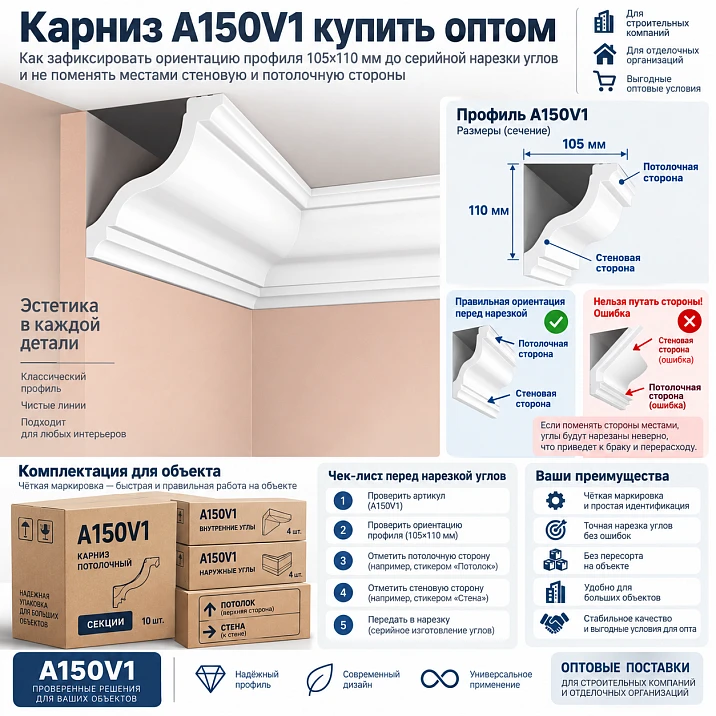
In wholesale purchasing and serial preparation of the HI WOOD A150V1 ceiling cornice, the main error can occur even before the first cut. The profile has dimensions of 105×110×2000 mm. The difference between the two dimensional axes is only 5 mm, so when read quickly the entry seems almost symmetrical. One specialist writes 105×110, another automatically swaps the digits as 110×105, and a third labels the template as “large side” and “small side.” The SKU itself remains A150V1, but the documents begin to describe different orientation variants of the same cross-section.
For a single room, the error can still be noticed during a trial fit. On a project with 60 hotel rooms and several public lobbies, it quickly becomes serial: one crew takes measurements, another prepares the corners, and a third installs. If the centralized cutting area works from an incorrectly read template, the error is replicated in dozens of finished parts.
Therefore, if you need to buy cornice A150V1 wholesale, first record not only the article number and size, but also the orientation of the profile in the specific assembly. For this, use the current drawing of A150V1, label the wall and ceiling planes, assemble one real internal corner and one external corner, approve the master templates, and only then start serial cutting.
The working chain looks like this: card A150V1 → current drawing → section orientation → reference internal corner → reference external corner → master template → serial cutting → part marking → room kits → reserve → repeat order. In this chain, you cannot replace the drawing with the guess “the larger side surely goes here.” Which side belongs to the wall and which to the ceiling is determined only by the current documentation for the specific A150V1.
Why the difference between 105 and 110 mm matters even before ordering
Five millimeters seems like a small value, especially on a large ceiling profile. That is exactly why the error is dangerous. If the sides differed by a factor of two, as with a clearly asymmetric profile, a person would almost certainly double-check the orientation. At 105 and 110 mm, a false sense arises that the order of the numbers is insignificant.
But the dimension line in procurement and the drawing is not used only for reference. It is used to create a BIM object, label the installation assembly, build the corner template, check the offset from the planes, and mark the parts. If one file treats one side as the first axis and another treats the second side as the first, the documentation ceases to be unified.
A conditional example: in the architectural schedule it is written A150V1 105×110, and in the process sheet — A150V1 110×105. From an arithmetic point of view, these are the same two values. From the point of view of the production process, it is necessary to determine which entry is tied to the actual orientation of the profile. The swap cannot be considered harmless until the drawing has been checked.




What product is actually purchased
| Field | Value |
|---|---|
| Manufacturer | HI WOOD |
| Article number | A150V1 |
| Type | Decorative ceiling cornice |
| Material | Polystyrene |
| Size | 105×110×2000 mm |
| Length | 2000 мм |
Product card: cornice HI WOOD A150V1 105×110×2000 mm.
This article does not need a general overview of wide cornices, nor does it need to prove that a large profile is suitable for high ceilings. The central task is different: to maintain the correct orientation of A150V1 from the product card and drawing through to serial installation.
Our factory also produces:
What the order of dimensions means
The order 105×110 cannot be interpreted from memory or by habit from another product line. It cannot be stated that the first figure always refers to the wall, or that the larger side must necessarily be on the ceiling. Such universal rules may prove incorrect.
There is only one working solution: open the current drawing specifically for A150V1, look at the designation of the dimension axes, and tie them to the wall and ceiling planes in the project detail. After that, the site's internal documentation should use not the abstract pair “105/110” but the labeled orientation.
Get Consultation
Why 105 and 110 are especially easy to mix up
The difference is:
110 − 105 = 5 mm.
On paper, these values look almost equal. When entered manually into Excel or BIM, a person can easily swap the order. On a printed drawing without labeled planes, the profile may visually appear almost square. In the warehouse, a cut piece without marking also does not provide an instant clue as to which side was the “wall” side according to the project.
Therefore, the numerical dimension alone is insufficient for production orientation.
Why the expression “approximately 110×110” is unacceptable
In conversation, such rounding seems convenient: the profile really is close to square. But in a specification, it destroys information about two different dimensional axes. After writing “approximately 110×110,” the next participant no longer has anything from which to reconstruct the original 105 and 110 mm.
For budgeting, rounding may not change the order of cost. For the angle template and installation assembly, it changes the meaning of the document. Therefore, the product line remains exact: 105×110×2000 mm.
Creating the project reference drawing
After checking the current product card and drawing, the object issues its own orientation work sheet. It shows:
- wall;
- ceiling;
- section A150V1;
- dimensional axis 105 mm;
- dimensional axis 110 mm;
- the direction of the decorative relief;
- a conventional arrow or orientation icon.
This sheet does not replace the manufacturer’s official drawing. It translates it into an unambiguous object instruction that the architect, technologist, and installer understand in the same way.
Do not rely on the 105×110×2000 string alone
The numeric string must go together with article A150V1 and the section image. Ideally, the master position should also be linked to the drawing version that was used to approve the assembly.
This is especially important on a long project. Six months later, no one should have to reconstruct the orientation from the memory of an employee who no longer works on the site.
Where the 105 and 110 mm swap occurs
The error can appear at any transition between systems:
- in the Excel schedule;
- in the BIM model;
- in the CAD drawings;
- in the estimate;
- in the procurement request;
- in the commercial proposal;
- in the cutting map;
- in the angle list;
- in the template signature;
- in the warehouse labeling.
Therefore, control cannot be focused only on the moment of purchase. Even if the supplier delivered the correct A150V1, the production template may be built according to a flipped scheme.
The architect may record the dimensions in one order, the estimator in another
This is a typical information problem. The architect looks at the profile in section and records the dimensions according to their own axis. The estimator receives only two numbers and rearranges them into the usual order. As a result, both files refer to A150V1, but describe the cross-section differently.
To avoid this, the master position must contain a reference to a single orientation scheme. Then the rearrangement of digits is detected immediately as a discrepancy.
Why this is dangerous even without product substitution
You can buy a perfectly correct HI WOOD A150V1 and still get an error on site. If the internal corner template is made with the wrong orientation, the prepared parts will be inconvenient to install. If the installer follows a flipped diagram, the decorative relief and the geometry of the joint will not be as the project specified.
That is, SKU control and orientation control are two different tasks. The article number confirms which product was purchased. The drawing confirms how that product should work in the joint.
First, one physical A150V1 plank
Before serial preparation, take a real A150V1 plank, place it against the reference joint, and check it against the current drawing. At this stage, the position of the profile relative to the wall and ceiling is approved.
After confirmation, it is useful to take a photograph of the end cross-section directly in the installation position. The photo should show both architectural planes. Then the image becomes understandable even to someone who does not know where the "top" of the cut piece is.
The photo should show the wall and ceiling
The white end of the profile on a table is almost useless for orientation. It can be rotated 90 degrees, and the viewer will not understand which side was approved as the wall side.
A photograph in the real joint solves this problem. The caption can be simple: "reference orientation A150V1, view together with drawing version ___".
Creating a reference internal corner
The next step is one real internal corner made of A150V1. On it, the orientation, relief line, junction, and position of the profile relative to the planes are checked.
This corner becomes the production reference. It can be used to check the template, markings, and the finished part before the entire series is launched.
We create a separate reference for the external corner
An external corner should not be considered an automatic continuation of an internal one. It has a different joint geometry and is usually more noticeable in the interior. Therefore, an object with external corners needs its own control sample.
If there are no external corners in the standard room types, but they are present in the lobbies, a sample is still needed before preparing the common areas.
Why you cannot cut corners for 60 rooms right away
Centralized cutting is effective only after the template has been confirmed. Before that, scale increases the risk. One incorrect orientation turns into dozens of finished parts that will require rework.
Therefore, the series launch is divided into stages: one room, then a check, then one standard floor or a small series, another check, and only after that the entire volume.
Sequence of the series launch
1 room → check → standard floor → check → entire series.
If an error is detected in the first room, the master template is corrected. If it is detected after the standard floor, further cutting must be stopped and the already manufactured parts must be localized.
Template versioning
The template must have a clear code. For example:
A150V1-VU-01
A150V1-NU-01
If the template has been changed, version 02 appears. The old version is withdrawn from use rather than kept nearby "just in case."
Why the terms "long side" and "short side" are unreliable
The difference between 110 and 105 mm is only 5 mm. In real work, "long" and "short" sound too similar and require additional comparison. Over a short distance or in an awkward position, a person can easily make a mistake.
It is more reliable to use an architectural reference: the side to the wall and the side to the ceiling — strictly according to the approved drawing.
We anchor the sides to architectural planes
After the orientation is approved, the working documentation should no longer require the installer to remember the order of the numbers. It includes "WALL" and "CEILING" pictograms or unambiguous arrows.
This does not cancel the 105×110 size. It remains in the specification. But for installation, the visual alignment to the planes is more important.
We do not invent orientation without an up-to-date drawing
This is a fundamental limitation. The article does not state which of the two numbers refers to the wall. Such a conclusion should only be made after checking the current drawing A150V1. Any memory, analogy with another cornice, or assumption that "it is usually done this way" is insufficient.
What the master position should look like
Working note:
HI WOOD / A150V1 / polystyrene / 105×110×2000 mm / drawing version ___ / orientation per detail ___.
Quantity, object, phase, and reserve can be added to it. But the core of the product and the reference to orientation remain unchanged.
Why the drawing file must have a version
In a large project, different contractors may have different exports of the same sheet. If the file has no version or date, it is impossible to quickly determine which one is current.
Therefore, the master position A150V1 must reference the specific revision of the object detail or official drawing used during approval.
Internal corners are counted separately
Once the orientation is approved, the number of internal corners can be counted by room. But counting alone is not permission for serial cutting. The internal corner template must be approved first.
External corners are counted separately
They should not be mixed with internal ones in a single line like “corners — 120 pcs.” External joints are usually more visible and require separate production control.
Straight joints also require correct orientation
It is a mistake to think that the 105/110 issue only concerns corners. At a straight joint, two parts must continue the same profile without being turned. If one segment is marked incorrectly, the texture or geometry may not match.
How to mark an already cut part
Example of internal marking:
A150V1 / NOM-301 / D-04 / WALL ↑
The specific format is chosen by the project itself. The main thing is that the code allows the room, position, and orientation of the part to be reconstructed.
An arrow or pictogram is better than the words “105” and “110”
After cutting, the installer does not need to remember which number refers to which plane. The "to wall" arrow or wall pictogram is read faster and is more resistant to errors.
The numbers remain in the process chart and specification, while visual marking helps during installation.
Marking is applied before storing the parts
You cannot first cut dozens of white elements, stack them in one pile, and then try to restore their purpose. The code is applied immediately after manufacturing or when transferring to the assembly table.
If the cornice is cut directly on site
Then each crew needs the same orientation reference, an up-to-date template, and clear marking. The advantage of on-site cutting is the ability to verify the actual geometry. The risk is different interpretations between crews.
If the cornice is cut centrally
The advantage is repeatability. One production area can produce dozens of identical sets. The risk is that the same repeatability quickly replicates an error if the master template is incorrect.
| Scheme | Main advantage | Main risk |
|---|---|---|
| centralized cutting | repeatability and a single standard | mass replication of a single error |
| cutting on site | verification of the actual assembly | different interpretations of orientation by crews |
How to calculate the wholesale volume itself
Once the section orientation is approved, you can move on to quantity. The calculation follows the standard pattern: room plans → finished parts → two-meter strips → cutting → usable offcuts → reserve → final order quantity. But in this article, quantity is secondary. The main object of control is ensuring that all parts are counted and cut in the same orientation A150V1.
If the project contains 60 standard rooms and several lobbies, it is convenient to first calculate each room type, then consolidate the repeating parts. Serial production makes it possible to use offcuts between identical rooms, but only if the segments retain the orientation marking.
Why the article should not turn into text about linear meters again
The total length of the cornice is important for the budget, but it does not solve the production task. Even if the exact number of linear meters is calculated, an incorrect angle template will make some of the blanks useless.
Therefore, in project A150V1, the geometric logic is approved first, and then the material is optimized.
Acceptance of wholesale batch A150V1
Upon receipt, check the manufacturer, item code A150V1, size 105×110×2000 mm, quantity, condition of the items, and packaging labeling. For a long-term project, it is also useful to verify the goods against the current product page or a saved reference sample.
Acceptance of the physical goods does not automatically confirm that the production templates are correct. This is a separate check.
You must not accept the goods as “a cornice approximately 110 mm”
Even if the correct SKU physically arrived, the documents must be accurate. The entry “wide cornice 110 mm” preserves neither the item code nor the second dimension axis.
On a repeat order, such a line will force procurement to guess again which product was used.
What to do if the invoice says 110×105×2000 mm
You should not automatically tell the supplier that they offered a different product. First, find out whether item code A150V1 remains the same and whether the difference is only a reordering of the axes in their internal recording system.
Work sequence:
- check item code A150V1;
- verify the current product page;
- request a drawing or supplier confirmation;
- match it against the master unit of the object;
- only after that should the documents be considered approved.
If it turns out that a different SKU is proposed, that is already a separate replacement.
The item code helps prevent incorrect normalization
Field A150V1 must remain mandatory in the estimate, request, invoice, and warehouse card. Even if the order of dimensions differs between the two systems, the item code immediately shows that it should refer to one specific item.
But the item code does not cancel the orientation check. The production template is built based on the actual cross-section and the approved unit, not just the model name.
Separate warehouse cell
The correct label in the warehouse:
HI WOOD A150V1 / 105×110×2000 mm
Bad signature:
large white cornice
If other large profiles are stored nearby, generalized labeling quickly leads to mix-ups.
Offcuts must also retain their orientation
If a useful offcut A150V1 remains after cutting, the article number, length, and orientation pictogram are preserved on it. For a nearly square cross-section this is especially important: after removing the factory packaging and trimming the end, it is harder to visually restore the "correct rotation."
Example:
A150V1 / offcut 760 mm / WALL ↑
Why an unlabeled offcut of a nearly square profile is dangerous
An offcut by itself is not yet a production asset. If the technician does not understand how it was oriented in the approved system and which part it is suitable for, the offcut has to be compared with the reference again.
On a series, this wastes time and creates the risk of turning the piece the wrong way. That is why labeling is applied immediately.
It is better to keep part of the reserve as whole strips
A full A150V1 plank 2000 mm long remains as versatile as possible. It can be used for a new part, a repair, or the replacement of a damaged element in any required orientation.
Short leftovers have limitations on length and cuts already made. Therefore, it is convenient to divide the object reserve into whole products and marked usable offcuts.
Re-order A150V1
Incorrect:
we need 20 more large cornices, approximately 110 mm
Correct:
HI WOOD A150V1 / polystyrene / 105×110×2000 mm / 20 pcs.
It is advisable to attach an up-to-date drawing or a link to the project master position to the repeat request.
Why a repeat order is especially sensitive to dimension order
The first batch often goes through with the participation of the project author, who knows the orientation. A few months later, the re-order is handled by another employee, who sees only the short line 110×105. Without article numbers and a drawing, they may decide that the old entry was erroneous and “correct” it according to their own understanding.
Therefore, a repeat order always starts from the master position, not from old correspondence.
What to do if the dimension order has been changed in the new catalog
You cannot silently rewrite the entire project history. First, you need to establish whether the product itself has changed or only the way the dimensional axes are recorded. The SKU, the actual drawing, and supplier confirmation are checked.
If the product is the same, the object master orientation diagram remains the primary working document. If necessary, a note is added to it about the different notation format in the current catalog.
Cross-reference table of different sources
| Source | Record | Status |
|---|---|---|
| Product card | 105×110×2000 | check against the current drawing |
| Estimate | 105×110×2000 | Matches |
| BIM | 110×105×2000 | check the axis order |
| Request | A150V1 | add geometry and drawing |
| Warehouse | large cornice | replace with the exact SKU |
Such a table is useful before mass cutting. It shows not only errors but also places where information is insufficient.
The first object template must not be changed locally
If the installer discovers that the internal corner does not align, you cannot simply file down the template and continue working on the same floor. First, the cause is checked: a measurement error, incorrect orientation, a wall defect, or the wrong template version.
If the correction relates to serial geometry, the master template is changed and a new version is released for all subsequent crews.
All subsequent crews receive the new version
The old version is archived and removed from active folders. Otherwise, one team will continue working with 01, another with 02. Two different standards will appear on the site.
What must be passed to the supplier
For a wholesale order, an exact set is sufficient:
- HI WOOD A150V1;
- size 105×110×2000 mm;
- material — polystyrene;
- quantity;
- delivery queue;
- reserve if necessary;
- please confirm the current drawing for the item.
If the supplier sends their own axis designation, it is compared with the drawing before payment.
How to create a master position in ERP or BIM
It is convenient to store the size not as a single string, but as separate fields. For example, axis A — 105 mm, axis C — 110 mm, length — 2000 mm. But the meaning of the letters must correspond to the product drawing, and in the object node it is additionally shown which axis is tied to the wall and ceiling.
This way the system stops automatically sorting two numbers in ascending or descending order.
The danger of automatic size normalization
Some databases or employees like to reduce dimensions to the format “larger × smaller.” For furniture or construction nomenclature, this can destroy the meaning of orientation. If 105×110 is automatically turned into 110×105, the system must preserve the original axis designations in separate fields.
One cannot assume that the order of numbers for a decorative profile is always free.
How to verify import from BIM into an estimate
If a BIM object exports the size in a different order, the estimator must not manually “correct” it by eye. First, master position A150V1 is checked.
A useful automated control: item code A150V1 must always be linked to one reference card. If the dimensions in the import differ in order, the system raises a “check orientation” flag instead of silently replacing the values.
How to check contractor drawings
The contractor may redraw the assembly in their own format. Before work begins, this sheet is compared with the reference. The wall and ceiling labels, the position of the relief, and the version number are checked.
If the contractor uses their own orientation symbol, it must be unambiguously mapped to the object system.
Why you shouldn't work from a screenshot from a messenger
A screenshot may be cropped, rotated, and missing a version number. It is suitable for quick discussion, but not as a master document for serial cutting.
For production, you need the original approved file or a printout with clear orientation.
How to record the reference internal corner
After assembly, it is useful to photograph it from several angles and assign a code, for example A150V1-VU-01. The photo must include a wall and ceiling reference point.
If the template changes later, a new one is created A150V1-VU-02, while the photo of the old version remains only in the archive.
How to record the reference outer corner
The same logic applies to the outer corner. There is no need to assume that the direction of the decorative relief and the cut is obvious from the inner template. It gets its own code and reference sample.
How to assemble a standard room set
After the templates are approved, each part receives a number. For example:
NOM-301 / D-01 / A150V1 / orientation according to template VU-01
NOM-301 / D-02 / A150V1 / orientation according to template NU-01
Finished parts are assembled into a room set and are not mixed with neighboring numbers.
How to assemble a public hall set
The hall may have a different geometry, more external corners, and longer straight sections. You don't need to automatically copy the hotel room's map for it. A150V1 remains the same product, but the set of parts is calculated separately.
How to divide 60 rooms by type
If there are several room types, each is assigned its own master map. For example, T-01, T-01R, T-02. But the article doesn't go into the topic of mirrored A70V1 layouts: here central control remains on the wall/ceiling orientation of the profile itself.
Room types are only needed to scale the quantity and sets.
Why a mirrored room doesn't cancel the profile's master orientation
Even if the layout is mirrored, the base position of A150V1 relative to the wall and ceiling remains described by the same drawing. The route and angles change, but not the rule for reading the section itself.
This helps avoid mixing two different issues: room mirroring and profile orientation.
How to count the number of internal and external corners
After the room map is approved, the number of corners is counted for each type. Internal and external corners are not combined, because different templates and reference samples are used for them.
The list may contain:
| Room Type | Number of rooms | Internal corners | External corners |
|---|---|---|---|
| T-01 | 24 | By map | By map |
| T-02 | 18 | By map | By map |
| Hall | 8 | By map | By map |
How to account for straight joints in a series
On long walls, straight connections of two-meter strips may be required. Orientation marking is also useful for them. If one element is flipped, even a straight joint can disrupt the continuity of the profile.
How to store finished corner pieces
It is best to store them by type and template version. For example, a separate zone for VU-01 and a separate one for NU-01. Mixing corner pieces by length alone is not acceptable.
How to conduct an intermediate audit after the first floor
After installing a typical floor, check: whether the orientation of all parts matched, whether there were any cases of flipping, whether the marking is read correctly, whether it is convenient for installers to work with the pictograms, and whether there is any confusion between template versions.
If the system works, it is scaled up. If not, it is adjusted before the next phase.
Why installers' feedback matters before mass rollout
Production marking may be logical for the process engineer, but inconvenient for the installer. If the designation "WALL ↑" is read ambiguously in a specific position, it is better to change it after the first room rather than after forty.
How to avoid losing orientation after painting
If elements are painted before final assembly, temporary marking may disappear. Therefore, the project must decide in advance where and how to preserve the part code: on the back side, on a removable tag, or in the packaging.
The specific method depends on the finishing technology. The main thing is that after painting, the installer can still determine the purpose of the part.
How to handle a damaged finished part
If a corner part is damaged, it is replaced by code and the current template version. There is no need to try to find a "similar corner" from another set without verification.
How to arrange the reserve of corner parts
Part of the reserve can be left as whole planks rather than pre-cut corners. This increases versatility. If it is known that a specific corner type is repeated dozens of times and the risk of damage is high, the project can provide several ready-made spare elements — the decision is made separately.
Why an excessively large pre-cut reserve is dangerous
If the old version becomes invalid after the template is changed, dozens of pre-cut spare parts may turn out to be useless. A whole A150V1 plank is more flexible in such a situation.
How to process returns of leftovers from installation
Whole planks are returned as A150V1. Cut pieces — with length and orientation. Ready-made corner parts — with the template code. Anything that has lost its identification should not automatically be considered a full-fledged reserve.
How to reconcile leftovers before reordering
Before a new purchase, three groups are checked: whole 2000 mm planks, free marked leftovers, and ready-made parts of the current version. Only after that is the actual requirement determined.
Why “18 m leftover” is not enough
Eighteen meters may consist of nine whole planks or of many short cut pieces. The production value of these options is different. Reordering requires the structure of the leftover, not just the total meterage.
Practical scenario: 60 rooms and 8 halls
Imagine a project where A150V1 is used in 60 hotel rooms and 8 public lobbies. In the rooms, the layouts repeat, while the lobbies have more external corners and long straight sections. The architect approved A150V1, but in the BIM model one specialist entered 105×110, and in the estimate spreadsheet another automatically swapped the values to 110×105.
If wholesale purchasing is based only on the item code, the supplier may still deliver the correct product. The problem will surface later, when the technician takes the estimate entry as the basis for a template and designates the “long side” as the ceiling side. If this does not match the actual A150V1 drawing, all corner templates will end up oriented incorrectly.
The right answer is not to argue about which number is “more logical” for the wall or the ceiling. You need to open the current drawing, fix the planes, and assemble one real corner. After that, the BIM, estimate, cutting, and installation memo are brought into a single system.
Step 1. Verify all sources
The card, drawing, BIM, estimate, and request are collected into one table. All rows where the order of axes differs are given the status “check.” No automatic correction without the drawing.
Step 2. Approve the physical sample
One A150V1 plank is installed in the reference assembly. The wall and ceiling sides are marked on it, and a photo of the end face is taken directly in the installation position.
Step 3. Create two templates
Internal and external corners receive their own codes and versions. The templates are checked in one room.
Step 4. Launch a limited series
Instead of all 60 rooms, first produce a set for one room or one floor. After installation, check that the labeling is clear and the profile direction is not reversed anywhere.
Step 5. Scale up
Only after that does the centralized section receive permission for serial cutting of the remaining sets.
How to maintain the A150V1 master specification
In the master table, it is useful to separate product data from object orientation.
| Field | Value | Data type |
|---|---|---|
| Manufacturer | HI WOOD | Product |
| Article number | A150V1 | Product |
| Material | Polystyrene | Product |
| Size | 105×110×2000 mm | Product |
| Wall side | according to the current drawing | object assembly |
| Ceiling side | according to the current drawing | object assembly |
| Template version VU | ___ | Production |
| Template version NU | ___ | Production |
| Quantity | ___ pcs. | Procurement |
This way, the product card does not try to store installation logic, and the object node does not replace the product specifications.
Why orientation cannot be stored only in the technologist's head
If the only person who remembers "which side goes where" gets sick or leaves the project, production stops or starts guessing. A serial system must survive staff changes.
Therefore, critical data is transferred from memory into the drawing, photo, template, and marking.
How to organize control before each new batch
If an object is built in several stages, before each batch it is useful to do a short check: is the SKU current, is the drawing current, have the template versions changed, are there any intact planks left, and which parts have already been manufactured.
This is especially important if several months pass between batches. There is no need to assume that all participants remember the decision from the first delivery.
How to work with a new crew in the middle of a project
The new team receives not a verbal explanation, but the same package: the master node, the reference photo, the template codes, and the marking rules. Then it makes a control corner and shows it to technical supervision or the responsible person.
This way, quality does not depend on the history of a specific crew.
How to check finished parts before packing
Before assembly, the room does not have to be fully assembled on the floor. It is enough to selectively verify several parts against the templates and check the marking. If incorrect orientation is detected, the series is stopped until the cause is determined.
If the problem relates to one operator or one template, it is easier to localize it before packing.
How to check a room set
Each set must contain the expected number of parts and the correct codes. If a number should have 12 items, but the package has 11 or 13, the error is detected before delivery to the floor.
For corner elements, not only the length is important, but also the type of corner and the orientation.
Why the same length does not make two parts interchangeable
Two parts of 850 mm may have different ends or belong to different areas of the room. Therefore, the warehouse should not combine them by length alone.
This is especially important after centralized corner preparation.
How to label room packaging
Example:
A150V1 / body A / floor 5 / number 512 / set v02
Individual part codes are preserved inside. External labeling helps the warehouse and installers avoid mixing up numbers.
How to store master templates
Templates should be stored separately from regular tools, and a version log should be kept. If a template is physically damaged, it should not be quietly patched up. The change is recorded and checked against the reference angle.
Why the paper template and the digital file must have the same code
Otherwise, the digital version may be v02 while production still has a v01 printout. The code on the paper, PDF, and physical template must match.
How to handle an external corner in a lobby
A public lobby often has columns and protrusions. If A150V1 wraps around them, the external corner becomes visually noticeable. An orientation error shows up immediately on both adjoining sides.
Therefore, it is better to launch the hall set after the outer template has been tested on a real assembly, not just on a test table.
How to work with an inner corner in a standard room
The inner corner occurs more frequently and is therefore especially dangerous for mass errors. If the template is incorrect, the defect multiplies faster. It is this assembly that should reasonably be used as the first checkpoint for serial launch.
How to handle a non-standard corner
If the room angle differs
When procurement can be launched
Four confirmations are required: the exact SKU A150V1, the current drawing, the approved orientation in the project assembly, and verified corner templates. After that, the quantity and commercial terms become a routine procurement task.
How to prepare a request to the supplier
Working wording:
Cornice HI WOOD A150V1 is required, polystyrene, 105×110×2000 mm, quantity ___ pcs. Please confirm the exact article number and the current drawing for the item. Substitution with another profile without approval is not provided for.
This helps avoid the response “cornice about 110 mm” and keeps the article number in the commercial proposal.
How to verify a commercial proposal
HI WOOD, A150V1, 105×110×2000 mm are cross-checked, along with the quantity and the absence of an unapproved equivalent. If the supplier writes 110×105, this is not immediately grounds to reject the proposal, but it is a mandatory reason to check their axis system and the attached drawing.
Why price does not identify the profile
Two different curtain rods can cost about the same. Price changes over time and depends on delivery terms. Therefore, it is never used as proof that the item in question is specifically A150V1.
How to accept a partial delivery
If the overall order is split across several vehicles, each batch is checked against the same master line. The second delivery cannot be considered automatically correct just because the first one was error-free.
How to label the central warehouse
On the cell:
HI WOOD A150V1 / 105×110×2000 / polystyrene
If finished parts are stored nearby, they are separated from whole strips and have their own codes.
How to maintain the A150V1 project balance
| Status | Quantity | Note |
|---|---|---|
| Ordered | ___ pcs. | under contract |
| Received | ___ pcs. | by shipments |
| issued for cutting | ___ pcs. | by batches |
| Full reserve | ___ pcs. | universal stock |
| Useful leftovers | ___ | with orientation marking |
| finished parts | ___ | by template versions |
This structure is more useful than total square footage because it shows the actual state of the material.
How to avoid mixing old and new versions of finished parts
If the template has been updated, all parts from the old version are isolated and checked. You cannot simply put them into the general set and hope that the installer will figure it out.
What to do with parts from the old version
Some parts may remain fully usable, some will require rework, and some will need to be written off or used as initial stock. The decision is made after comparison with the new geometry, not automatically.
How to conduct a final audit before serial installation
Before releasing all kits, it is useful to run a short checklist:
- Item code A150V1 matches in all documents.
- The size is recorded as 105×110×2000 mm.
- The current drawing has been identified.
- The wall and ceiling sides are labeled.
- The internal template has been approved.
- The external template has been approved.
- The template versions match in the files and in production.
- Part marking is clear to installers.
- The warehouse separates full planks, offcuts, and finished parts.
- The control floor was installed without systemic errors.
Central table of the article
| Document | Bad entry | More correct |
|---|---|---|
| Estimate | cornice 110 mm | A150V1 105×110×2000 mm |
| BIM | 110×105 without a diagram | A150V1 + orientation drawing |
| Layout | large/small side | side to wall / side to ceiling per drawing |
| Template | A150 corner | A150V1 + corner type + version |
| Warehouse | wide HI WOOD | HI WOOD A150V1 |
| Reorder | same cornice | A150V1 105×110×2000 mm |
Common mistakes when working with A150V1 at wholesale
Mistake 1. Treating 105×110 as almost square and unimportant. The axis order gets lost in documents.
Mistake 2. Writing 110×105 without checking the drawing. This creates a different interpretation of the assembly.
Mistake 3. Using “large/small side”. The difference is only 5 mm, making the term unreliable.
Error 4. Marking all corners before the reference sample. The template error gets replicated.
Error 5. Not labeling the wall and ceiling. Numbers remain without architectural reference.
Error 6. Passing only a photo of the profile on the table. It doesn't show the installation position.
Error 7. Storing templates without a version. Crews use different revisions.
Error 8. Allowing different crews to use their own designations. Marking stops being a shared system.
Error 9. Mixing finished parts without marking. After cutting, they lose their purpose.
Error 10. Treating unmarked leftover material as universal. Its orientation has to be re-established from scratch.
Error 11. Submitting a request as "cornice 110 mm". The article number and second axis are lost.
Error 12. Placing a reorder without A150V1. Months later, the context is no longer obvious.
Error 13. Using a wooden cornice cluster. A150V1 is polystyrene HI WOOD.
Error 14. Transferring the frequency of a generic query to the SKU. The exact article query is used without invented numbers.
Error 15. Repeating the overview topic "wide cornice for high ceilings". This page has a different intent — orientation and series preparation.
How to use generic wholesale anchors without losing product intent
The article remains about the specific A150V1. Generic queries like building materials Moscow wholesale, construction materials suppliers moscow, wholesale building materials warehouse or supply of construction materials are appropriate only in the context of comprehensive project procurement.
They lead to the STAVROS homepage and do not replace the product link to A150V1.
Why wooden cornice queries are unnecessary here
A150V1 is a HI WOOD polystyrene profile. Therefore, queries about oak, beech, and wooden cornices describe a different product. Adding them to expand semantics is incorrect.
Final workflow sequence
A150V1 selected → current drawing downloaded → wall and ceiling labeled → physical sample made → internal corner approved → external corner approved → templates created and numbered → parts counted → 2000 mm strips calculated → wholesale batch arranged → finished parts labeled → batch accepted → control floor installed → series scaled → reserve saved → reorder is fulfilled using the same master position.
Buy cornice A150V1 wholesale after orientation approval
A150V1 has a problem unusual for a procurement article: you can buy the right product and still get the wrong serial result. The reason is the nearly equal sides of 105 and 110 mm. If the order of axes changes between the product card, BIM, estimate, and production template, the same SKU begins to be interpreted differently by different project participants.
Therefore, accurate procurement begins with A150V1 105×110×2000 mm, but does not end with that line. A current drawing must be linked to it. Based on it, the project fixes the wall and ceiling orientation, creates a physical reference, internal and external corners, and then master templates with versions.
Centralized cutting starts only after the control placement. Finished parts are marked before storage. Whole strips, remnants, and corner elements are accounted for separately. An unmarked cut piece is not considered a full-fledged reserve, because its orientation has to be restored from scratch.
If the supplier swapped the dimensions to 110×105 on the invoice, this is not a reason to automatically declare it a different product, but it is a mandatory reason to verify the article number and drawing. The A150V1 article number helps maintain product identity, while the drawing maintains geometric identity.
For a large project supply, you can use cornices wholesale, buy cornices wholesale, or ceiling cornices wholesale as supporting commercial semantics, but the main product query remains one: buy cornice A150V1 wholesale.
After the final verification, you can order HI WOOD cornice A150V1 in the calculated quantity. The correct result is determined not by how easy it is to remember the numbers 105 and 110, but by the fact that the project does not require memory at all: the orientation is already fixed by the drawing, reference, templates, and marking.
How to cross-check all documents before serial cutting
Before mass production, it is useful to assemble one short verification sheet in which the A150V1 card, project drawing, BIM, estimate, request, process chart, and corner template stand side by side. The task is not to rewrite all documents from scratch, but to make sure that each of them describes the same profile and the same orientation.
The check is performed against four points: article A150V1, size 105×110×2000 mm, the current drawing number, and the object reference "wall/ceiling". If at least one document uses only 110×105 without a diagram, it is marked "requires verification" rather than "error" until the axis order in that system is clarified.
Such a sheet is especially useful before the first centralized cutting run. It turns the abstract problem of swapped dimensions into a concrete control process.
Why the printed master assembly must be located next to the cutting area
Even if all documentation is stored in a digital system, it is inconvenient for the operator to open BIM or search for an email every time. The production area must have access to the current master sheet with a clear section image, wall and ceiling labels, and version number.
When the version changes, the old sheet is physically removed. It is not enough to update the file in the cloud if the previous printout is still hanging next to the saw.
How to check the template after a long break
If production of A150V1 has stopped for several weeks or months, cutting cannot automatically continue using the template lying on the shelf. First, its code, version, and compliance with the master assembly are checked. Then one control part is produced.
This is especially important for a repeat queue of a hotel project, when the contractor, software, or set of working documentation could have changed between phases.
How to prevent profile flipping during transfer between areas
The orientation may be correct at the saw and be lost at the next stage. For example, parts are moved to the finishing table, turned face down, and placed in a different stack. If the marking is only on one side or disappears after processing, the set again becomes ambiguous.
Therefore, the designation system must account for the entire route of the part: cutting → processing → packaging → warehouse → installation. The code is applied where it will remain until it is handed over to the installer, or it is duplicated on the packaging label.
How to organize control of the first ten serial parts
After the template is approved, it is not necessary to immediately trust the entire batch. It is useful to check the first few identical parts: whether the orientation matches, whether the marking is legible, and whether the operator is using the template correctly. If the first ten items pass without comments, production continues the series.
This is not a statistical norm and not a universal mandatory scope of control. It is an organizational principle: the first serial batch requires increased attention, because it is precisely in it that errors in translating the master assembly into the real process become apparent.
Why the installation crew must have the right to stop the series
If, on site, the installer sees that the actual part does not match the reference, they must not "adjust" it at any cost for the sake of the schedule. The correct action is to stop using the suspicious set and check the template code, orientation, and neighboring parts.
This way, a local error remains local. If installation continues, the incorrect template may end up in several more rooms before the problem is recognized as systemic.
How to localize an orientation error
When an incorrect part is detected, it is necessary to determine exactly where the failure occurred. Possible points: the original drawing, transfer to BIM, the master template, a specific operator, marking, packaging, or installation.
It is convenient to go back along the chain: part code → template version → cutting map → master assembly → current drawing. If the master assembly is correct but the part is incorrect, the problem is already in the production part. If the master assembly itself is flipped, the source must be corrected, not just the finished part.
How to file a note about incorrect orientation
The phrase "the cornice is upside down" is too general. A working record must contain the room, the part code, and the template version. For example:
NOM-412 / D-07 / A150V1 / manufactured according to template VU-01; orientation does not match master assembly v03. The batch is on hold pending inspection.
Such a record helps quickly check whether only one item is affected or the entire batch for this template.
How not to confuse a quantity change with a geometry change
If, after measuring, 398 slats are needed instead of 420, this is a change in purchase quantity. It does not require a new profile orientation. But if the wall and ceiling assembly itself has changed, the templates must be reconfirmed, even if the quantity remains the same.
Separating these two types of changes reduces unnecessary approvals and at the same time prevents a genuinely important geometric correction from being missed.
Final check before placing a wholesale order
| Inspection | Status |
|---|---|
| HI WOOD A150V1 is specified in all purchasing documents | ___ |
| The size 105×110×2000 mm is preserved without rounding | ___ |
| Current drawing verified | ___ |
| Wall and ceiling sides secured in the object node | ___ |
| Internal corner physically verified | ___ |
| External corner physically verified | ___ |
| Templates are versioned | ___ |
| Marking is clear for production and installation | ___ |
| The number of whole strips is calculated after the parts map | ___ |
| The whole reserve is separated from usable offcuts | ___ |
If all items are closed, wholesale purchasing no longer depends on who exactly remembers the difference between 105 and 110 mm. The system already contains this information in documents, reference samples, and templates.
Why one control marking on the end saves more than repeated recounts
For A150V1, the main loss of time arises not from the complexity of the arithmetic, but from the need to constantly restore orientation. If each cut segment has to be laid against the drawing again and the side intended as the wall side identified, batch production loses its meaning. Simple, unambiguous marking removes this question at the production stage.
This is especially noticeable when fitting out dozens of identical rooms. The installer should not have to measure 105 and 110 mm with a tape measure each time, compare them, and recall the order in which they were written. They should see the part code and a clear orientation indicator. Then size control remains a product check, while orientation becomes separate production information.
What should remain in the archive after the project is completed
After installation, it is useful to keep the A150V1 master position, the current drawing, photographs of reference corners, the latest version of the templates, one short control sample, and the final specification. Such an archive simplifies repairs, replacement of a damaged part, and reordering several years later.
The main thing is not to leave only a photograph of the finished interior or an old invoice. To restore the system, both the exact article number and the geometric orientation are needed. Then a future reorder again starts with HI WOOD A150V1 / 105×110×2000 mm, rather than with a search for a “similar wide cornice.”