Article Contents:
- Which product is currently being purchased: HI WOOD A130
- Why the current model should be the first field
- Why you cannot decide on your own that L2101 is a different product
- Why you cannot thoughtlessly remove L2101 from old documents
- Why a separate “alternative designation” field is needed
- Why the SKU cannot be stored only inside the name
- Why A130V1 cannot be shortened to A130
- Table of forbidden abbreviations
- Size is used as a check, not as the only identifier
- What to do if the old table contains only L2101
- How to merge three Excel files from different participants
- Architect's file
- General contractor's file
- Finishing contractor's file
- What counts as sufficient confirmation of a match
- Why a single URL is sometimes not enough
- Why a single size is not enough either
- What is insufficient for merging
- When A130/L2101 can be merged with A130
- When you can't merge
- Why you need to keep the source of every number
- Example of a duplicate order
- Example where quantities need to be added
- What should be returned in the commercial proposal
- How to avoid getting A130V1 instead of A130
- Why A130V1 cannot be considered a "new version" of A130
- How to process a mispick
- Why an alias should not create a second stock balance
- Physical inventory A130
- How to store history without a duplicate card
- Version R0
- Version R1
- Version R2
- Version R3
- Who should see the master reference
- Why the master reference cannot be edited without a log
- Example of an Excel normalization table
- Why automatic deduplication by name is also dangerous
- How to determine that two identical rows really duplicate each other
- Why normalization is needed before the budget
- How to communicate with a large building materials supplier
- How to use supplier-related queries without deviating from A130
- How to draft a confirmation request to a supplier
- What to do if the supplier responds ambiguously
- What to do if the supplier says that L2101 is a separate old version
- Why does size 100×83 immediately show an error
- How to set up automatic validation in the table
- How to work with archived PDFs and drawings
- Why you cannot backdate changes to old signed documents
- How to perform A130 acceptance on site
- Why acceptance by name alone is insufficient
- A130 reference for the warehouse
- Why A130V1 is needed in the reference table but not necessarily physically
- How to label a warehouse cell
- Why a separate L2101 cell after confirmation is harmful
- How to manage A130 issuance to the installation crew
- Why an installer doesn't need to understand the renaming history
- How to process returns of leftovers
- Why old leftovers marked L2101 require verification
- Installation reserve
- Operational reserve
- Historical leftover
- Why reserve A130V1 is not reserve A130
- 5. Considering the number 130 a sufficient identifier
- 6. Ordering “HI WOOD 130 mm”
- 7. Not attaching the drawing to a large purchase
- 8. Using an old specification without updating it
- 9. Create two warehouse cards
- 10. Double the warehouse stock due to an alias
- 11. Place a reorder for L2101 without verification
- 12. Merge items only by similar name
- 13. Transfer the frequency of the general query to A130
- 14. Use wooden keys for polystyrene A130
- 15. Turn the article into A130 versus A130V1
- What size is A130?
- What material is A130 made of?
- What does A130/L2101 mean?
- Can L2101 be considered a separate product?
- Can L2101 be removed from all old documents?
- How does A130 differ from A130V1?
- Can A130 and A130V1 be merged into one card?
- What is a master position?
- What is an alias?
- How to merge Excel files?
- What to do if two files each contain 120 A130?
- How to accept delivery?
- How to store in a warehouse?
- How to place a reorder?
- Can I reorder using the words "cornice L2101"?
- What should I do if the new document shows a different size?
- Where can I order A130?
- Second table: procurement chain control
- How to verify procurement readiness before payment
- What a supplier request should look like
- Why it is better to state the ban on A130V1 explicitly
- How to handle a reorder after several months
- Why a new manager should not search for "L2101" in the catalog blindly
- What should I do if the current URL still contains L2101
- Why a URL is useful as a linking identifier
- How to close a project without re-splitting the nomenclature
- Three diagnostic scenarios worth checking before the final order
- Scenario 1 — the same quantity in two files
- Scenario 2 — the same product, different cases
- Scenario 3 — a similar name, a genuinely different SKU
- How to run a reverse check of the final specification
- Why normalization must be verifiable by another employee
- How to organize a compliance evidence field
- What to do if the evidence is outdated
- How to store master data alongside commercial documents
- 01_Master
- 02_Orders
- 03_Delivery
- 04_Stock
- 05_Legacy
- Why this approach reduces errors not only for A130
- How to verify the warehouse after merging two cards
- Option A
- Option B
- Option C
- Why this nuance is especially important before reordering
- How to conduct the final inventory
- Quarantine is a useful status for uncertain records
- How to conduct the final audit after the last delivery
- What to hand over to operations
- Why the operations department should not create a new L2101 card
- How to verify that the master position has not fallen apart after several months of work
- Why aliases need to be reviewed periodically
- What to do if a new supplier uses a different internal designation
- Why normalization must end with physical verification
- The last test before placing an order
On large projects, double purchasing often occurs not because the procurement specialist miscalculated the meters. A far more dangerous situation is when the same item passes through different documents under different designations. The architectural schedule retains the old A130/L2101, while the current supplier card lists the item as A130, the contractor writes L2101, and the estimate already contains A130. If the three tables are simply merged and summed, one actual cornice can turn into two or three procurement line items.
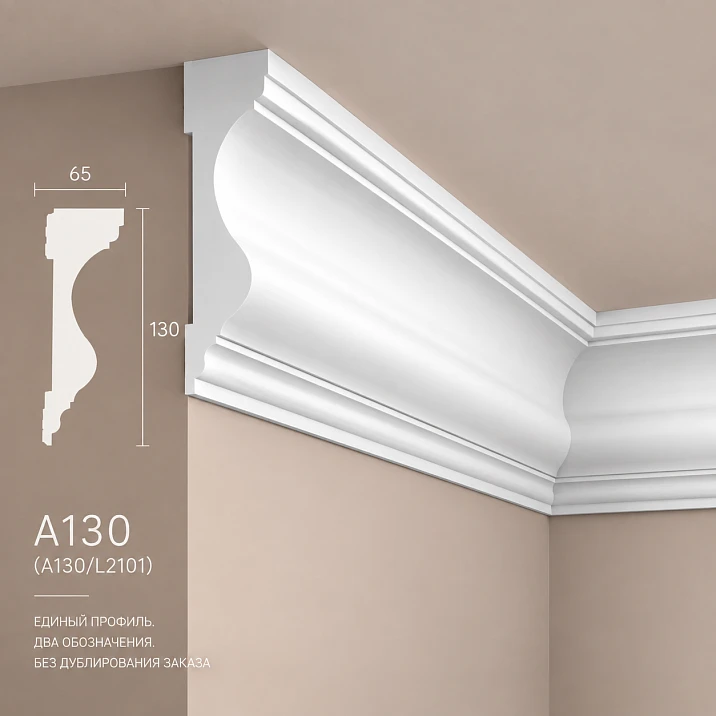
For HI WOOD A130, this task is especially illustrative. In the current A130 line, this is a polystyrene ceiling cornice 130×65×2000 mm. In older project and catalog materials, the designation A130/L2101 may appear. At the same time, there is also A130V1 — which is indeed a different profile measuring 100×83×2000 mm. Therefore, procurement must solve two opposite tasks at once:
-
merge historical designations of the same product if the correspondence is confirmed;
-
do not merge a genuinely different SKU just because the name starts the same way.
That is why buying the A130 cornice wholesale should happen after normalizing the nomenclature:
all source records → verification of the item card and drawing → correspondence table → one master item A130 → separate A130V1 → removal of duplicate quantities → calculation of actual demand → request → quotation → invoice → acceptance → unified warehouse card → reorder under the current designation with the preserved historical alias.
The main principle of the article:
one physical product must exist in the procurement system as one master item, even if it has several spelling variants in old documents.
At the same time, the historical designation does not need to be erased. It is preserved as a search alias so that old drawings, invoices, and statements remain readable.

Which product is currently being purchased: HI WOOD A130
Current product item:
| Parameter | Value |
|---|---|
| Model | A130 |
| Brand | HI WOOD |
| Material | Polystyrene |
| Size | 130×65×2000 mm |
| Length | 2000 мм |
| Type | Decorative ceiling cornice |
Product card: cornice A130 on STAVROS.
In the current lineup, there is a related A130V1 100×83×2000 mm. This is a separate profile. The presence of a common fragment A130 in the name does not make the models interchangeable.




Why the current model should be the first field
Bad line:
cornice 130 mm.
Stronger:
HI WOOD A130 / polystyrene / 130×65×2000 mm.
The number 130 by itself does not guarantee the model. It may be perceived as:
-
height;
-
part of an old SKU;
-
a shortened common name;
-
a fragment of the name of another modification.
Therefore, model A130 should be a separate structural field, not a word inside a long description.
Our factory also produces:
Where A130/L2101 appears and why it cannot be interpreted automatically
In old project documentation, saved exports, or historical card names, the following may appear:
A130/L2101.
This is an important search marker.
But from the designation itself, without additional verification, one cannot infer:
-
that L2101 is a separate SKU;
-
that L2101 is an old factory code;
-
that this is a modification of A130;
-
that
A130/L2101always means exactly the same product in all documents.
A reliable approach:
historical designation detected → compare URL, size, drawing, and supply documents → after confirmation, add it to master item A130 as an alternative name.
Get Consultation
Why you can't decide on your own that L2101 is a different product
Let's imagine an old inventory list:
A130/L2101 — 180 pcs.
Current card:
A130 — 130×65×2000 mm.
If the old URL, size, and drawing match the current product page, a strong working scenario is to treat this as a historical designation of the same product.
If instead you create:
SKU 1 — A130;
SKU 2 — L2101,
the system starts seeing two stock balances, two limits, and two orders.
That's how double purchasing is born.
Why you shouldn't thoughtlessly delete L2101 from old documents
The opposite extreme is also dangerous.
If the old designation is simply deleted:
-
it becomes impossible to search old invoices;
-
it becomes harder to match up reports;
-
the contractor keeps sending L2101;
-
archived drawings lose their connection to the current product page;
-
a new employee concludes that this is an unknown item.
Therefore, it's better to:
A130 is the current master model.
A130/L2101 — historical/alternative designation, if the correspondence is confirmed.
This is how the system understands both languages.
What is a project master record
A master record is a single approved line to which all verified spelling variants are mapped.
For example:
HI WOOD A130 / polystyrene / 130×65×2000 mm / current model A130 / historical alias A130-L2101 / product URL ___ / revision R2.
In a real ERP/Excel system, it may have the following fields:
-
master_sku; -
current_name; -
alias; -
brand; -
material; -
section; -
length; -
product_url; -
drawing; -
revision; -
status.
What matters is not the software format, but the logic:
one physical item = one master reference line.
Why a separate “alternative designation” field is needed
If the old file contains only:
L2101,
search in the master reference should lead the employee to the record:
A130.
But the alias itself should not increase the balance.
That is:
A130 = product.
L2101 = additional search key after confirming the match.
This is a fundamental difference.
Why the SKU cannot be stored only inside the name
Line:
Ceiling cornice HI WOOD A130/L2101 polystyrene white wide 130 mm
convenient for a person.
But it is poorly suited for automatic data merging.
Better to split:
| Field | Value |
|---|---|
| current_model | A130 |
| historical_alias | A130/L2101 |
| brand | HI WOOD |
| material | Polystyrene |
| section | 130×65 |
| length | 2000 |
| status | active |
| revision | R2 |
Then the program can group by current_model, while a person can search by historical_alias.
The most dangerous mistake is confusing A130 with A130V1
A130V1 is not a historical alias.
It is a real, separate model.
Comparison:
| Model | Size | Status |
|---|---|---|
| A130 | 130×65×2000 mm | target SKU |
| A130/L2101 | after documentary verification — an alternative designation for A130 | alias |
| A130V1 | 100×83×2000 mm | separate SKU |
The last characters V1 are essential.
A130V1 ≠ A130.
Why A130V1 cannot be shortened to A130
This kind of shortening sometimes happens manually:
we have cornice A130V1, I'll leave A130 in the table to keep it shorter.
As a result:
-
a different size;
-
different offset;
-
different geometry;
-
different SKU
falls into the same master position.
Therefore, the normalization rule should be:
a historical alias can only be removed after a verified match;
meaningful modification suffixes must not be truncated automatically.
Table of prohibited abbreviations
| Original entry | Must not be turned into | Reason |
|---|---|---|
| A130 | “cornice 130” | model is lost |
| A130/L2101 | L2101 as a separate product without verification | risk of duplicate |
| A130V1 | A130 | actually a different model |
| A130 130×65×2000 | A130V1 | size mismatch |
| “cornice HI WOOD 130 mm” | A130 automatically | insufficient data |
Such a table is especially useful when importing multiple Excel files.
How to check an old specification before merging
For each row, you need to collect:
-
original name;
-
model/SKU;
-
size;
-
material;
-
URL;
-
a drawing;
-
document date;
-
quantity;
-
zone/cabinet;
-
author/row source.
You shouldn't start with quantity.
Identity first.
Then the math.
Size is used as a check, not as the sole identifier
Match:
130×65×2000 mm
— a strong argument that the two records refer to the same product.
But size should not be the only criterion.
Why?
Different catalogs may contain:
-
similar profiles;
-
renamed products;
-
versions;
-
input errors.
Use the combination more strongly:
model + URL + size + drawing + supplier confirmation.
What to do if the old table contains only L2101
Do not guess.
Need to pull up:
-
old URL;
-
a drawing;
-
old invoice;
-
delivery note;
-
correspondence with the supplier;
-
archive card.
If confirmation is found:
alias L2101 → A130.
If not:
status "requires verification".
No automatic merging.
How to merge three Excel files from different participants
Let's imagine:
Architect's file
A130/L2101 — 120 pcs.
General contractor's file
A130 — 120 pcs.
Contractor's finishing file
L2101 — 120 pcs.
If we simply do SUM, we get 360.
But this could be the same scope described in three languages.
The correct process:
-
normalize the nomenclature;
-
determine the source of the quantity;
-
understand whether the lines refer to the same rooms;
-
remove duplicates;
-
only then sum up.
Why you can't first add up the quantities and then clean up duplicates
A duplicate order doesn't only appear in the final count. The error starts affecting the project much earlier.
If A130 and A130/L2101 entered the system as two separate lines, they can increase:
-
budget;
-
the purchasing limit;
-
the planned demand;
-
the warehouse capacity;
-
delivery schedule;
-
reserve;
-
the volume of commercial requests.
That is, even if the duplicate was discovered before payment, it had already distorted the documents.
Correct order:
source lines → mapping table → statuses → master items → quantity source check → summation.
Not the other way around.
Creating a mapping table
Example working table:
| Original entry | Size | Source | Preliminary status | Master position |
|---|---|---|---|---|
| A130 | 130×65×2000 | current estimate | match | A130 |
| A130/L2101 | 130×65×2000 | old statement | check/merge | A130 after confirmation |
| L2101 | unknown | contractor file | Requires verification | — |
| A130V1 | 100×83×2000 | current request | Separate product | A130V1 |
| cornice 130 mm | no full size | draft | insufficient data | — |
This table distinguishes three types of situations:
-
confirmed match;
-
probable historical alias;
-
a genuinely different SKU.
What counts as sufficient confirmation of a match
Strong identification is not based on a single attribute.
A useful combination:
-
the same URL;
-
the same drawing;
-
the same size 130×65×2000;
-
same material;
-
a matching external profile;
-
supplier confirmation;
-
an old invoice for the same project.
The more independent matches there are, the more reliable the normalization.
Why a single URL is sometimes not enough
The URL may be preserved after renaming the card.
This is good for history.
But if the project is technical, it is better to additionally check:
-
size;
-
a drawing;
-
the SKU in the current quotation.
Why one size alone is also not enough
The size may coincidentally match for two products.
Therefore 130×65×2000 — a control attribute.
Not a unique identifier.
What is insufficient for merging
Bad grounds:
"looks like it's the same thing".
"the name almost matches".
"both have 130".
"they were next to each other in the old file".
"the manager said over the phone".
A wholesale batch requires documentary confirmation.
A verbal explanation can be used as a hint, but not as a final status.
When A130/L2101 can be merged with A130
after checking:
-
old name;
-
current card;
-
size;
-
URL;
-
drawing;
-
if necessary — supplier confirmation.
After that, in the master reference:
master_sku = A130;
alias = A130/L2101.
Quantity by alias does not create a new product.
When merging is not allowed
If the old record:
-
has a different size;
-
leads to a different URL;
-
has a different profile;
-
the supplier confirms a separate SKU;
-
cannot determine the origin.
Then the status:
DO NOT MERGE UNTIL VERIFIED.
This is safer than artificially "cleaning up" the nomenclature.
First we clean up the nomenclature, then we count the quantity
Let's imagine four rows:
-
A130 — 120 pcs.;
-
A130/L2101 — 120 pcs.;
-
L2101 — 120 pcs.;
-
A130V1 — 40 pcs.
If the first three reflect the same cabinet and the same requirement, the total is:
A130 — 120 pcs.;
A130V1 — 40 pcs.
Not:
A130 — 360 pcs.
But if:
-
A130 — body A, 120 pcs.;
-
A130/L2101 — body B, 80 pcs.,
then after normalization:
A130 — 200 pcs.
Therefore, identical goods do not yet mean duplicated quantity.
The quantity object must be checked.
Why the source of each figure must be preserved
In the master table, the following fields are useful:
-
source_document; -
source_sheet; -
source_row; -
zone; -
building; -
revision; -
quantity.
Then, for the row:
A130 — 200 pcs.
the origin can be revealed:
-
120 — building A;
-
80 — building B.
And it's clear that this is a sum, not a duplicate.
Example of a double order
Architect:
A130/L2101 — 180 pcs.
contractor:
A130 — 180 pcs.
Procurement sees two files and does:
360 pcs.
The supplier ships.
It turns out in the warehouse that both documents described the same volume.
The error can no longer be fixed with a single Excel formula.
The following appeared:
-
extra payment;
-
extra delivery;
-
extra warehouse;
-
the need for a refund or transfer.
This is exactly why normalization happens before the price request.
Example where quantities need to be summed
Architect:
body A / A130-L2101 — 120 pcs.
contractor:
body B / A130 — 80 pcs.
After confirming the match:
master item A130 — 200 pcs.
Here, the same product belongs to two different zones.
The quantities are indeed summed.
What the final line A130 should look like
After cleaning:
HI WOOD A130 / polystyrene / 130×65×2000 mm / main volume ___ pcs. / reserve ___ pcs. / project ___ / revision ___ / historical alias A130-L2101.
The historical alias is not required on the invoice.
But it is useful within the project.
How to send a request to the supplier if the match has not yet been confirmed
Do not write:
A130 and L2101 are needed.
Stronger:
The project documentation uses the designations A130 and A130/L2101 for the HI WOOD cornice measuring 130×65×2000 mm according to the following card. Please confirm the current commercial designation and indicate whether these entries are one product item within this URL.
This way the supplier answers a specific question.
What should be returned in the commercial proposal
After identification, the quotation must include:
-
current name;
-
A130;
-
130×65×2000 mm;
-
material;
-
quantity;
-
price;
-
deadline;
-
delivery terms.
If it appears again:
A130V1,
this is already a different item and requires separate verification.
How to avoid getting A130V1 instead of A130
In each document, store the size next to the model:
A130 / 130×65×2000.
This creates double control.
If an employee accidentally writes:
A130V1 / 130×65×2000,
the system detects an internal contradiction.
if:
A130 / 100×83×2000,
as well.
The SKU and size must confirm each other.
Why A130V1 cannot be considered a "new version" of A130
The V1 suffix may be psychologically perceived as:
version 1 of the same product.
But in the catalog, this is a separate geometry.
Therefore, you cannot:
-
combine stock;
-
replace in the order;
-
consider it the same reservation;
-
substitute in the backorder.
A130 and A130V1 — two master positions.
Acceptance of A130 delivery
On site, the following are checked:
-
model A130;
-
size 130×65×2000 mm;
-
material;
-
quantity;
-
marking;
-
matching the invoice;
-
absence of A130V1, if it was not ordered.
If 100 A130 and 20 A130V1 arrived instead of 120 A130, this cannot be accepted as:
120 HI WOOD cornices.
This is a wrong-item substitution.
How to process a wrong-item substitution
Example:
Ordered: HI WOOD A130 130×65×2000 — 120 pcs.
Actual: A130 — 100 pcs.
Actual: A130V1 100×83×2000 — 20 pcs.
Shortage A130 — 20 pcs.
Incorrectly supplied A130V1 — 20 pcs.
This way the error is clear to both the supplier and accounting.
Warehouse card A130: one item, multiple search names
After confirming the match, the warehouse should see one physical item.
Main card:
HI WOOD A130 / 130×65×2000 mm.
Additional search fields:
-
A130/L2101;
-
L2101;
-
old name;
-
old URL;
-
archival card number, if there was one.
But the stock is stored once.
Why an alias should not create a second stock balance
Bad system:
A130 — stock 24 pcs.
L2101 — stock 18 pcs.
The storekeeper sees:
42 in total.
But physically these may be the same 24 items, reflected through two catalogs.
An alias should help find the product.
Do not multiply it.
Physical inventory A130
During inventory, the following are counted:
-
actual whole planks;
-
actual remaining stock;
-
reserve;
-
issued but not written-off items.
Not counted separately:
-
aliases;
-
old article names;
-
alternative spellings.
That is:
1 plank = 1 physical unit of master position A130.
Not:
1 rail = A130 + L2101.
How to store history without a duplicate card
A master position can have a log:
| Date | Designation | Source | Status |
|---|---|---|---|
| 2024 | A130/L2101 | old statement | historical |
| 2025 | L2101 | contractor file | alias after verification |
| 2026 | A130 | current card | current |
This is how history is preserved.
And the warehouse stays clean.
How to maintain versioning of the master reference
A practical option:
Version R0
Raw project rows.
Version R1
After the initial merge.
Version R2
After verifying the card and dimensions.
Version R3
After supplier confirmation.
All departments must use the latest approved version.
Otherwise, the architect continues working with R1, procurement with R3, and the warehouse with R0.
Then duplicates return.
Who should see the master reference
Minimum:
-
designer;
-
cost estimator;
-
procurement;
-
warehouse;
-
contractor;
-
person responsible for acceptance.
If necessary:
-
accounting;
-
ERP administrator;
-
technical supervision.
The goal is not to give everyone editing rights.
The goal is for everyone to see one approved nomenclature.
Why the master reference book cannot be edited without a log
The employee saw:
A130/L2101.
Decided:
I'll remove
/L2101, so it looks nice.
After that, it's unknown:
-
who changed it;
-
on what basis;
-
what was there before;
-
whether the other edits can be trusted.
Therefore, any changes to the master position must have:
-
date;
-
author;
-
reason;
-
supporting document.
How to normalize data in Excel safely
You cannot use a single crude rule:
delete everything after
/.
Because in another product range, the suffix after the slash may be a real modification.
Stronger:
-
export unique original names;
-
assign a status manually or using a reference list;
-
create a column
master_sku; -
separately
alias; -
merge quantities only by
master_sku; -
keep the original name unchanged.
This way the source data is not lost.
Example of a normalization Excel table
| raw_name | master_sku | alias | qty | zone | source | status |
|---|---|---|---|---|---|---|
| A130 | A130 | — | 120 | Building A | Estimate | confirmed |
| A130/L2101 | A130 | A130/L2101 | 120 | Building A | Project | duplicate candidate |
| L2101 | A130 | L2101 | 80 | Building B | contractor | confirmed after check |
| A130V1 | A130V1 | — | 40 | Hall | Estimate | separate SKU |
Now you can analyze:
-
body A: there is a duplicate 120/120;
-
body B: separate 80;
-
A130V1: separate 40.
Final:
A130 — 200;
A130V1 — 40.
Why automatic duplicate removal by name is also dangerous
Let's imagine:
A130 — 120 / body A.
A130 — 120 / body B.
If Excel removes duplicate rows by master_sku, the second cabinet will be lost.
Therefore, a duplicate is determined not only by the item.
You need to compare:
-
the product;
-
object;
-
zone;
-
source;
-
revision;
-
quantity assignment.
How to tell that two identical rows really duplicate each other
Strong indicators:
-
the same zone;
-
the same quantity;
-
the same set of rooms;
-
the same revision;
-
one document copies another;
-
the date/basis of calculation matches.
If doubt remains, the line gets:
duplicate_candidate.
Not deleted automatically.
Why normalization is needed before the budget
Estimate:
A130 — 180 pcs.
A130/L2101 — 180 pcs.
Financial system:
two lines × price.
Budget doubled.
Then management sees:
cornices are too expensive.
The problem seems commercial.
In reality, it is a reference issue.
Therefore, nomenclature cleanup is part of financial control.
How to communicate with a large building materials supplier
If the project purchases through large supplier of building materials, the request must already contain a normalized item.
There is no need to send the supplier three raw lines and ask:
calculate everything.
Stronger:
the master item HI WOOD A130 130×65×2000 mm has been confirmed; the old designation A130/L2101 is retained for reference.
This way, the supplier is not involved in the project's chaotic internal consolidation.
How to use supplier inquiries without deviating from A130
Phrases like Wholesale building material suppliers, building materials supplier и building materials distributor are appropriate in commercial sections about supplier selection and card approval.
But the article remains about a single SKU.
After the general commercial introduction, the reader should arrive at the exact line:
HI WOOD A130 / 130×65×2000.
How to draft a confirmation request to the supplier
A practical wording:
In previously issued project documentation, the cornice at this URL is designated as A130/L2101. The current card uses the designation A130. The size in the old and current documentation is 130×65×2000 mm. We ask you to confirm that the model A130 should be used for the current commercial order and that the designation A130/L2101 refers to the same product item in our historical documentation.
An important word:
for the current commercial order.
This moves the question from theory into practical action.
What to do if the supplier responds ambiguously
For example:
yes, that's what it used to be called.
This may be sufficient for internal navigation, but for the master reference it is better to request:
-
current commercial name;
-
current size;
-
current product card;
-
drawing.
After that, the status:
confirmed.
What to do if the supplier says that L2101 is a separate old version
Then automatic merging is not allowed.
You need to find out:
-
whether the geometry is the same;
-
whether the batches are interchangeable;
-
whether the current batch differs;
-
what to do with the old remaining stock.
In such a scenario, the master catalog may have:
A130 current;
L2101 legacy.
But only after confirming a real difference.
The article should not invent this conclusion in advance.
How to protect against A130V1 in a commercial proposal
The supplier may have a wide catalog.
The supplier writes:
large HI WOOD 130.
The manager sees A130V1 and adds it.
To prevent this:
A130 + 130×65×2000 + URL.
Triple control is better than one name.
Why does the size 100×83 immediately show an error
If the quotation:
A130V1 / 100×83×2000,
and the project:
A130 / 130×65×2000,
the difference is visible without design expertise.
That's why size is a good control filter.
How to set up automatic validation in a spreadsheet
Simple logic:
-
If
master_sku=A130, expected size =130×65×2000; -
if the row contains a different size → flag
CHECK; -
if the name contains
A130V1→ master_sku is not A130.
Even a basic conditional formula can catch errors before payment.
How to work with archived PDFs and drawings
The archive is not rewritten.
It retains:
A130/L2101.
But alongside it, in the index file:
legacy alias → current master A130.
This preserves the legal/project history without creating a new product.
Why you cannot correct old signed documents retroactively
An old act or approved drawing is part of history.
There is no need to edit it just for a new name.
It is better to create a correspondence table and a new project revision.
This way you can prove:
-
what was in the document;
-
how it is interpreted now;
-
on what basis.
How to carry out acceptance of A130 on site
Acceptance must confirm not only the number of packages.
Checked:
-
A130;
-
HI WOOD;
-
polystyrene;
-
130×65×2000 mm;
-
quantity;
-
marking;
-
matching the invoice;
-
absence of A130V1;
-
condition of the items;
-
distribution by delivery queue.
If the invoice states A130, but in fact there is a different geometry inside, the document does not make the delivery correct.
Why acceptance by a single name is insufficient
The box may have an abbreviated:
A130.
This is a good sign.
But for the first batch it is useful to additionally verify:
-
end section;
-
size;
-
drawing.
After that, a physical reference sample can be created.
Reference sample A130 for the warehouse
Reference kit:
-
signed section A130;
-
photo of the end profile;
-
current drawing;
-
label;
-
product card;
-
master position;
-
historical alias A130/L2101.
The reference sample is not consumed during normal installation.
It is needed for:
-
subsequent deliveries;
-
reorder;
-
comparison of the disputed profile;
-
training a new employee.
Why A130V1 is needed in the reference table but not necessarily physically
There is no need to buy A130V1 just for comparison.
It is enough to have:
-
the card;
-
size 100×83×2000;
-
photo/drawing.
Goal:
the employee sees that a similar name is not an alias for A130.
How to label a warehouse bin
Not:
cornice 130.
Stronger:
HIWOOD / A130 / 130×65×2000
If old employees search for L2101, you can add in small text:
historical alias: A130/L2101.
But the main name is the current one.
Why a separate L2101 cell after confirmation is harmful
If the match is confirmed, two cells:
A130;
L2101
create a false separation of physically one item.
This results in:
-
double stock;
-
double reservation;
-
confusion during issue;
-
erroneous reorder.
Therefore, the alias exists in search.
Not on the warehouse floor.
How to issue A130 to the installation crew
Issue document:
body / floor / room / A130 / quantity.
Not:
L2101 — 20 pcs.
if the project has already switched to the current master position.
If necessary, in the note:
corresponds to the old designation A130/L2101.
This way, old documentation remains understandable, but the warehouse speaks the current language.
Why the installer doesn't need to understand the renaming history
The installer must know:
-
which profile to take;
-
what it looks like;
-
where its cell is;
-
how much has been issued.
Historical normalization is a task for the project and procurement.
There is no need to force the contractor to choose between:
A130;
L2101;
A130/L2101.
He receives:
A130.
How to process the return of leftovers
Return:
A130 / length / condition / source.
For example:
A130 / 980 mm / serviceable / floor 4.
The historical alias does not need to be repeated.
After normalization, the leftover lives under the master SKU.
Why old leftovers marked L2101 require verification
The following may be on site:
L2101 / 1100 mm.
If the master reference confirms:
L2101 alias A130,
the remaining balance can be transferred:
A130 / 1100 mm / legacy source L2101.
If there is no confirmation:
quarantine.
Do not mix from memory.
How to manage A130 reserve
Reserve:
A130 / RESERVED / ___ pcs.
Not:
HI WOOD cornices reserve.
Not:
L2101 reserve separately.
After confirming one item, there is also one reserve.
Installation reserve
Used until issue.
Operational reserve
Transferred to the object.
Historical balance
May exist from an old batch, but must be linked to the master position.
Why reserve A130V1 is not reserve A130
Even if A130V1:
-
of the same brand;
-
of the same length;
<5. Consider the number 130 a sufficient identifier
Why it happens: it seems unique.
Consequence: "cornice 130" becomes ambiguous.
How to prevent: HI WOOD A130 / 130×65×2000.
6. Ordering "HI WOOD 130 mm"
Why it happens: abbreviation in correspondence.
Consequence: the manager selects the wrong SKU.
How to prevent: full master string.
7. Not attaching a drawing to a large purchase
Why it happens: the SKU seems sufficient.
Consequence: a dimensional error is not caught by a second method.
How to prevent: up-to-date drawing/card.
8. Use an old specification without updating it
Why it happens: the item seems to be the same.
Consequence: an outdated name or incorrect size is retained.
How to prevent: review before each major batch.
9. Create two warehouse cards
Why it happens: A130 and L2101 came from different systems.
Consequence: the physical stock is doubled in accounting.
How to prevent: one master_sku + alias.
10. Double the warehouse stock because of an alias
Why it happens: both cards show the quantity.
Consequence: phantom stock.
How to prevent: aliases do not store quantity.
11. Reordering L2101 without verification
Why it happens: that is what the old invoice says.
Consequence: the new employee looks for a separate item.
How to prevent: reorder using A130 with a note about the historical designation.
12. Merging items based only on a similar name
Why it happens: manual data cleanup.
Consequence: A130V1 is mistakenly included in A130.
How to prevent: size, URL, drawing, documents.
13. Transferring the frequency of the general query to A130
Why it happens: you want precise SEO numbers.
Consequence: fabricated search frequency.
How to prevent: do not attribute numbers to a specific SKU without confirmation.
14. Using wooden keywords for polystyrene A130
Why it happens: mixing the KZ and HI WOOD series.
Consequence: wrong material and intent.
How to prevent: polystyrene semantics.
15. Turning the article into A130 vs A130V1
Why it happens: the comparison seems like simple content.
Consequence: the unique normalization intent is lost.
How to prevent: compare A130V1 only as a mismatch control.
Practical questions before payment
What size is A130?
130×65×2000 mm.
What material is A130 made of?
Made of HI WOOD polystyrene.
What does A130/L2101 mean?
This designation may appear in old documentation and historical naming. In the current procurement system, it should be used as an alternative identifier only after confirming it matches A130.
Can L2101 be considered a separate product?
Not automatically.
Can L2101 be removed from all old documents?
No. It is better to preserve the history.
How does A130 differ from A130V1?
A130 — 130×65×2000 mm.
A130V1 — 100×83×2000 mm.
These are different SKUs.
Can A130 and A130V1 be merged into one product card?
No.
What is a master position?
One approved product entity to which verified alternative designations are linked.
What is an alias?
A historical search name that helps find the master position but does not create a new stock balance.
How do I merge Excel files?
First normalize the product rows, then verify the quantity sources, then sum them.
What should be done if two files each contain 120 A130?
Check whether they belong to the same zone. If they are duplicates — keep 120. If they are different cabinets — add them together.
How to accept the delivery?
By A130, size 130×65×2000, quantity, and labeling.
How should it be stored in the warehouse?
With a single master card A130. A130/L2101 — only an alias after confirmation.
How should a reorder be placed?
HI WOOD A130 / 130×65×2000 mm / ___ pcs.
If necessary, add:
in old documentation — A130/L2101.
Can it be reordered using the words “cornice L2101”?
Only after verifying that in this project L2101 is confirmed as an alias of A130.
What to do if the new document shows a different size?
Do not merge automatically. Move to review status.
Where to order A130?
After clearing the nomenclature, you can order cornice A130 using the current commercial line.
Central normalization table
Entry in the source document Size What to do Master SKU A130 130×65×2000 Leave A130 A130/L2101 130×65×2000 verify the card/drawing A130 after confirmation L2101 unknown do not merge automatically Check A130V1 100×83×2000 Separate product A130V1 «cornice 130 mm» insufficient data Clarify — This table must appear before the total quantity sum.
Second table: procurement chain control
Stage Check Project A130 or historical designation master reference one product = one row Estimate no duplicate quantity Request A130 + 130×65×2000 Commercial proposal not A130V1 Count exact current designation Acceptance model + size Warehouse one physical stock item Reorder A130 + historical alias for reference only If any step breaks this chain, the duplicate may return.
How to verify purchase readiness before payment
You need to answer “yes”:
-
is the current A130 model confirmed?
-
is size 130×65×2000 confirmed?
-
is A130V1 separated?
-
is A130/L2101 checked?
-
is L2101 not merged automatically without context?
-
is the mapping table ready?
-
are the source rows preserved?
-
Is the source of each quantity known?
-
Have duplicate quantities been removed?
-
Has the reserve been added after normalization?
-
Does the request contain A130?
-
Does the quotation contain the correct size?
-
Does the invoice contain the correct model?
-
Will there be a single warehouse card?
-
Does the alias not create a second stock balance?
-
Has the reorder format been approved?
If several answers are "no", the wholesale order is not ready yet.
What a supplier request should look like
Please calculate a wholesale supply of the HI WOOD A130 polystyrene ceiling cornice, size 130×65×2000 mm. In previously issued project documentation for the same item, the designation A130/L2101 appears. Please confirm the current commercial name and reflect it in the quotation and invoice. The main requirement after removing duplicates is ___ pcs., reserve — ___ pcs., project — ___, delivery — ___ batches. Do not include A130V1 100×83×2000 mm in this item.
This wording simultaneously:
-
states the current SKU;
-
explains the old name;
-
blocks A130V1;
-
does not ask the supplier to count duplicates.
Why it is better to state the ban on A130V1 explicitly
One might hope that the manager already understands the difference.
But the explicit phrase:
Do not include A130V1 in this item
reduces the risk.
Especially if the project purchases many similar HI WOOD items at the same time.
How to place a reorder after several months
Before reordering:
-
open master_sku A130;
-
check the current product page;
-
check the size;
-
open the latest invoice;
-
check the remaining stock;
-
determine the actual shortage;
-
send the current A130 line.
The historical alias is added for reference only.
Why a new manager should not search for "L2101" in the catalog blindly
It may find:
-
an old cache;
-
another product;
-
someone else's card;
-
nothing.
It is better to give it:
the current URL + A130 + 130×65×2000 + a note about the historical designation.
This is how search becomes navigation, not guessing.
What to do if the current URL still contains L2101
The URL slug itself is not necessarily equal to the current commercial name.
A URL may retain a historical name for the sake of stability.
Therefore:
The URL contains
a130-l2101does not automatically mean that the current product name must be A130/L2101.
The current product page and supplier documents are more important than the slug.
Why the URL is useful as a linking identifier
At the same time, the same URL between the old and new documentation is a good argument that the pages are related.
Therefore, the URL is stored in the master position.
But it does not replace the SKU.
How to close the project without re-splitting the nomenclature
After the last delivery:
-
physical stock — A130;
-
repair fund — A130;
-
historical alias — in the reference book;
-
A130V1 — separate card;
-
old documents — in the archive;
-
mapping table — together with the object passport.
A year later, a new employee will see:
L2101 → see master A130.
And will not create a second item.
Three diagnostic scenarios worth checking before the final order
Scenario 1 — equal quantity in two files
Architect:
A130/L2101 — 160 pcs.
Estimator:
A130 — 160 pcs.
Both lines belong to the same cabinet, the same phase, and the same revision.
After confirming the match, this is not:
320 pcs.
This:
160 pcs. A130.
In the master table, one row receives the status:
duplicate_of.
This way the duplicate does not disappear without a trace, but no longer affects the quantity.
Scenario 2 — same product, different cases
Case A:
A130/L2101 — 160 pcs.
Case B:
A130 — 90 pcs.
After normalization:
A130 — 250 pcs.
Here the nomenclature is merged, but the quantities are added because they belong to different zones.
This scenario shows why duplicates cannot be deleted based only on the product name.
Scenario 3 — similar name, actually a different SKU
Project:
A130 — 120 pcs.
Hall:
A130V1 — 20 pcs.
An automatic formula that removes
V1, will turn:A130V1 → A130.
Now the system will show 140 A130 and lose the separate profile.
Therefore, meaningful suffixes cannot be cleaned with a regular expression without a reference list.
How to perform a reverse check of the final specification
Before sending to the supplier, it is useful to go through the path in reverse:
final line → master position → correspondence table → source documents.
For example:
A130 — 250 pcs.
You need to see:
-
160 — building A;
-
90 — building B;
-
160 from the old project is recognized as a duplicate of the first line;
-
A130V1 — excluded and counted separately.
If the origin of 250 cannot be explained, the final total is not ready yet.
Why normalization must be verifiable by another employee
A strong system does not depend on the author of the table.
A new procurement specialist should open the master reference and understand:
-
why A130/L2101 was consolidated into A130;
-
which documents this is based on;
-
why A130V1 is not merged;
-
which quantities were removed as duplicates;
-
which were folded in as additional zones.
If answering requires calling the person who made the file six months ago, the documentation is weak.
How to organize a compliance evidence field
The table can include:
evidenceFor example:
same URL + same size + supplier confirmation 15.09.2026.
Or:
archived product card + drawing.
This simple field greatly increases trust in the normalization.
What to do if the evidence is outdated
The project lasts a long time.
The compliance confirmation was a year ago.
Before a new large reorder:
-
open the current product page;
-
check the size;
-
check the model;
-
if there are significant changes, request confirmation again.
The historical evidence remains in the archive.
A new purchase receives a new revision.
How to store master data together with commercial documents
Useful folder structure:
01_Master
-
card A130;
-
alias table;
-
a drawing;
-
revision.
02_Orders
-
requests;
-
CP;
-
invoices.
03_Delivery
-
delivery notes;
-
mis-sort reports.
04_Stock
-
remnants;
-
reserve;
-
inventory count.
05_Legacy
-
old A130/L2101;
-
old invoices;
-
archived specifications.
This way the historical designation is preserved but not mixed with current purchasing.
Why this approach reduces errors not only for A130
A130 is a specific example.
But the model itself is useful for any project where:
-
the card was renamed;
-
the old code remained in the project;
-
a new SKU with a similar name appeared;
-
several contractors use different designations.
The article remains about A130, but the reader gets a universal normalization algorithm.
How to check the warehouse after merging two cards
If the ERP previously had:
A130 — 12 pcs.
L2101 — 8 pcs.
After confirming the alias, you cannot simply record:
A130 — 20 pcs.
First, a physical inventory.
Options are possible:
Option A
Physically, there are 20 different strips.
Then the balance of A130 = 20.
Option B
The same 12 strips are reflected in two cards.
Then the balance = 12.
Option B
Some balances are real, some are duplicated.
A recalculation is needed.
In other words, merging the catalog and merging the stock balances are two different operations.
Why this nuance is especially important before reordering
the system shows:
A130 = 12;
L2101 = 8.
The project still needs 15 more.
If the procurement specialist thinks:
there are 20 in stock, no need to buy,
but physically there are 12, installation will stop.
If they think the opposite:
L2101 is not counted, we only have 12,
but physically there really are 20, there will be an extra order.
Therefore, before reordering — a physical balance.
How to complete the final inventory
Table:
Physical group Marking Quantity After verification batch 1 A130 12 A130 batch 2 A130/L2101 8 A130 after confirmation disputed batch L2101 4 quarantine Total master A130:
20 confirmed.
The 4 disputed ones are not included until verification.
Quarantine is a useful status for uncertain records
Not everything needs to be classified right away.
If an old batch is found:
L2101,
without a drawing and documents:
QUARANTINE.
This is better than two mistakes:
-
automatically include in A130;
-
automatically write off as someone else's goods.
After verification, the status changes.
How to conduct the final audit after the last delivery
Before handing over the project, check:
-
how much A130 was purchased;
-
how many have been installed;
-
how many remain;
-
which aliases were used;
-
whether there is a second warehouse card for L2101;
-
whether any A130V1 remains in bin A130;
-
what reserve is being transferred to operations;
-
which revision of the master item is final.
After that, the project closes the product history.
What to hand over to operations
Minimum passport:
-
HI WOOD A130;
-
130×65×2000 mm;
-
historical alias A130/L2101;
-
current URL;
-
a drawing;
-
full reserve;
-
useful leftovers;
-
an indication that A130V1 is a different SKU.
In a few years, this will protect the repair order from repeating the same confusion.
Why the operations department should not create a new L2101 card
If they were given an old act with L2101, they must find the alias in the master reference.
Do not create:
new material L2101.
This is how nomenclature discipline continues after construction.
How to check that the master position has not fallen apart after several months of work
A project may have the correct table at the start, but after a few months different departments will create their own abbreviations again. Therefore, before each major phase, a short audit is useful.
Checked:
-
what new names have appeared in requests;
-
whether a new card has appeared
L2101; -
whether anyone has started shortening A130V1 to A130;
-
does the size match in the latest quotations;
-
does the warehouse use a single master card;
-
has the reserve not multiplied across aliases.
If a new record form appears, it is first added to the mapping table.
Not into the purchasing stock balance.
Why aliases need to be reviewed periodically
A historical alias is useful as long as documents are actually received under it.
If after several years it is no longer used, it can still be kept in the archive.
But the active reference list must clearly distinguish:
-
current; -
historical; -
deprecated; -
unknown.
This keeps search convenient, and new employees do not perceive the old name as an active SKU.
What to do if a new supplier uses a different internal designation
For example, the supplier writes:
A130-NEW.
There is no need to immediately add it as a new product.
First:
-
size;
-
a drawing;
-
URL;
-
official description;
-
confirmation of compliance.
After verification, this may become another alias.
Or a separate item.
The decision is made based on facts, not on a similar name.
Why normalization must end with physical verification
Even a perfect Excel file does not prove that the correct profile is in the warehouse.
Therefore, the final check always links:
digital master item → commercial document → physical A130.
If all three levels match, the system is truly closed.
If the table says A130, the invoice says A130, but the warehouse has end face A130V1 — normalizing the reference data did not save acceptance.
A full control cycle is needed.
Final sequence for purchasing A130
Collect all spelling variants
→ separate A130V1
→ check A130/L2101
→ check L2101
→ create master A130
→ save historical alias
→ verify quantity sources
→ remove only true duplicates
→ sum additional zones
→ add reserve
→ format A130 / 130×65×2000
→ get quote
→ verify invoice
→ accept as A130
→ store as a single remaining stock item
→ place a reorder for A130
→ keep the alias only for search and history
The main question of this article is not:
how many meters of A130 does the project need?
But:
how many times the same HI WOOD A130 already appears in the project under different designations, and how to consolidate these records into a single master item without losing history and without mixing up the actual different A130V1?
Once this issue is resolved, wholesale purchasing no longer depends on who exactly opened the old Excel file. The architect, estimator, procurement, supplier, warehouse, and operations see one physical product entity — HI WOOD A130 130×65×2000 mm, while A130/L2101 remains a useful historical key but can no longer double the order.
Final test before placing the order
Before payment, it is useful to select any source row from the old file — for example
A130/L2101— and follow the entire path through to the physical product.The employee should be able to find, without verbal hints:
-
the corresponding master position A130;
-
the confirmed size 130×65×2000 mm;
-
the source of the alias decision;
-
the current card;
-
the final count after removing duplicates;
-
the commercial proposal line;
-
the future warehouse card;
-
the reorder rule.
Then perform the reverse check with A130V1 and make sure that it does not fall into A130 at any stage.
If both checks pass, the nomenclature is truly normalized. If at some step you have to explain “we just know that it is the same thing,” the system still depends on employees’ memory and needs improvement.
For a wholesale batch this is fundamental: the cost of an error is determined not by a single incorrectly selected strip, but by the number of items that will automatically repeat the erroneous nomenclature in all subsequent documents.
The final principle is simple: a historical designation should help find A130, not create a second product. The current SKU, confirmed size, quantity source, and physical stock must converge into a single master item throughout the entire project — from the old Excel file to the last repair reorder.
-