Article Contents:
- Why a designer needs a 3D model of a real skirting board
- Why a simple rectangle along the wall is not enough
- Which parameters of a 3D model must match the real product
- Why you should not stretch the skirting board in height
- What can be changed in a 3D model of a skirting board
- Skirting and doors without casings
- 3D model of a tall skirting board
- Baseboard and built-in wardrobe
- Skirting and kitchen
- Baseboards and wall panels
- Skirting and slatted wall
- Skirting and molding frames
- Skirting and sockets
- What to do with a curved wall
- Oak or beech skirting board in the visualization
- Skirting for painting
- How to use Instances and a master model
- What to do if there is no exact model yet
- Why the total meters are not yet an order
- Checklist before handing over to the procurement specialist
- Where to get a STAVROS 3D skirting board model
- What matters more in a 3D skirting board: height or thickness?
- Can you model a skirting board with a regular Box?
- Can you stretch the model only along its length?
- Can you increase the model's height?
- What to do if there is no exact 3D model?
- How do I check the scale?
- How do I link 3D with DWG?
- Do I need to model miters on all corners?
- How to match the baseboard with the trim?
- How do I coordinate the baseboard with the cabinet?
- How do I calculate the linear footage?
- Do I need to order a sample?
- How do I store the model in the studio library?
- Can I use one model in multiple projects?
- What should I hand over to the procurement specialist?
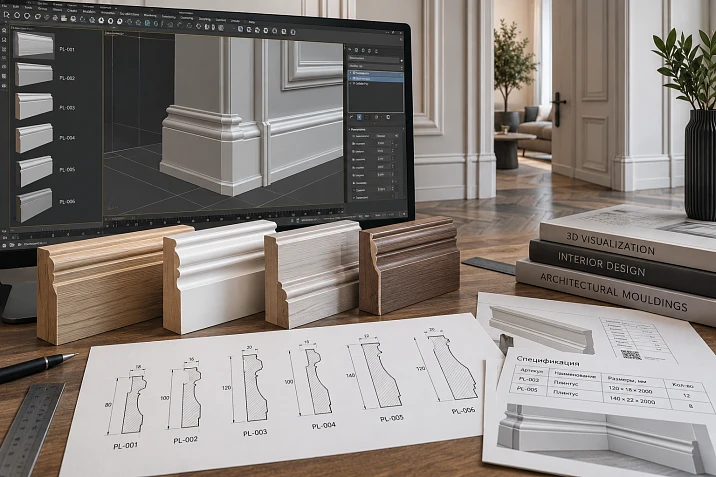
A visualization can look convincing while depicting a baseboard that cannot be purchased. The most common reason is that the scene contains a placeholder rectangle or a generic baseboard chosen only for its appearance. After the project is approved, you have to look for “something similar,” change the height, thickness, and door junctions at a late stage.
The professional workflow should be reversed:
catalog → specific SKU → actual size → 3D → visualization → DWG/details → calculation → specification → order.
Therefore 3D models of skirting boards are not needed for additional render detail. Their main function is to verify the actual profile of a specific product within the interior: height, thickness, projection, relief, and scale next to doors, furniture, and wall finishes.
The main rule:
the visualization must feature the skirting board that can actually be ordered afterward.
If the 3D, DWG, and specification describe a single SKU, the project becomes reproducible. If they diverge, the beautiful image ceases to be a working document.
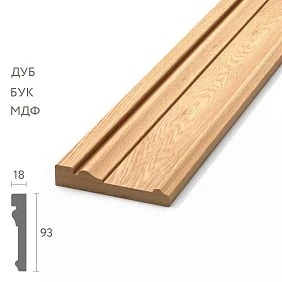
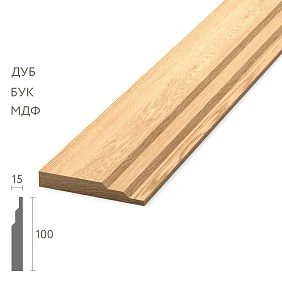
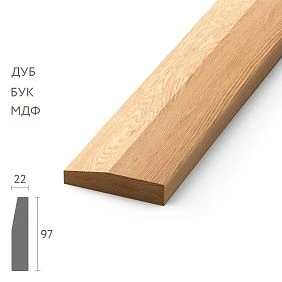
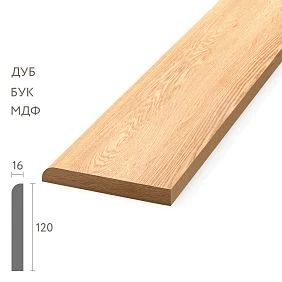
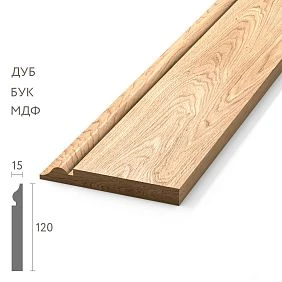
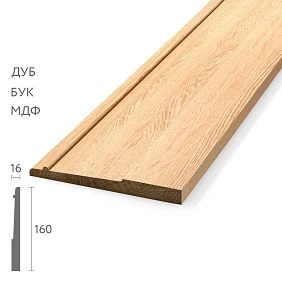
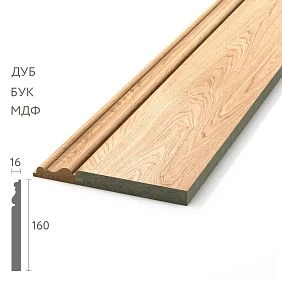

Why a designer needs a 3D model of a real skirting board
A skirting board seems like a small detail, but it runs along the perimeter of the room and constantly interacts with other elements. An error in its profile is repeated over dozens of meters.
A real 3D model allows you to verify several things before working documentation.
Actual height
Height affects the proportions of the lower part of the wall. A 60–70 mm profile and a tall 120–150 mm skirting board create a different visual scale even with the same color.
Thickness
Thickness becomes critical for door casings, wall panels, and built-in furniture.
In a distant render, a difference of a few millimeters can be almost imperceptible. On site, it is exactly what creates a step.
Profile shape
The skirting board can be:
- smooth;
- stepped;
- with a soft rounded edge;
- with fluting;
- with a classic shaped top;
- with a pronounced overhang.
The form affects light and shadow more strongly than a conventional line on the layout.
Interaction with furniture
The scene shows whether the skirting board interferes:
- the wardrobe to stand against the wall;
- the side panel of the kitchen;
- a low cabinet;
- a built-in plinth;
- a decorative panel.
Actual SKU
A 3D object must have a clear connection to the product.
If the scene contains baseboard_07.max, and no one knows its SKU, the visualization is not yet ready for the specification.




Why a simple rectangle along the wall is not enough
A quick approach for a visualizer is to make a Box roughly 15 × 100 mm and stretch it along the walls.
For an early sketch, this may be sufficient. For the final visualization of a project product, it is not.
A real baseboard may have:
- a rounded edge;
- steps;
- a complex top edge;
- recess;
- decorative relief;
- an overhang that is greater than the thickness of the base.
All these features change the light and the junctions.
Light and shadow
In side light, the profile creates its own pattern of shadows.
A conventional rectangle looks flat and can make the interior visually calmer than it will be in reality.
Junction with the door
The rectangle almost always joins with the door casing “perfectly,” because it has no real profile.
A real skirting board can:
- protrude;
- be thinner;
- have a top bevel;
- require a return or end piece.
Joint with the wall panel
The panel has its own thickness. A simple Box does not show who actually protrudes forward.
When a proxy is acceptable
At an early stage, temporary geometry may be used, but it must be explicitly marked as unapproved and replaced before final sign-off.
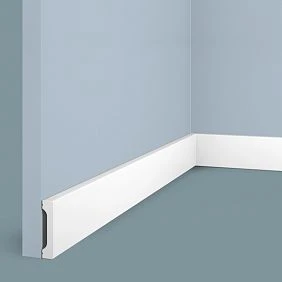
Our factory also produces:


SKU first, then the 3D model
Incorrect sequence:
download a nice generic baseboard → approve the interior → then look for a similar product.
Correct:
the STAVROS catalog → specific SKU → actual dimensions → 3D model → scene.
Why this saves time
It seems like a random model would be faster. But the savings end at the very first technical question:
- what is the actual height;
- what is the thickness;
- what is the material;
- can it be purchased;
- does the required length exist;
- how to join it with the door casing.
If the model is linked to the product from the start, these questions are resolved earlier.
What to save along with the object
Minimum set:
- brand;
- SKU;
- height;
- thickness;
- the material;
- URL;
- 3D file name;
- DWG name, if used.
Internal project code
An additional code can be assigned to the object:
PL-01
and use it in the scene, DWG, and specification.
Get Consultation
Which 3D model parameters must match the actual product
Not all model properties are equally critical.
Height
Must match the actual profile.
If a product is 100 mm, it should not become 120 mm in the scene just for a more striking image.
Thickness
This is a technical parameter that affects the trim, panels, and furniture.
Profile shape
The main visual parameter.
If the profile is simplified too much, the light and shadow and the perception of the product will be incorrect.
Product length
For a 3D scene, the length of the section is design-based and can be anything. However, the product length is stored as a reference characteristic for calculating procurement.
Material
The model must store at least a clear material status:
- Oak;
- Beech;
- MDF;
- for painting;
- another confirmed option.
Article number
The SKU must be fixed in the object name, a custom property, or an external table.
How to check the model scale after import
The first step after import is to measure the object.
Do not rely on visual estimation.
Reference dimension
They verify:
- height;
- thickness;
- overall profile dimensions.
If the real profile is 100 × 16 mm, these values should remain 100 × 16 mm in the scene.
Why errors occur
3D files may use different units:
- millimeters;
- centimeters;
- meters.
During import, an object sometimes appears ten, a hundred, or a thousand times larger or smaller.
What to do
Fix the unit system or the overall import scale so that the reference dimension matches.
After that, do not change the section arbitrarily.
Check once more after conversion
If the object is converted, merged, or moved to another scene, it is better to repeat the reference dimension check.
Why you should not stretch a baseboard in height
If a real SKU has a height of 100 mm, scaling it up to 140 mm with the Scale command creates a product that does not exist.
The visualization becomes more attractive, but it loses its connection to purchasing.
What happens next
The client approves a tall profile.
The assembler finds the actual product 100 mm.
The designer has to:
- change the SKU;
- change the render;
- change the bottom frame margins;
- change the door units.
The right solution
If 100 mm is not enough, you need to select an actual tall profile.
The composition should be built around a product that exists.
What can be changed in the 3D model of the skirting board
Main principle:
design length, standard profile.
You can change:
- the length of the section;
- position;
- turn;
- the path along the wall;
- the number of instances.
You cannot arbitrarily change:
- height;
- thickness;
- relief;
- the cross-section shape.
The material can be adjusted, but do not invent a product
For visualization purposes, it is acceptable to try different colors and finishes.
But the final specification must store the actually approved material and finish.
Geometric simplification
For a distant shot, the mesh can be lightened if the outer profile and overall dimensions remain accurate.
How to model a long baseboard
For long sections, it is better to work from the actual cross-section rather than store a heavy mesh several meters long.
Practical scheme:
actual cross-section → spline/path → sweep/extrusion → instances.
Why this is convenient
A single profile can be quickly run along different walls.
If the layout changes, the length updates without deforming the cross-section.
What must remain unchanged
- height;
- thickness;
- relief;
- profile shape.
What changes
- length;
- direction;
- turn;
- number of segments.
3ds Max
In 3ds Max, it is convenient to use a spline as a path and build a profile along it. It is important that the original cross-section is real.
SketchUp and other programs
The logic is the same: the profile must remain unchanged, and only the path changes.
Why a single six-meter mesh is worse
It is harder to edit, more difficult to reuse, and more often encourages scaling instead of proper rebuilding.
How to check the skirting board in the interior: doors, furniture, and panels
This is one of the main focal points of the article.
In the large render, you need to see:
- which one extends farther from the wall;
- whether the thickness matches;
- where the baseboard ends;
- how the end looks;
- whether the reliefs conflict.
Baseboard thickness vs. door casing thickness
If the baseboard is thicker than the door casing, it will protrude.
If the door casing is thicker, a different step appears.
Both options can be acceptable, but they must be intentional.
Example
Baseboard 18 mm thick and door casing 12 mm:
- the baseboard protrudes forward by 6 mm;
- the end face becomes noticeable;
- side light emphasizes the difference.
In a simplified model, this is easy to miss.
Visual check
It is useful to make a separate close-up shot or a technical viewport screenshot specifically of the door assembly.
This is faster than discovering a conflict after ordering.
Skirting board and doors without casings
For a hidden door, the logic is different.
You need to decide:
- the skirting board meets the frame;
- is interrupted;
- receives an end return;
- continues through the opening;
- changes the material.
Why the usual rule does not work
There is no casing with which to compare the thickness.
The main reference point is the finished wall plane and the actual geometry of the concealed frame.
What to show in 3D
- the break line;
- end face;
- shadow;
- the possible gap;
- the transition to the door leaf.
This is how the client and the contractor see one solution.
3D model of a tall skirting board
A tall profile changes not only the bottom of the wall, but the entire composition.
It can:
- enhance the architectural character;
- visually connect the wall to the door;
- change the distance to the molding frame;
- reduce the free surface.
When a tall profile is appropriate
- tall doors;
- large casings;
- classic panels;
- detailed carpentry;
- spacious room.
When it can be excessive
In a small room, a tall profile can visually raise the lower boundary of the wall too high.
Checking in 3D
Compare two real SKUs, not one profile stretched vertically.
Baseboard and built-in wardrobe
3D is especially useful here because it lets you see the profile and the furniture at the same time.
There are several working scenarios.
Option 1. The baseboard ends at the cabinet
Need to show:
- the ending point;
- end face;
- the side of the cabinet;
- gap.
Option 2. The skirting board runs in front of the plinth
Not always suitable. You need to check whether it creates an accidental protrusion.
Option 3. The furniture gets its own profile
The wall skirting board ends, while the furniture plinth continues the lower line.
Option 4. The cabinet is cut to fit the profile
This solution is only possible if the furniture is designed in advance and the manufacturer receives the exact cross-section.
Why this is decided before production
After the furniture is manufactured, changing the side panels, plinth, and clearances is much more difficult.
Skirting board and kitchen
Kitchen furniture forms a separate lower system.
In 3D, it is necessary to check:
- side panels;
- a tall pencil case;
- the furniture plinth;
- end panel;
- wall baseboard transition to the kitchen;
- material transition.
The wall baseboard should not "pass through" the furniture
If the profile is hidden behind the cabinets, it may not be needed in this area.
If it remains visible at the end of the kitchen, the termination must be decided in advance.
Tall cabinet
The skirting board may prevent the cabinet from sitting flush against the wall.
This is clearly visible from a side angle.
Skirting board and wall panels
The wall panel adds its own thickness and changes the lower junction.
In 3D, it is necessary to check:
- panel thickness;
- skirting board thickness;
- transition line;
- which one protrudes forward;
- the material;
- shadow.
Panel above the skirting board
The panel ends at the top edge of the profile or slightly above.
The end face of the panel needs to be shown.
Skirting board over the bottom edge of the panel
In this case, the profile covers the bottom end face.
The total projection is checked.
One plane
The most accurate option requires calculating all layers of the base.
Why 3D is useful
The section shows exact dimensions, while the visualization shows how the actual projection is perceived in the interior.
Skirting board and slatted wall
The slatted system has its own rhythm.
Possible schemes:
- slats start from the top edge of the skirting board;
- slats extend behind the profile;
- the lower base of the panel replaces the usual skirting board;
- the skirting board runs in front of the slats.
What to check
- the distance to the first slat;
- protrusion;
- lower shadow;
- matching materials;
- end faces.
Main risk
A random gap of a few millimetres between the rhythm of the slats and the skirting board is clearly visible in a close-up shot.
Skirting board and moulding frames
Replacing the skirting board affects the position of the lower frame.
If the profile was 80 mm and became 140 mm, the old lower offset may become too small.
Need to check:
- the top edge of the skirting board;
- the bottom edge of the frame;
- free field;
- the width of the moulding.
Why 3D matters more here than a schematic diagram
The render immediately shows whether the lower part of the wall has become visually overloaded.
Skirting board and sockets
With a tall skirting board, electrical installation products need to be checked.
Compared:
- center mark of the socket;
- top of the profile;
- actual height of the socket frame;
- distance between them.
Main risk
The skirting board must not visually or physically enter the socket frame.
If the profile changes after the electrical work, this junction is rechecked.
How to model internal and external corners
In the background, simplified geometry can be used. In a close-up shot, the corners should be more realistic.
Inner corner
Need to check:
- continuation of the profile;
- joint line;
- absence of mesh overlap;
- relief direction.
External corner
Especially sensitive to errors.
Checked:
- profile match;
- corner cleanliness;
- absence of gaps;
- UV/wood texture direction.
Do not model impossible perfection
The render should show the design principle, but is not required to turn an assembly joint into a physically seamless surface if in reality there will be a connection.
What to do with a curved wall
You can't just bend a rigid real baseboard with the Bend modifier and consider the solution complete.
First, you need to establish whether a real implementation method exists:
- flexible version;
- different material;
- segmentation;
- custom fabrication;
- omitting the profile on the radius.
Why 3D is dangerous in this scenario
The program allows you to achieve any geometry.
But visual possibility does not mean production possibility.
Segmentation
At a large radius, short straight segments can approximately follow the curve.
In 3D, it is useful to show real joints if they will be noticeable.
Skirting material and finish in 3D
Oak or beech skirting in the visualization
A 3D texture shows only a visual approximation.
The final specification must store:
- the real species;
- finish;
- SKU.
Oak
An expressive grain pattern has a stronger effect on the interior with a clear finish.
Beech
Usually perceived as calmer in texture.
Don't match the material only to the picture
If you liked the oak texture in the render, but beech under clear oil is being purchased, that's already a different visual result.
Paint sample and physical sample
To approve the texture and shade, it's better to use Product samples, especially before a large order.
Skirting board for painting
In the render, you can quickly check several scenarios:
- in the color of the wall;
- contrasting;
- in the color of the door casing;
- in the furniture color.
In the color of the wall
The profile is defined by relief and shadow.
In the color of the casing
Connects the lower system with the doors.
Contrasting
Emphasizes geometry and any joints more strongly.
Render limitation
Color in Corona, V-Ray, or another renderer does not replace a real paint sample.
There is no guarantee on screen of an exact match between the material and the object's lighting.
How to organize a 3D skirting board object in the scene
Name baseboard_final3 convenient only at the moment of work. After a few months, it explains nothing.
It is better to use a combination:
brand + SKU + size or type.
For example:
STAVROS_PLT_SKU
Or:
STAVROS_PLT_SKU_100x16.
What should be clear from the name
- manufacturer;
- specific article number;
- that this is a skirting board;
- if necessary — the size.
What to store outside the name
There is no need to turn the object name into a full specification.
Material, finish, URL, and room are more convenient to store:
- in User Properties;
- external table;
- specifications;
- asset manager.
Why this matters for teamwork
The visualizer may finish work earlier than the designer and the specifier.
If an object in the scene has only a conditional name, the next specialist has to re-identify the product.
How to use Instances and the master model
One SKU should have one source master model.
It is better to get all areas of the apartment from one profile:
- instance;
- clone with a shared base;
- sweep along different splines;
- another controlled method.
What this provides
If the SKU changes, the system is updated centrally.
If each area were modeled manually, a new version might only reach part of the rooms.
When a unique object is still needed
For example:
- complex end face;
- unusual angle;
- custom piece next to the cabinet;
- radius segment.
But even such an object must retain the original product cross-section.
Scene check
Before the final render, it is useful to search for old SKU objects by name and make sure they are not left in hidden layers.
What to do if the exact model is not available yet
At an early stage, a temporary proxy can be used.
For example:
PROXY_PLINTH_NOT_APPROVED.
What the proxy should preserve
- approximate height;
- approximate thickness;
- position;
- status “not approved.”
What it should not do
Create the impression that a specific product has already been selected.
When to replace
Before final approval:
- select SKU;
- verify the actual dimensions;
- replace the proxy;
- check the nodes;
- Update the specification.
Why the status matters
If a proxy looks too realistic and is not marked in any way, it can easily be mistaken for an approved position.
3D + DWG: why a designer needs both files
3D and DWG solve different tasks.
3D:
- scale;
- proportion;
- chiaroscuro;
- perception in the interior.
DWG:
- exact cross-section;
- working node;
- dimensions;
- constraints.
SKU:
- purchasing.
The correct combination:
SKU → 3D → DWG → specification.
To work with technical geometry, the following are used DWG of skirting boards, and for the visual library — 3D Decor Models и 3D models for designers.
Where the discrepancy arises
A typical situation:
- the visualizer took a model from the library;
- the designer drew a different profile;
- the order picker selected a third SKU.
The three documents look logical individually, but they describe different products.
How to check
The project table must contain one row:
PL-01 / SKU / 3D_FILE / DWG_FILE / URL.
If any file relates to a different SKU, the item is not ready.
How to go from 3D to linear footage
After the profile is approved, the 3D scene becomes a source of geometric information, but linear footage is better calculated from the working plan or the agreed site map.
Sequence:
- add up the length of all segments;
- exclude openings;
- account for furniture zones;
- break down by rooms;
- convert square meters into product line items.
Why it is convenient to break down by rooms
For example:
LIVING — 12.8 m
HALL — 8.4 m
BEDROOM — 10.2 m
This makes it easier to:
- distribute the delivery;
- monitor stock levels;
- place a repeat order;
- compare actual consumption.
Where 3D helps
The scene helps spot areas that are easy to miss on a plan:
- the short end of the cabinet;
- niche;
- the column;
- the baseboard around the portal.
Why the total meters is not yet an order
Suppose the project requires 28.4 linear m.
This does not yet mean that you can order 28.4 m.
The product is supplied in planks of fixed length.
Need to consider:
- Cutting;
- long walls;
- short offcuts;
- external corners;
- internal corners;
- visible joints.
Example of a practical difference
Suppose there are four sections:
- 3.2 m;
- 3.2 m;
- 2.8 m;
- 1.1 m.
Sum:
10.3 m.
If the product plank is shorter than the long section, joints on two walls are unavoidable.
You need to decide in advance where they are acceptable, and only then calculate the purchase quantity.
Cutting plan
The next stage after the linear meterage:
| Section | Length | Room | Priority of the solid plank |
|---|---|---|---|
| PL-A | 3200 мм | Living room | High |
| PL-B | 3200 мм | Living room | High |
| PL-C | 2800 мм | Hall | Medium |
| PL-D | 1100 мм | Bedroom | Low |
This way, purchasing is based on actual planks, not just the total number of meters.
How to specify the skirting board in the specification
A specification line must link the digital model and the product.
| Field | What to specify |
|---|---|
| Code | PL-01 |
| Manufacturer | STAVROS |
| SKU | specific |
| Material | oak / beech / MDF |
| Profile | actual |
| commercial length | actual |
| Footage | estimated |
| Number of planks | Calculation |
| 3D | file name |
| DWG | file name |
| URL | product page |
| Finish | approved |
| Status | APPROVED |
Why both 3D and DWG are needed in the table
This allows the procurement specialist or a new employee to quickly verify that the visual and working geometry belong to the same SKU.
Calculated linear meters and purchase quantity
These are different data.
For example:
CALCULATED LENGTH: 28,4 m
PURCHASE: 15 pcs
Both values are needed.
Material
If the profile exists in several versions, the specific material must be specified separately.
Checklist before handing over to the kit assembler
Before a commercial request, check:
- the model has a real SKU;
- scale 1:1;
- section is not deformed;
- door casing checked;
- hidden doors verified;
- furniture verified;
- kitchen verified;
- wall panels verified;
- corners resolved;
- footage is calculated;
- DWG matches;
- URL recorded;
- Finish agreed.
The fastest verification formula
SKU = 3D = DWG = size = material = specification.
If at least one element does not match, the position is not yet ready for order.
How to buy a skirting board after 3D approval
The commercial stage begins after the technical selection.
Final chain:
3D → approved SKU → DWG → linear meters → cutting → specification → order.
Buy a wooden skirting board
Request Buying a wooden baseboard becomes workable when the profile, size, material, and quantity are known.
Wooden skirting board
Wooden baseboard in the project, it should be linked not only to the floor color, but also to the door casing, furniture, and the lower wall geometry.
Solid wood skirting boards
solid wood skirting boards additionally require specifying the species and finish.
Wooden trim
wooden moulding made of oak and beech are convenient to consider as a connected system if the project uses skirting boards, moldings, and other profiles made of the same material.
Moldings, cornices, and skirting boards
wooden moldings, cornices, and baseboards it is especially logical to compare them together when the interior is built on a unified language of trim.
Commercial wording
After fixing the SKU, it is natural to use:
- buy wooden skirting board;
- buy wooden floor skirting board;
- buy wooden floor skirting board;
- buy a solid wood skirting board;
- buy tall wooden skirting board;
- buy oak skirting board;
- buy beech skirting board;
- wooden skirting board price;
- buy wooden skirting board price;
- order a skirting board for a design project.
But none of these queries replaces a technical check of the profile in the scene.
How to use professional STAVROS materials
On the official STAVROS downloads page, a general DWG archive of products, 3D models of geometric items, and a PDF catalog of wooden and MDF mouldings are currently available. This allows selection, visualization, and working documentation to be kept within a single product system.
STAVROS for designers and architects useful as a professional route when a project needs not only product cards but also digital materials, samples, and related project work.
How to build a studio library
Practical structure:
01_CATALOG
02_3D
03_DWG
04_SAMPLES
05_APPROVED_SKU
06_PROJECTS
Do not store only a beautiful render
Upon project completion, it is useful to save:
- SKU;
- 3D file;
- DWG;
- photo of the unit;
- actual square footage;
- the material;
- finish;
- installation comments.
On the next project, this information becomes a verified library rather than just an archive of images.
Sample after 3D
3D shows geometry well, but it does not replace physical verification of the surface. For solid wood, it is especially useful to compare the approved model with a real sample of the material and finish.
Common mistakes when working with 3D models of skirting boards
Mistake 1. First download a beautiful model, then look for the product
Why it happens: it is faster to start rendering this way.
Consequence: the final SKU differs in height and thickness.
How to prevent: product first, then model.
Mistake 2. Not checking the scale
Why it happens: the object looks normal visually.
Consequence: the baseboard in the scene differs from the real one by ten or a hundred times.
How to prevent: measure a reference dimension after import.
Mistake 3. Stretching the profile along the height
Why it happens: visually you want a taller element.
Consequence: a product that doesn't exist appears in the scene.
How to prevent: choose a different SKU.
Mistake 4. Ignoring the thickness of the door casing
Why it happens: the door unit does not fall within the main view.
Consequence: a step appears on the object.
How to prevent it: perform a separate close-up check.
Mistake 5. Run the skirting board through built-in furniture
Why it happens: modeling is done automatically along the perimeter.
Consequence: the furniture cannot be installed as shown.
How to prevent it: split the path into realistic segments.
Mistake 6. Bend a rigid profile along a radius
Why it happens: the modifier allows this to be done in seconds.
Consequence: the visualization promises a solution that does not exist.
How to prevent: first confirm the technology.
Mistake 7. Forgetting to update all instances after replacing the SKU
Why it happens: some objects have become unique.
Consequence: two profiles end up in the same scene.
How to prevent: a master model and a final check by name.
Mistake 8. Calculating the square footage directly from a single render
Why it happens: the scene is perceived as a complete project.
Consequence: hidden areas, door gaps, and niches are missed.
How to prevent: calculate using an agreed-upon plan/map.
Mistake 9. Not accounting for product length
Why it happens: only the total linear meters are known.
Consequence: a real cutting plan cannot be obtained.
How to prevent: a plank map after measuring.
Mistake 10. Treating wood texture as an exact color reference
Why it happens: the material looks realistic in the render.
Consequence: real oak or beech differs.
How to prevent: an approved sample and a finish test.
When a detailed 3D model of the skirting board is not needed
Not every project requires heavy geometry and a large profile render.
Concept stage
At the early concept stage, a proxy is acceptable.
But it must be clearly marked as unapproved.
Distant angle
If the skirting board occupies only a few pixels, a simplified profile can be used.
The key is to preserve the actual height and overall projection.
Reused verified project
If the same SKU and the same assembly are used, the existing library can be reused.
When an exact model is almost mandatory
- large door assemblies;
- tall skirting board;
- complex classical profile;
- wall panels;
- built-in furniture;
- natural wood;
- close-up visualization;
- an expensive project where the product is approved based on a render.
Five practical scenarios
Small bedroom
The baseboard is checked next to:
- headboard;
- cabinets;
- a door;
- the lower wall frame.
The main risk is a profile that is too tall, which reduces the free field.
Living room with classic frames
Changing the baseboard height requires rechecking the bottom offsets of all frames.
In 3D this is visible faster than in a table.
Hallway with many doors
The main task is the joints with the door casings.
Even a small conflict will repeat at every door.
Kitchen with built-in tall cabinets
It is necessary to check the ends of the skirting board and the possibility of placing furniture against the wall.
House with wood panels
Here the skirting board must be coordinated with:
- species;
- relief;
- thickness;
- finish;
- panel lines.
3D helps verify the overall materiality, DWG — the technical geometry.
FAQ
Where can I get a 3D model of the STAVROS skirting board?
You can start with the STAVROS downloads section and the product pages for specific items. For the final project, the model needs to be linked to a real SKU and the dimensions checked.
What matters more in a 3D skirting board: height or thickness?
Both parameters. Height determines the visual proportion, thickness — the joints with the architrave, panel, and furniture.
Can a skirting board be modeled with a regular Box?
For an early sketch — yes. For final approval, it is better to use the actual profile or a correctly built model of the specific SKU.
Can a model be stretched only along its length?
Yes. The length of the section is determined by the project. The profile, height, and thickness must remain as per the product.
Can the height of the model be increased?
No, if the model represents a real SKU. A different product must be selected.
What should be done if there is no exact 3D model?
Use a proxy with the actual dimensions and NOT APPROVED status, then replace it before final approval.
How do I check the scale?
Measure the height and thickness after import and verify them against the product card.
How to link 3D with DWG?
Use a single SKU and store both file names in the specification or project table.
Is it necessary to model the cuts at all corners?
For distant shots — no. For a close-up or a complex joint, it is better to show a realistic connection.
How to match the baseboard with the trim?
Compare the thickness and profile in 3D, then confirm the joint using the DWG or section view.
How to match the skirting board with the wardrobe?
Decide where the profile ends and give the furniture maker the actual thickness and height before production.
How is the linear meterage calculated?
Based on the actual project sections, excluding openings and areas where there is no skirting. After that — cutting according to commercial lengths.
Is it necessary to order a sample?
For natural wood, a complex profile, and a large project — it is useful. 3D does not fully convey the texture and actual shade.
How should the model be stored in the studio library?
With a name that includes the brand and SKU, plus a link to the product page, dimensions, and the date of the last check.
Can one model be used in multiple projects?
Yes, if the SKU is current and the dimensions have been double-checked.
What should be passed to the order assembler?
SKU, material, size, product length, linear meters, number of planks, URL, 3D name, DWG name, and finish.
Bottom line: a 3D model of a baseboard should describe the product, not just look good
A professional 3D model is valuable when it remains part of a real project workflow:
catalog → SKU → 3D → 1:1 scale → door casing → furniture → panels → corners → DWG → linear meters → cutting → specification → order.
If a generic baseboard is used in the scene, the visualization may be aesthetically strong but technically unreliable.
If a real profile is used, the designer understands in advance:
- how tall the baseboard looks in the room;
- how it protrudes relative to the door casing;
- whether it interferes with the cabinet;
- how it meets the panel;
- where end caps are needed;
- what happens at the corners;
- which SKU goes into procurement.
This way, 3D stops being just a presentation and becomes a tool for specifying the design project.