Article Contents:
- After payment, we first lock in the baseline version of the order
- You cannot track production against an outdated specification
- Not the entire order moves along a single route
- Russian-language readiness statuses make the report clearer
- The estimated date should not automatically become the installation date
- The next stage makes the status manageable
- Why you can't ask to expedite the entire order at once
- Yellow risk should not be tied to a universal number of days
- It is necessary to separate the causes on the supplier's, customer's, and project's side
- A small item should not get lost in a large completion percentage
- If SKU readiness has diverged, first check the schedule rather than calling a vehicle
- The question "when will it be ready?" should be replaced with eight specific questions
- Fully manufactured does not yet mean the order is fully assembled
- A fully assembled order is not yet equal to permission to ship
- How to distinguish warehouse availability from production availability
- How to handle a mixed line item: part is available, part needs to be manufactured
- How to handle a quantity increase after payment
- How to handle a quantity decrease after payment
- How to handle an SKU change after payment
- How to stay in control when an order has 30 SKUs
- How to log status changes so you can see real progress
- How to link status to the responsible contact
- The confirmed date should apply to a specific line item, not the entire order
- How to distinguish a forecast from a confirmed date
- If the confirmed date changes, we record the reason
- How to work if the site moved the required date later
- How to work if the site moved the required date earlier
- How to determine that the finished part actually covers the installation queue
- How to control an order if it consists of several queues
- How not to confuse criticality and cost
- How not to confuse quantity and criticality
- Construction materials Moscow wholesale: the Moscow cluster should not turn the article into a page about choosing a supplier
- How to manage an order without a complex management system
- How to work with the weekly report when nothing has changed
- When the "DONE" status should be removed
- How to handle a single disputed line when everything else is fully ready
- How to handle a small order
- How to verify order readiness on the eve of moving to pre-shipment inspection
- Practical scenario: low readiness percentage, but the nearest installation is protected
- Practical scenario: the date was confirmed, but the customer delayed the finishing themselves
- Practical scenario: the supplier reported "done", but they were only referring to production
- Practical scenario: four curtain rods matter more than a hundred baseboards
- How not to lose touch with the original specification in weekly reports
- How to keep a history of changes in the completed quantity
- How to assess risk on a line that moves slowly but steadily
- How to handle a line where the completed quantity suddenly decreased
- Building materials wholesale Moscow: control should be calm, not emergency
- Buy building materials wholesale Moscow: after payment, the task shifts from selection to managing execution
- How to handle the dependency of one item on another
- How to control readiness by zones in parallel with control by SKU
- How to handle a single line split into multiple installation queues
- How to assess whether a separate request is needed for a critical line
- How to handle a deadline adjustment without a blaming wording
- How to check whether the required object date is outdated
- How to proceed if the object already has part of the required SKU
- How to handle a reserve without masking a delay
- How to proceed if one line is ready earlier than the confirmed date
- How to understand item readiness if the quantity is picked but labeling is not yet complete
- What to do if all lines have the status “READY” but the order has not yet been physically assembled
- 1. Call only to ask "when will it be ready?"
- 2. Have a single status for the entire order
- 3. Look only at the completion percentage
- 4. Treat the cost percentage as a readiness indicator
- 5. Not distinguish between warehouse and production
- 6. Treat partial readiness as complete
- 7. Treat completion of production as readiness for shipment
- 8. Not record the confirmed date
- 9. Pass the forecast to the client as a promise
- 10. Not know the next stage
- 11. Not tracking the duration of a single status
- 12. Not flagging critical items
- 13. Asking to speed everything up indiscriminately
- 14. Not recording the reason for a hold
- 15. Recording waiting for the customer's decision as a supplier delay
- 16. Losing a small SKU in a large order
- 17. Shipping the finished part without assessing the consequences
- 18. Not linking delivery status to the required installation date
- Should status be tracked for each line of a small order?
- What matters more: the completion percentage or the readiness of the nearest queue?
- What should be considered a confirmed date?
- Can a manufactured item be considered ready for shipment?
- What should be done if only part of the quantity is ready?
- When does a line item become yellow for risk?
- How should waiting for the customer's decision be accounted for?
- Should the entire order be expedited if one line is behind?
- When does it make sense to ship the completed part separately?
- Where does readiness control end and pre-shipment inspection begin?
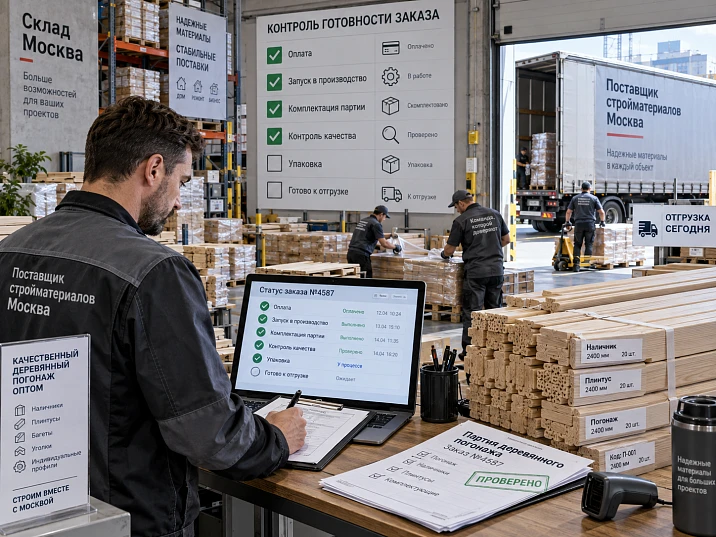
The order of wooden moulding for the project has already been calculated, approved and paid for. SKUs are locked, materials and lengths are approved, and the quantity for each line item is determined. But the vehicle has not yet been assigned: some items are in stock, some are in production, several lines are undergoing inspection, and for one line item there is still no confirmed readiness date.
This is exactly the gap that is most often described with overly general wording: "order in progress", "almost ready", "waiting on a few items", "we'll be able to ship next week". For a small order this is sometimes enough. For a project batch of 15–30 SKUs, where installation is tied to a calendar, it is not.
The buyer needs not a general estimate of the readiness percentage, but the state of each purchasing line: what is already fully ready, what is in production, what is awaiting inspection, what is partially ready, what is on hold due to an open question, and which date is confirmed for critical items.
Therefore construction materials supplier Moscow within such a project is considered not only as a source of goods, but also as a party from which the buyer needs clear information about the progress of a specific order.
Work sequence:
ORDER CONFIRMED → BASE SPECIFICATION → "STOCK / PRODUCTION" SPLIT → STATUS FOR EACH SKU → CURRENT STAGE → NEXT STAGE → CONFIRMED READINESS DATE → COMPARISON WITH THE PROJECT'S REQUIRED DATE → RISK ASSESSMENT → ORDER PHYSICALLY READY → TRANSITION TO PRE-SHIPMENT INSPECTION.
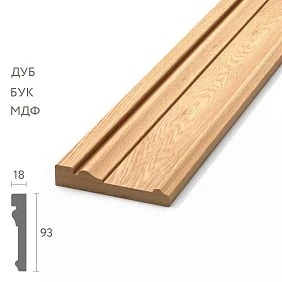
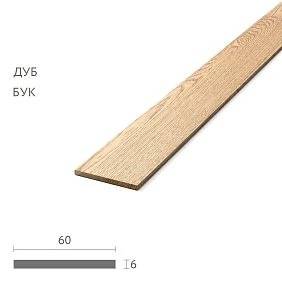
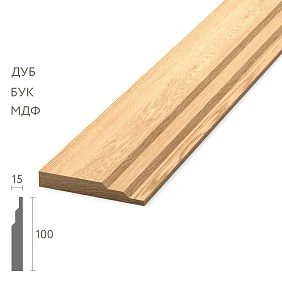
After payment, we first lock in the base version of the order
Readiness control only makes sense relative to a specific version of the order. At the moment of confirmation, the following must be locked in:
- SKU;
- the material;
- size or cross-section, if this is important;
- product length;
- quantity;
- finishing;
- specification revision;
- zone or queue of the object;
- required date at the object.
For example:
| SKU | Material | Length | Quantity | Finish | Revision | Required at the object |
|---|---|---|---|---|---|---|
| PLT-A | Oak | 2400 мм | 120 | F01 | 08 | 20.09 |
| MLD-A | Beech | 2400 мм | 86 | F02 | 08 | 21.09 |
| KZ-A | Oak | 2000 мм | 28 | F01 | 08 | 22.09 |
After that, all further readiness information refers specifically to this version. If the specification changes, that is already a separate event, not an "ordinary continuation of production."




Production cannot be tracked using the old specification
The real mistake looks simple. The order was paid according to revision 08. After payment, the designer changed MLD-A to MLD-B. The purchaser keeps asking, "when will the whole order be ready?", while production is moving according to the original confirmed configuration.
Before discussing timelines, we need to answer the question:
what is currently the active order?
If the change is accepted, it must receive a new approved revision and a clear impact on work already completed. If the change is still under discussion, the old production line must not disappear from the history.
Readiness status does not replace specification change management.
Our factory also produces:



Not the entire order moves along a single route
Within a single batch, some items may be in stock, some in production, and some mixed.
For example:
| SKU | Ordered | Route | Current status |
|---|---|---|---|
| PLT-A | 120 | In stock | Being assembled |
| MLD-A | 86 | Production | In production |
| KZ-A | 28 | 20 in stock + 8 in production | Partially ready |
Therefore, the entire order cannot be described with a single word, "in production." The skirting board may already be physically available, the molding may be in the production cycle, and the cornice may consist of both finished and in-production parts.
Get Consultation
Russian readiness statuses make the report clearer
For procurement control, a simple set of statuses is sufficient:
- ORDER CONFIRMED — the line has been accepted for processing;
- STOCK CHECK — the warehouse balance or specific variant is being verified;
- IN PRODUCTION — the item is being manufactured;
- IN QUALITY CONTROL — the items have been manufactured and are undergoing inspection;
- PARTIALLY READY — part of the ordered quantity is ready;
- READY — the specific line is fully ready in terms of quantity;
- ON HOLD — there is an issue blocking further progress;
- READY FOR PRE-SHIPMENT INSPECTION — the order is physically assembled and can move to the next process.
The last status does not yet mean that the vehicle can already leave. After it, a separate pre-shipment inspection begins, which confirms the physical composition of the finished batch.
The order readiness board shows specific line items, not an overall percentage
| SKU | Ordered | Status | Done | Remaining | Confirmed date |
|---|---|---|---|---|---|
| PLT-A | 120 | done | 120 | 0 | 18.09 |
| MLD-A | 86 | In production | 48 | 38 | 21.09 |
| MLD-B | 42 | IN QUALITY CONTROL | 42 | 0 | 19.09 |
| KZ-A | 28 | Partially ready | 20 | 8 | 20.09 |
This table shows exactly which items make up the remaining risk. It is far more useful than saying "the order is about 80% ready."
Why "the order is 90% ready" says almost nothing about risk
The total order is 500 units. 450 are done. Formally, readiness is 90%.
In one scenario, the missing 50 are all the KZ-A for the main hall. Without it, the nearest installation queue cannot be closed out.
In another scenario, the missing 50 are baseboards for the third phase, which will not be needed until a month from now.
The percentage is the same. The consequences are opposite.
Therefore, the buyer must see:
readiness by SKU + required date at the site + criticality of the item.
Construction material suppliers Moscow: readiness for production and readiness for shipment are different states
Even if the item is manufactured, quality control, kitting, labeling, and packaging may still remain before physical shipment.
Therefore, the status:
MANUFACTURED
is not equal to the status:
READY FOR DISPATCH.
This is especially important for a large project batch, where one line item may be fully produced but not yet assembled into the order, while another is already in the warehouse but awaiting final labeling.
“Partially ready” is a separate status, not half a solution
100 moldings ordered. 64 ready.
This is neither “READY” nor “NOT READY.” It is:
64 out of 100 — PARTIALLY READY.
Then the project chooses a strategy:
- wait for all 100;
- consider partial early shipment;
- do not split the delivery because of logistics;
- use the ready part only for a specific queue.
The supplier should not have to guess whether the project needs a partial shipment. They report the line status, and the buyer compares it with the site schedule.
Each row requires four different dates
One of the most common causes of false expectations is mixing different date types.
| Date | What does it mean |
|---|---|
| Requested date | When the object would like to receive completion |
| Estimated date | Current forecast at the time of the report |
| Confirmed completion date | The date that can be relied upon as current confirmation |
| Actual completion date | When the row actually received the "DONE" status |
These four dates cannot be stored in a single "deadline" column.
An estimated date should not automatically become the installation date
The supplier said: "approximately September 20." The site manager scheduled installation for September 21. This created a dependency that no one had actually confirmed.
It is better to pass the confirmed date to the project calendar, and use the estimated date as a forecast for risk assessment.
If there is no confirmation yet, the installation task should have an appropriate caveat rather than appear as a guaranteed event.
A weekly order report is better than daily "any updates?" calls
For a large batch, a short regular report is convenient.
| SKU | Previous status | Current status | Next stage | Confirmed date |
|---|---|---|---|---|
| PLT-A | Being assembled | done | Pre-shipment inspection | 18.09 |
| MLD-A | In production | In production | Quality control | 21.09 |
| KZ-A | Availability check | Partially ready | Completion of missing items | 20.09 |
If the status hasn't changed, that's information too. The buyer can see which line has progressed over the week and which hasn't.
If the status hasn't changed, you need to look at how long it has already been in that state
Line MLD-A can be in the "IN PRODUCTION" state on September 10, September 13, and September 16. The same status by itself doesn't indicate a problem. But if the required date at the site is approaching, the duration without transitioning to the next stage becomes a useful signal.
For internal control, you can add a field:
DAYS IN CURRENT STATUS.
For example:
| SKU | Status | Days in status | Next stage | Required at the object |
|---|---|---|---|---|
| MLD-A | In production | 6 | Quality control | 21.09 |
| KZ-A | Partially ready | 2 | Completion of missing items | 22.09 |
Six days in one status doesn't automatically mean a delay. But it's a reason to ask a specific question about the next stage and the date it will be reached.
The next stage makes the status manageable
The phrase "in production" describes the current state but does not show forward movement. Therefore, for each critical line item, it is useful to see the next expected stage.
For example:
Currently: IN PRODUCTION.
Next stage: QUALITY CONTROL.
Planned transition date: 19.09.
Such an entry is far more informative than the message "working on it." It allows you to check whether movement occurred in the next report.
Critical SKUs need to be highlighted separately
Not all items in a large order are equally important for the nearest installation. It is convenient to divide them by criticality.
- K1 — without the item, the nearest installation queue stops;
- K2 — the item is needed within the next two weeks;
- K3 — the item belongs to a later queue.
If both MLD-A and KZ-A are in production, the buyer looks at K1 first, not at the line with the larger quantity or higher value.
Why you can't ask to expedite the entire order at once
If one critical item is approaching its required date, that doesn't mean the entire order needs to be switched to urgent mode.
First, you need to understand:
- which line creates the risk;
- what its current stage is;
- what the next stage is;
- whether there is a confirmed date;
- whether installation can be rescheduled;
- whether there is a ready part of the order that can support another front.
The purpose of control is to see the risk in advance and manage that risk itself, rather than demanding acceleration of every item indiscriminately.
Early warning is best captured with a simple color-coded risk
To link procurement and the construction calendar, it is convenient to have three risk states:
- GREEN — confirmed readiness fits the object's requirement;
- YELLOW — the deadline has not yet been missed, but there is little time buffer or there is uncertainty;
- RED — the confirmed date no longer matches the required installation schedule.
Color does not replace the actual status. A line can be "IN PRODUCTION / YELLOW risk" or "IN QUALITY CONTROL / GREEN risk".
Yellow risk cannot be tied to a universal number of days
There is no rule that "three days before installation is always yellow." For one item, production is fast and the object's warehouse is nearby. For another, re-manufacturing takes significantly longer, and installation depends specifically on it.
Yellow risk can arise when:
- transition to the next stage is taking too long;
- no confirmed date;
- there is an open question regarding execution;
- the required date for the object is already near;
- only one critical line remains;
- readiness depends on the customer's decision.
The early warning rule is set by the project itself.
A suspended item must have a clear reason
A "SUSPENDED" status without a reason is useless. It makes it impossible to understand what to do next.
The report must contain at least two fields:
- REASON FOR SUSPENSION;
- RESPONSIBLE FOR RESOLVING THE REASON.
For example:
| SKU | Reason | Responsible | What you need |
|---|---|---|---|
| MLD-B | Finish not approved | Customer | Confirm F03 |
| KZ-A | Quantity clarification | Project team | Resolve the issue for 8 pcs. |
Then the buyer sees not only the suspension but also the specific action to continue.
Reasons need to be separated by supplier, customer, and project side
Not all suspensions can be recorded as a "supplier delay."
Useful classification:
- SUSPENSION ON THE SUPPLIER'S SIDE — order fulfillment issue;
- SUSPENSION ON THE CUSTOMER'S SIDE — no approval or decision;
- TECHNICAL SUSPENSION — design review required.
This history is especially useful after order completion, when the reasons for actual timelines are evaluated.
A small item should not get lost in a large completion percentage
The order consists of:
- 300 skirting boards;
- 180 moldings;
- 4 cornices.
The first two groups are fully ready, four cornices are still in production. By total quantity, the order is almost complete, but if it is specifically the cornices that are needed for the main hall, they may be the only critical line item.
That is why readiness is tracked line by line, not by percentage of quantity or value.
If SKU readiness has diverged, we first check the schedule rather than calling a vehicle
Scenario:
- skirting board — READY;
- moulding — READY;
- cornice — another 10 days.
The decision should not automatically sound like “send everything that is available.”
First, check:
- the required dates for each item on site;
- whether there is space to store the finished part;
- whether a separate expensive vehicle will be required;
- can installation really start without a cornice;
- won't splitting the batch create additional confusion;
- when the readiness of the remaining line is confirmed.
Only after that is a decision made on partial or full shipment.
We link order status to the installation plan for the coming weeks
| SKU | Supplier status | Required at the object | Installation | Risk |
|---|---|---|---|---|
| PLT-A | done | 20.09 | 23.09 | Green |
| MLD-A | IN QUALITY CONTROL | 21.09 | 24.09 | Green |
| KZ-A | In production | 22.09 | 23.09 | Yellow |
Now you can see not just the manufacturing state, but its impact on the construction site.
construction materials suppliers moscow: risk needs to be seen before the deadline is missed
Good control does not wait for the moment when the confirmed date has already been missed. It connects five parameters in advance:
- current status;
- next stage;
- confirmed readiness date;
- required project date;
- risk level.
If the critical KZ-A is still in production, the confirmed date is approaching installation, and there is almost no time buffer, the buyer sees the risk before the actual delay.
The question "when will it be ready?" should be replaced with eight specific questions
A general question almost always produces a general answer. For a large batch, it is more useful to ask by order structure.
- Which lines are already fully ready?
- Which items are in production?
- Which products have already been manufactured and are undergoing quality control?
- Are there lines with the status "ON HOLD"?
- What is the reason for each hold?
- What is the next stage for critical SKUs?
- What is the confirmed completion date for each critical line?
- What has changed compared to the previous report?
This approach turns communication with the supplier from an exchange of promises into a managed order report.
Fully manufactured does not yet mean the order is fully assembled
All items may be physically produced, but the order is not yet ready as a single batch.
After manufacturing, the following may remain:
- final inspection;
- marking;
- sorting by groups;
- quantity assembly;
- packaging;
- verification of compliance with the current specification.
Therefore, the status:
PRODUCTION COMPLETED
does not always mean:
THE ORDER IS FULLY ASSEMBLED.
A fully assembled order does not yet equal permission to ship
Even after full assembly, a separate checkpoint may remain:
- customer pre-shipment inspection;
- quantity and SKU verification;
- resolution of one disputed package;
- preparation of the final packing list;
- checking the site's readiness for acceptance;
- transport scheduling.
This article ends at the state:
READY FOR PRE-SHIPMENT INSPECTION.
Next begins a separate process: physical inspection of the already assembled batch before actual shipment.
Wooden skirting board: the warehouse stock can be assembled faster, but this is not yet the entire batch
Suppose 120 planks are ordered wooden baseboard PLT-A. All 120 are in stock.
For this line, the path is short:
STOCK CHECK → IN ASSEMBLY → READY.
But MLD-A is still in production nearby. Therefore, the entire order cannot be called ready just because the mass-produced PLT-A line has already been assembled.
Readiness for one item and readiness of the entire order are different levels.
Wooden moulding: production is better tracked by stages, not by an overall percentage
for wooden molding 86 units of MLD-A have been ordered.
For example:
- 48 units have already been manufactured;
- 38 are in production;
- the finished part is not yet considered a separate batch for shipment;
- the final inspection of the entire line has not yet been completed.
Correct status:
PARTIALLY READY — 48 of 86.
This gives the buyer a realistic picture without the false impression that the molding is almost ready.
Wooden cornice: a small line item can become critical for the entire schedule
In order 28 wooden crown moldings KZ-A. Twenty are already ready, eight are still in progress.
By quantity, the line is almost complete. But if these eight are needed for the central hall of the first phase, they are the ones that determine the project risk.
Therefore, for critical small SKUs, the following are especially important:
- current ready quantity;
- remaining stock;
- next stage;
- confirmed date;
- required date of the item.
How to distinguish warehouse availability from production readiness
A warehouse line usually requires confirming availability, quantity, execution, and the ability to reserve the required volume. A production line requires completing the technological stages of manufacturing and inspection.
Therefore, it is useful to have a separate field in the readiness board:
READINESS SOURCE: WAREHOUSE / PRODUCTION / MIXED.
This way the buyer understands why two lines with the same required date are progressing at different speeds.
How to work with a mixed line: part is available, part needs to be manufactured
28 KZ-A ordered. 20 are in stock, 8 more need to be manufactured.
Bad entry:
"in stock".
It hides the missing 8.
Good record:
20 done / 8 in production / final status — PARTIALLY DONE.
Only when all 28 are available in the required finish does the line receive the status "DONE".
How to handle a quantity change after payment
After order confirmation, the project may change the quantity of one item. For example, MLD-A was 86, now it is 92.
You cannot simply correct the number in the current report and continue calculating the old readiness.
You need to:
- record the specification change;
- determine how much of the new quantity is already covered by the finished stock;
- clarify whether the additional 6 affect the deadline;
- update the confirmed date if it has changed;
- keep the history "86 → 92".
Otherwise, the buyer will compare the current readiness with an outdated volume.
How to handle a decrease in quantity after payment
The reverse situation: there were 86 MLD-A, now there are 78. If 82 have already been produced, the project received four potentially excess items.
The order status should show not only "ready" but also the impact of the change:
- how many were confirmed;
- how many are now needed;
- how many have already been manufactured;
- whether there is a surplus;
- what commercial decision was made.
This is no longer purely a matter of timelines, but without it the readiness of the line can be misinterpreted.
How to handle a SKU change after payment
It was MLD-A, now it's MLD-B. Even if the quantity doesn't change, the previous readiness status no longer applies to the new configuration.
For example, MLD-A is 60 of 86 ready. After an official replacement with MLD-B, you can't write "60 of 86 ready" without specifying that this is a different item.
The new line starts its own readiness path. The old one is kept in history as modified after order confirmation.
How to stay in control when an order has 30 SKUs
A large order is hard to control if the buyer reads every line the same way. It's convenient to filter the board by three criteria:
- criticality;
- risk;
- status change over the past week.
For example, the following are shown first:
- all K1;
- all red;
- all yellow;
- all items without a confirmed date;
- all rows that haven't changed status for a long time.
The remaining green rows stay visible but don't require daily attention.
How to record status changes to see real progress
It's useful to store not only the current state but also the date of the last change.
| SKU | Current status | Change date | Previous status |
|---|---|---|---|
| PLT-A | done | 18.09 | Being assembled |
| MLD-A | In production | 12.09 | Order confirmed |
| KZ-A | Partially ready | 16.09 | Availability check |
This shows that MLD-A hasn't changed for six days, while KZ-A progressed quite recently.
How to link status to the responsible contact
If one line item requires a customer decision and another requires production information, it is useful for the buyer to know who holds the next step.
The board can have a field:
NEXT ACTION / OWNER.
For example:
| SKU | Next action | Responsible |
|---|---|---|
| MLD-B | Approve finish F03 | Customer |
| KZ-A | Complete 8 pcs. | Production |
Then the issue does not hang in the impersonal status of “waiting.”
The confirmed date must relate to a specific line item, not to the entire order
The phrase “the order will be ready on September 21” can hide different realities. PLT-A is already ready on the 18th, MLD-A on the 21st, KZ-A on the 24th. If a single common date is given, the buyer does not understand which line items are limiting shipment.
Therefore, the confirmed date is stored by SKU or by a homogeneous group if it truly has one route.
In this case, the overall order completion date is determined by the last mandatory line that the project decided to wait for before the overall shipment.
How to distinguish a forecast from a confirmed date
The forecast may change as work progresses. The confirmed date should be used more carefully: if it is changed, the reason for the change should be visible.
For example:
| SKU | Forecast 12.09 | Confirmed 15.09 | Actually ready |
|---|---|---|---|
| MLD-A | 20.09 | 21.09 | 21.09 |
| KZ-A | 20.09 | 22.09 | ___ |
Such a history allows you to later understand where the forecast was inaccurate and where the order itself changed.
If the confirmed date changes, we record the reason
A date change without explanation looks the same, although the reasons can be fundamentally different.
Options:
- change in quantity by the customer;
- SKU change;
- unapproved finish;
- technical hold;
- production reason;
- demand shift by the project itself.
For supplier and project evaluation, these reasons must not be mixed.
How to proceed if the project moved the required date later
If installation shifted from September 23 to 30, the line can turn from yellow back to green without any change from the supplier. This is not a production improvement, but a change in the project's demand.
Therefore, the board must separately contain:
- confirmed readiness date;
- required date at the object.
The risk is calculated between them rather than stored as a fixed assessment.
How to proceed if the site moved the required date earlier
The opposite situation: installation accelerated. KZ-A was green with a need date of September 30, but the new date is September 23. With the previously confirmed readiness of September 25, the line turns red.
This does not mean the supplier suddenly started falling behind the original plan. The construction calendar changed.
This distinction matters so that options can be discussed correctly:
- reschedule installation;
- assess partial readiness;
- discuss the possibility of accelerating a specific line;
- change the delivery queue.
How to handle a partially ready batch without premature logistics
Partial readiness is information, not a command to "ship."
For example, 64 of 100 MLD-A are ready. Before deciding on an early shipment, you need to understand:
- whether the 64 units fully cover the nearest zone;
- whether a second transport will be needed;
- whether there is storage space at the facility;
- whether two parts of the same batch will get mixed up;
- when the remaining 36 will be ready;
- whether the supplier needs additional packaging grouping.
If an early shipment does not provide real benefit for installation, you can safely wait for the full quantity.
How to determine that the ready part truly covers the installation queue
The total quantity is not enough. You need to match the ready part against the specific set of SKUs in the first queue.
For example:
| First phase | Required | Done | Can we start? |
|---|---|---|---|
| PLT-A | 40 | 120 | Yes |
| MLD-A | 28 | 48 | Yes |
| KZ-A | 8 | 0 | No |
Despite the high overall completion percentage, the first phase is incomplete due to KZ-A.
How to track an order if it consists of several phases
For a large project, it is convenient to add a "phase" column:
- Phase 1 — the nearest installation;
- Phase 2 — the next stage;
- Phase 3 — the later zone.
Then the purchaser sees not only the item's status but also its place in the construction sequence.
Line K1 from the first phase requires more attention than K1 from the third if the third phase is still a month away.
How not to confuse criticality and cost
An expensive line item is not always critical for the nearest installation. Conversely, four inexpensive curtain rods can hold up the handover of a hall.
Therefore, it is better to prioritize control based on impact on the schedule, not on the price of the item.
Cost is needed for commercial management, criticality — for the calendar. These are different attributes.
How not to confuse quantity and criticality
300 skirting boards look more important than four curtain rods only at the level of quantity. For installation, it may be the opposite.
On the readiness board, quantity shows scale, but priority is set by:
- required date;
- the role of the SKU in the zone;
- the ability to start work without it;
- the availability of a replacement or reserve;
- time until the next stage.
building materials Moscow wholesale: the Moscow cluster should not turn the article into a page about choosing a supplier
The scenario of this article begins after the selection and payment. The reader is not comparing stores, showrooms, or the terms of different companies. They are managing a project order that has already been placed.
Therefore, geography is secondary here. The main practical task is to obtain transparent statuses by SKU and connect them to the construction calendar.
How to manage an order without a complex management system
For most projects, one table is enough. Minimum columns:
- SKU;
- ordered;
- done;
- current status;
- status change date;
- next stage;
- confirmed readiness date;
- required date for the site;
- criticality;
- risk;
- REASON FOR SUSPENSION;
- responsible person.
This table is already significantly stronger than messaging back and forth asking, "How's the order coming along?"
How to handle the weekly report when nothing has changed
The report does not need to be filled with artificial changes. If MLD-A is still in production, that is what is stated.
But it is useful to update:
- days in the current status;
- confirmed date;
- risk relative to the object;
- comment on the next stage.
This way, "no changes" becomes full-fledged information rather than an empty line.
When the "DONE" status needs to be removed
Rarely, but it is possible: a line was considered done, then a project change, an execution error, or the need for an additional check was identified.
In that case, you cannot keep the old status just for a nice percentage.
The string is translated to:
ON HOLD
or another current status with a reason.
The history of previous readiness is preserved, but the current board must show the real state.
How to handle one disputed line if the rest are fully ready
If 19 out of 20 SKUs are ready and one line is on hold, the project needs to decide:
- whether the ready part can go separately;
- whether the disputed line is needed for the nearest queue;
- what its resolution date is;
- how much will additional logistics cost;
- is there a risk of mixing up partial shipments;
- wouldn't it be easier to wait for the complete order.
There is no general rule. The main thing is to make a decision based on the specific line item, not on the phrase “99% is already ready.”
How to handle a small order
If an order consists of two SKUs and is needed in a month, a complex board may be excessive. The following is sufficient:
- the current specification;
- the current status;
- the confirmed date;
- the required date of the site.
The methodology scales to the risk. Its goal is not the maximum number of fields, but clear readiness.
How to verify order readiness on the eve of moving to pre-shipment inspection
Before the final physical inspection, the buyer must see that the production stage is truly complete.
Checklist:
- All mandatory SKUs have the status "READY".
- The quantity for each line matches the current specification.
- There are no open holds.
- All order changes are accounted for.
- Critical lines have no hidden unresolved issues.
- The order is consolidated as a single batch or clear queues.
- You can proceed to the physical pre-shipment inspection.
After that, the readiness board had served its purpose.
Practical scenario: the order is 88% ready, but the first phase is still at risk
The order consists of 17 SKUs. By quantity, 88% of the items are ready. The purchaser might mistakenly conclude that the risk is minimal.
But if you break it down by the first phase, you get:
| SKU | For the first phase, you need | Done | Status |
|---|---|---|---|
| PLT-A | 44 | 120 | done |
| MLD-A | 30 | 48 | Partially ready |
| KZ-A | 6 | 0 | In production |
The second and third rows show that the nearest installation is not complete. Even with a high overall percentage, the first phase depends on KZ-A.
So the main question is not “how many percent are ready,” but “is the set for the nearest zone complete.”
Practical scenario: low readiness percentage, but the nearest installation is protected
The opposite situation. The entire order is only 62% ready, but the first phase is fully closed.
For example:
- all SKUs for Stage 1 are ready;
- half of Stage 2 — completed;
- Stage 3 has barely begun.
The overall percentage looks alarming, but the actual construction risk is low. This is another argument in favor of linking delivery to the phased schedule.
Practical scenario: the date was confirmed, but the client delayed the finishing themselves
MLD-B was supposed to be ready on September 24. On September 18, the supplier requested final confirmation of F03. The client responded only on September 22.
If production could not continue without a decision, the waiting period cannot be recorded as a pure supplier delay.
In the report:
| Date | Event | Side |
|---|---|---|
| 18.09 | F03 confirmation requested | Supplier |
| 18–22.09 | Awaiting decision | Customer |
| 22.09 | F03 confirmed | Customer |
This allows for an honest assessment of the actual order history.
Practical scenario: the supplier said "done," but they were only referring to production
Sometimes the word "done" is used too broadly. The manager means that the item has been manufactured. The purchaser understands that the entire order can be loaded tomorrow.
To avoid such a discrepancy, it is better to use specific statuses in the report:
- PRODUCTION COMPLETED;
- IN QUALITY CONTROL;
- BEING ASSEMBLED;
- READY FOR PRE-SHIPMENT INSPECTION.
The more precise the term, the fewer false expectations.
Practical scenario: four cornices are more important than a hundred skirting boards
The baseboard is fully ready, the molding is almost ready, and four special cornices are still in production. These four elements are needed for the central hall, which must be closed first.
In the report, they receive:
K1 / YELLOW.
The baseboard, meanwhile, remains:
K2 / GREEN.
So
How not to lose the connection to the original specification in weekly reports
If the readiness board lives separately from the order, after a few weeks you may get nice statuses but not understand which revision they refer to.
In the header of each report, it is useful to indicate:
- order number;
- the specification revision;
- the report date;
- responsible person;
- list of changes since the previous report.
Then the status "DONE" unambiguously refers to a specific version of the order.
How to keep a history of changes to the completed quantity
For a partially completed line, it is useful to store the dynamics.
| Date | Done | Remaining |
|---|---|---|
| 12.09 | 20 | 66 |
| 15.09 | 48 | 38 |
| 18.09 | 72 | 14 |
This way the buyer sees real progress, not just the unchanging status "IN PRODUCTION".
How to assess risk for a line that moves slowly but steadily
Slow movement does not always mean a problem. If MLD-A adds completed quantity every week and the confirmed date still fits the schedule, the risk may remain green.
What matters is not emotions about speed, but the combination of:
- pace;
- remaining volume;
- the confirmed date;
- of the required date;
- criticality.
How to handle a line where the finished quantity suddenly decreased
Such an event requires an explanation. For example, yesterday 42 items were finished, today the report shows 38.
Possible causes:
- some failed inspection;
- a discrepancy was found;
- an error in the previous report;
- the specification was changed.
The quantity should not "float" without a comment. The history should explain why four items are no longer counted as finished.
building materials wholesale Moscow: control should be calm, not emergency-driven
The main benefit of the readiness board is not to create more calls, but rather to reduce them. If critical lines, dates, and risks are visible in advance, the buyer does not have to check the overall order status every day.
Control becomes a regular process: report → changes → risks → actions on specific lines.
buy building materials wholesale moscow: after payment, the task shifts from selection to managing execution
After the order is placed, there is no need to choose a supplier or profile again. The central task is to maintain compliance with the confirmed specification, understand the progress of each line, and identify risks to the project in time.
That is why this article does not duplicate materials on selection, comparison, or pre-shipment inspection.
How to handle the dependency of one item on another
Sometimes an individual SKU is ready on its own, but it cannot be used until the adjacent element is ready. For example, the molding for the portal has already been assembled, but the special cornice of the same assembly is still in production. Formally, one line is green, but the portal installation kit is not complete.
Therefore, for critical areas it is useful to additionally check the completeness of the assembly. On the board, you can indicate:
PLT-A — READY.
MLD-A — READY.
KZ-A — IN PRODUCTION.
"LOBBY" ZONE — NOT COMPLETE.
This prevents the error where individual lines look fine, but the actual installation kit has not yet been assembled.
How to monitor readiness by zone in parallel with monitoring by SKU
Line-by-line control answers the question "what is happening with the item." Zonal control answers the question "which work front can actually be opened."
| Zone | Required SKUs | Completeness | Risk |
|---|---|---|---|
| Floor 1 | PLT-A, MLD-A | Complete | Green |
| Lobby | PLT-B, MLD-B, KZ-A | KZ-A missing | Yellow |
| Floor 3 | PLT-C | Not required now | Green |
The two tables do not duplicate each other. One manages the order, the other links it to the construction front.
How to handle a single line split across multiple assembly queues
120 units of PLT-A were ordered, but the first queue requires 40, the second requires another 50, and the third requires 30.
If 64 units are ready, the line has the status "PARTIALLY READY", but the first queue is in fact fully covered.
Useful to store:
- total quantity — 120;
- ready — 64;
- Stage 1 requirement — 40;
- remaining after Stage 1 — 24;
- Stage 2 is not yet complete.
This is how partial readiness stops being an abstract number.
How to assess whether a separate request is needed for a critical line
Not every yellow item requires an urgent call. The priority of a request increases if several conditions are met simultaneously:
- item K1;
- there is no confirmed date or it is close to the required date;
- the status has not changed for a long time;
- there is no alternative work front;
- there is no warehouse reserve at the site;
- the next stage is not defined.
If only one indicator raises a question, a regular report is sufficient. This approach reduces noise and leaves attention for truly critical items.
How to handle a deadline adjustment without an accusatory wording
Instead of writing "the supplier delayed KZ-A" before the causes are clarified, it is better to use a factual wording:
confirmed date changed from 22.09 to 25.09; reason — being clarified / specified.
Once the reason is recorded, the event can be attributed to the supplier, the customer, a technical issue, or a project change.
This discipline makes the final assessment of the delivery more objective.
How to check whether the required date for the object is outdated
A buyer can keep perfect control over the supplier while working with an outdated construction schedule. That is why the required date also needs to be updated.
With each weekly report, it is useful to check:
- whether the installation has not been rescheduled;
- whether the sequence of floors has not changed;
- whether a new priority has not appeared;
- whether the requirement has not been closed by the object's warehouse stock;
- has the previously critical position not become late.
Risk is calculated only based on the current calendar.
How to work when the site already has part of the required SKU
The site may still have 12 PLT-A from a previous delivery. The new batch is not yet fully ready, but the first phase requires 10.
In this case, the construction risk is lower than the new order status shows. The supplier's board should be supplemented with the site's actual stock if this affects the decision.
It is important not to mix the site's remaining stock with supplier readiness: these are different data. But in assessing installation risk, they come together.
How to work with reserve without masking the delay
If a service or installation reserve temporarily covers the need, this does not mean that the supplier line can be considered ready.
In the report:
KZ-A — IN PRODUCTION / installation risk temporarily covered by the site's reserve.
This preserves an honest order history and at the same time shows that construction can continue work.
How to perform a final reconciliation before moving the entire order to the next stage
Before the "READY FOR PRE-SHIPMENT CHECK" status, it is useful to perform a final management reconciliation:
- The current specification matches the current order.
- All changes made after payment are reflected.
- The full quantity is ready for each mandatory line.
- There are no "PARTIALLY READY" lines among those mandatory for this shipment.
- There are no open holds.
- Critical SKUs have a confirmed actual status.
- The zones of the nearest queue are complete.
- The readiness report can be closed and the batch handed over for physical inspection.
After this, the purchaser stops managing production readiness and moves on to inspecting the already assembled physical cargo.
How to proceed if a line is ready before the confirmed date
Early readiness is useful, but it should not automatically change the entire schedule. First, check whether the item forms a standalone installation kit, whether the site is ready to receive the material, and whether premature delivery would require extra storage.
If early readiness genuinely helps the construction site, the purchaser may revise logistics. If not, the line remains ready on the supplier's side until the overall assembly is complete. The fact of early readiness is recorded separately from the actual shipment date.
How to interpret item readiness if the quantity is complete but labeling is not yet finished
The quantity may be physically complete, but the line should not yet receive the final status "READY FOR PRE-SHIPMENT CHECK" if, without labeling, it cannot be reliably distinguished from similar SKUs. In this case, it is better to leave the status at the assembly stage.
This way, the purchaser does not receive a false signal that the batch is already ready for physical inspection, even though the warehouse cannot yet present it as an unambiguously identified group.
What to do if all lines have the status "READY" but the order has not yet been physically assembled
This scenario is possible if readiness is tracked at the level of individual SKUs, while physical assembly is not yet complete. For example, the skirting board is in one warehouse, the molding is in the packing area, and the cornice has passed quality control, but in the table each line has already received the status "READY."
In this case, the overall order should not automatically move to pre-shipment inspection. First, you need to confirm that all ready lines are actually consolidated into one manageable batch or into pre-agreed queues, that labeling is preserved, that quantities are available for final reconciliation, and that there are no open assembly issues.
It is useful to have a separate overall status:
THE ORDER IS FULLY ASSEMBLED.
Only after it does the next status appear:
READY FOR PRE-SHIPMENT INSPECTION.
This way, the buyer does not confuse the readiness of individual lines with the readiness of the physical batch as a single object of control.
For large orders, such a final transition is especially useful: it separates managerial control of deadlines from the physical inspection of the already assembled batch and prevents production readiness from being prematurely considered actual readiness for shipment.
18 readiness control mistakes for a paid order
1. Calling only with the question “when will it be ready?”
Why it happens: you want to get a single date quickly. Consequence: the answer is too general and hides problematic SKUs. How to prevent it: ask about statuses, the next stage, and confirmed dates for critical lines.
2. Having one status for the entire order
Reason: it is easier to keep up the correspondence this way. Consequence: warehouse, production, and suspended items get mixed together. Prevention: a status for each purchasing line.
3. Looking only at the readiness percentage
Reason: the percentage seems clear. Consequence: a small critical SKU gets lost in the overall mass. Prevention: readiness by SKU + criticality + required date.
4. Treating the cost percentage as a readiness indicator
Cause: expensive items have a greater impact on the total. Consequence: the calendar risk is assessed incorrectly. Prevention: separate commercial value from installation criticality.
5. Not distinguishing between warehouse and production
Cause: the entire order is described with the word "in progress." Consequence: the purchaser does not understand the route of a specific line. Prevention: a "warehouse / production / mixed" field.
6. Treating partial readiness as complete
Cause: most of the quantity is already ready. Consequence: a vehicle is assigned before the required queue is complete. Prevention: show "X of Y ready."
7. Treating completion of production as readiness for shipment
Cause: the items are physically manufactured. Consequence: inspection, kitting, and labeling are ignored. Prevention: separate statuses after production.
8. Not recording the confirmed date
Cause: an estimated date seems sufficient. Consequence: the construction calendar is built on an assumption. Prevention: separate "estimate" and "confirmed" fields.
9. Presenting a forecast to the client as a promise
Cause: the calendar needs to be filled. Consequence: the installation task appears guaranteed. Prevention: maintain the status of uncertainty.
10. Not knowing the next stage
Cause: the current status seems sufficient. Consequence: it is impossible to tell whether the line is moving. Prevention: a "next stage" field.
11. Not tracking the duration of a single status
Cause: the status has not formally changed. Consequence: a stalled item is noticed too late. Prevention: count the days in the current status.
12. Not flagging critical items
Cause: all lines are considered equal. Consequence: attention goes to high-volume but late items. Prevention: K1 / K2 / K3.
13. Asking to speed everything up indiscriminately
Cause: one line causes alarm. Consequence: priorities become blurred. Prevention: work with a specific risk.
14. Not recording the reason for suspension
Reason: it is enough to write "waiting". Consequence: no one knows who should act. Prevention: reason + responsible person.
15. Recording the customer's pending decision as a supplier delay
Reason: the final date shifted. Consequence: the order history is distorted. Prevention: separate the reasons for suspension.
16. Losing a small SKU in a large order
Reason: it barely affects the quantity and cost. Consequence: the species zone is blocked. Prevention: line-by-line control.
17. Sending the finished part without assessing the consequences
Reason: there is a desire to "take at least something". Consequence: extra logistics and storage with no benefit to installation. Prevention: check the completeness of the queue and the economics of splitting.
18. Not linking the delivery status to the required installation date
Reason: production and construction are managed separately. Consequence: the risk becomes noticeable only after a delay. Prevention: a single table "status → confirmed date → site need → risk".
Final readiness control sequence from payment to pre-shipment inspection
ORDER CONFIRMED → BASE SPECIFICATION → WAREHOUSE / PRODUCTION → STATUS BY SKU → CURRENT STAGE → NEXT STAGE → CONFIRMED DATE → REQUIRED SITE DATE → CRITICALITY → GREEN / YELLOW / RED RISK → PRODUCTION COMPLETED → QUALITY CONTROL → ORDER ASSEMBLED → READY FOR PRE-SHIPMENT INSPECTION.
- Lock the current specification after payment.
- Record SKU, material, length, quantity, and finish.
- Specify the required date for the site.
- Separate warehouse and production items.
- Assign a status to each line.
- Mark partial readiness separately.
- Record the ready and remaining quantity.
- Indicate the date of the last status change.
- Indicate the next stage.
- Record the confirmed readiness date.
- Do not substitute it with an estimated date.
- Assign criticality K1 / K2 / K3.
- Compare the supplier's date with the site's requirement.
- Assign the risk level.
- Record the reasons for suspensions.
- Separate supplier, customer, and project reasons.
- Update the report regularly.
- Monitor rows that have not changed status for a long time.
- Do not make a decision about partial shipment based on a single readiness percentage.
- Verify the completeness of the nearest queue.
- Close all specification changes.
- Confirm full readiness of mandatory SKUs.
- Move the order to the "READY FOR PRE-SHIPMENT CHECK" status.
- After that, launch a separate physical inspection of the batch before shipment.
Bottom line: after payment, the purchaser needs not the phrase "order in progress," but a manageable picture for each line item
The period between payment and physical readiness of the batch should not be a gray area. Even a large order can be controlled without a complex system if each SKU has a clear status, ready quantity, next stage, confirmed date, and link to the site calendar.
Main logic:
what is ordered → what is happening now → what will happen next → when readiness is confirmed → when it is needed by the site → whether there is a risk.
This model makes it possible to see a problem before it becomes overdue, not to mix warehouse and production items, not to mistake partial readiness for full readiness, and not to send a vehicle just because "most of it is already ready."
When all mandatory lines are collected and there are no open questions left, this article ends. Next begins a separate task — the physical pre-shipment inspection of the finished batch: verification of SKUs, materials, lengths, quantities, packaging, and authorization for the actual shipment.
Frequently asked questions
Is it necessary to track the status of each line in a small order?
If there are only two or three SKUs, a simplified table can be used. But for critical items, it is still useful to see the current status and the confirmed date.
What is more important: the completion percentage or the readiness of the nearest queue?
For a construction schedule, the completeness of the nearest queue is more important. A high overall percentage may hide the absence of one critical SKU.
What should be considered a confirmed date?
The date that the parties use as the current confirmation of readiness for a specific line. An approximate forecast is better kept separately.
Can a manufactured item be considered ready for shipment?
Not necessarily. After production, quality control, kitting, marking, and packaging may still remain.
What should be done if only part of the quantity is ready?
Specify the actual ratio "X of Y ready" and separately decide whether partial shipment is needed. The status itself does not mean automatic shipment.
When does an item turn yellow for risk?
The rule is set by the project. The cause may be a close required date, a status unchanged for a long time, no confirmed date, or an open question.
How should waiting for the customer's decision be accounted for?
As a separate reason for suspension. Such a period cannot be automatically attributed to supplier delay in fulfillment.
Should the entire order be expedited if one line is behind?
No. First, you need to assess the criticality of this specific item, the required date, and the possibility of rescheduling installation.
When does it make sense to ship the ready part separately?
When it fully covers an independent installation queue and the benefit to the schedule outweighs the additional logistics and storage.
Where does readiness control end and pre-shipment inspection begin?
When all mandatory items are physically ready and the order can be passed to the final check of the actual composition, packaging, and labeling before shipment.